





Apple published a support document stating that it will start inspecting files shared through iCloud public links for harmful material. The policy takes effect with upcoming 27.3 software updates, including iOS 27.3, iPadOS 27.3, macOS 27.3, and visionOS 27.3, allowing the company to review items that users expose through open web addresses. Under the new terms, any picture stored in iCloud Photos or document uploaded to iCloud Drive with public link permissions will be made accessible to company systems for inspection [1]. The change gives Apple the authority to block abusive uploads, sever shared access, or shut down offending accounts [3].
New Rules for iCloud Public Links
The updated sharing policy focuses squarely on files that users distribute through broad web links rather than private invitations. In the support document reported by 9to5Mac, Apple explained that choosing open link access explicitly makes uploaded items readable to company servers so automated tools can scan them for harmful content. Users who create these links will no longer retain server-side confidentiality for those particular files because generating an open link inherently invites outside access. That inspection process applies to both individual snapshots and larger shared photo collections stored across company servers [1].
Apple has not offered a precise definition of what constitutes harmful content in the newly published support pages. Reporters Jay Peters at The Verge and Juli Clover at MacRumors pointed out that the scope likely covers malware, malicious software files, and child sexual abuse material (CSAM), especially given that Apple explicitly warns of law enforcement involvement [2]. That lack of specific wording leaves room for Apple to adjust detection thresholds as new threats emerge. Protesters had previously called on Apple to implement stronger measures against illegal imagery on its cloud platform, and this update creates a direct mechanism to examine publicly accessible links [3].
Not all files face review. Personal items that remain unshared or stay inside private folders will not be inspected under this specific mechanism [1].

Differences Between Sharing Modes
Apple devices currently give users two primary methods when they distribute files or images from iCloud storage. A user can choose Send a Copy, which transmits an independent duplicate of the file straight to a recipient through Messages, Mail, or AirDrop, leaving the original item unchanged inside personal cloud storage [1]. Alternatively, a user can choose Share a Link, which creates a web address that directs people back to the file hosted on Apple servers so they can download it directly to their own hardware [2].
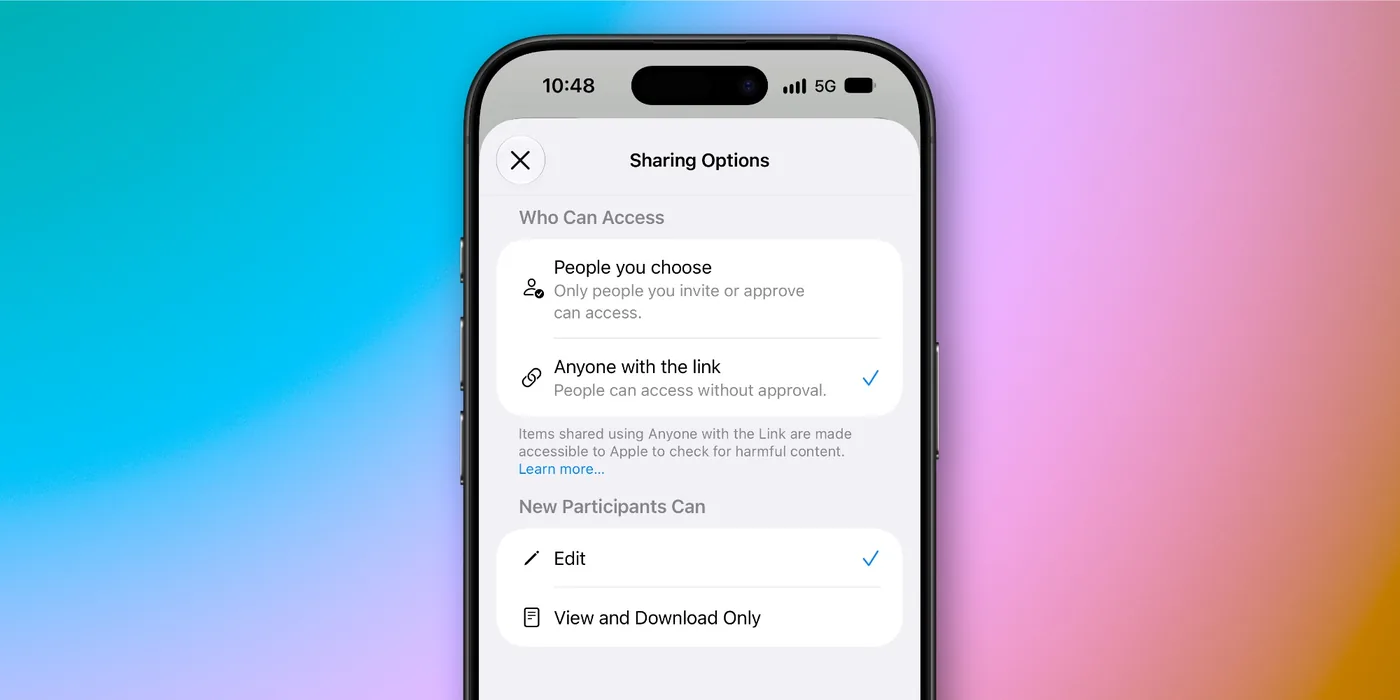
When someone picks the link option, the operating system presents two distinct permission settings called People you choose and Anyone with the link. The first option restricts access to specified Apple Accounts that the owner invites by email address or phone number, ensuring that unauthorized individuals cannot open the file even if they obtain the URL [2]. The second option creates a public link that permits any web user with the address to download the material without signing in or requesting permission. Apple confirmed that only items set to “Anyone with the link” will be made accessible to company reviewers, while private link shares among invited contacts remain outside the new inspection system. This separation gives users a straightforward way to keep collaborative projects private while avoiding unwanted server scans [1].
Access permissions define the boundaries. When colleagues collaborate through private invitations, they retain restricted access boundaries that prevent outsiders from finding their working folders [2]. Public links function like open download mirrors, which explains why Apple treats them as open network destinations that need content moderation [1].


Encryption and Advanced Data Protection
The decision to inspect public links fundamentally alters the cryptographic status of shared files. Apple confirmed that once a user marks a file as accessible to anyone with the link, that item is no longer protected by end-to-end encryption. This exclusion holds true even when a customer has turned on Advanced Data Protection, a security setting introduced to provide end-to-end encryption for the vast majority of iCloud data categories, including device backups, notes, and photos [2].
The loss of end-to-end encryption occurs because Apple servers must be able to read and analyze the raw file data to detect harmful material. In standard private storage with Advanced Data Protection active, only trusted user devices hold the decryption keys, meaning company engineers cannot view stored photos or documents even if compelled by outside parties [2]. Generating an open link forces the system to decrypt the file data on the server side so the web portal can deliver content to visitors who lack personal decryption credentials [1].
Apple has not clarified whether public links generated before the release of version 27.3 will be retroactively inspected when the new code deploys. MacRumors observed that older links might either continue operating under earlier rules or face re-evaluation once server updates go live across global data networks [2]. The content screening policy builds on earlier platform safety moves, such as banning AI nudify apps on the App Store to limit abusive media generation.
Enforcement Actions on iCloud Public Links
When automated systems or reviewers identify prohibited files in iCloud public links, Apple gives itself broad discretion to intervene quickly. According to the updated documentation, the company “reserves the right to move, refuse, modify, remove, or delete the content at any time” without prior warning to the uploader [1]. That language allows Apple to delete offending files instantly or sever the download connection so outside web users can no longer access the hosted payload [3].
Erasing individual files is not the only penalty. Apple warns that it may disable or permanently block the user’s Apple Account, cutting off access to purchased services, connected devices, and associated cloud backups [1]. The company also reserves the authority to prevent the offending user from creating another account with that same email address or telephone number in the future [2].
In serious situations, Apple plans to escalate incidents straight to federal or local authorities. The support document states that the company will take punitive steps up to, “if necessary, involving law enforcement” to address illegal uploads such as child exploitation material [1]. The link screening also follows other system security adjustments, including tightening macOS full disk access to curb software vulnerabilities across desktop environments.
Developer Betas and December Rollout
The new link inspection system arrived in developer channels alongside the first beta release of iOS 27.3. Apple seeded the testing build to registered developers this week, giving software creators their first look at interface adjustments and backend system updates before the general public receives them in December [1]. Companion beta builds for iPadOS 27.3, macOS 27.3, and visionOS 27.3 were released simultaneously to ensure synchronized policy enforcement across the entire hardware catalog [2].
The 27.3 update cycle follows shortly after Apple released iOS 27.2 on October 26, which brought several enhancements to Siri AI and added Suggestions in Messages. That earlier release united the iPhone Duo and other iPhone models onto a single software track while introducing minor additions across Photos, Podcasts, Games, Apple TV, and FaceTime [2]. The newly seeded 27.3 beta builds upon that foundation by adding further Siri AI improvements, new Safari features, and the all-new Apple Health app [1].
Software testers and cloud storage users will watch closely to see how effectively the automated scanners handle false positives once the December rollout begins. For everyday users, keeping sensitive uploads confined to direct file transfers or password-protected private shares will remain the simplest way to maintain full end-to-end encryption across Apple services [2].
- ONLINE NEWS Christoffel, R. (2026, November 4). With iOS 27.3, Apple will start checking iCloud public links for ‘harmful content’. 9to5Mac. [Article Link]
- ONLINE NEWS Clover, J. (2026, November 4). Apple will check public iCloud links for harmful content starting in iOS 27.3. MacRumors. [Article Link]
- ONLINE NEWS Peters, J. (2026, November 4). Apple will check shared iCloud links for ‘harmful content’. The Verge. [Article Link]
- ONLINE NEWS Techmeme. (2026, November 4). Apple says it will check iCloud items shared to “Anyone with the link” for “harmful content” in 27.3 OS versions. Techmeme. [Article Link]


