


On November 4, 2026, OpenAI rolled out a feature that lets users turn text prompts and uploaded photos into looping animations. The update runs on the company’s new Images 2.6 model and brings ChatGPT animated GIFs to the platform in a single step. Instead of relying on external software to stitch still pictures together, people can now ask the chatbot to generate a moving visual directly in the conversation window. The rollout reaches accounts on web browsers, desktop clients, and mobile devices across both ChatGPT and Codex user bases [1].
Single-Step Animation in Images 2.6
For two years, making animations inside the chatbot was an awkward chore. Earlier software builds could not output moving graphics in a single pass. Simon Batt of XDA Developers said AI-assisted GIF creation had never been well supported, leaving users with static images [5].
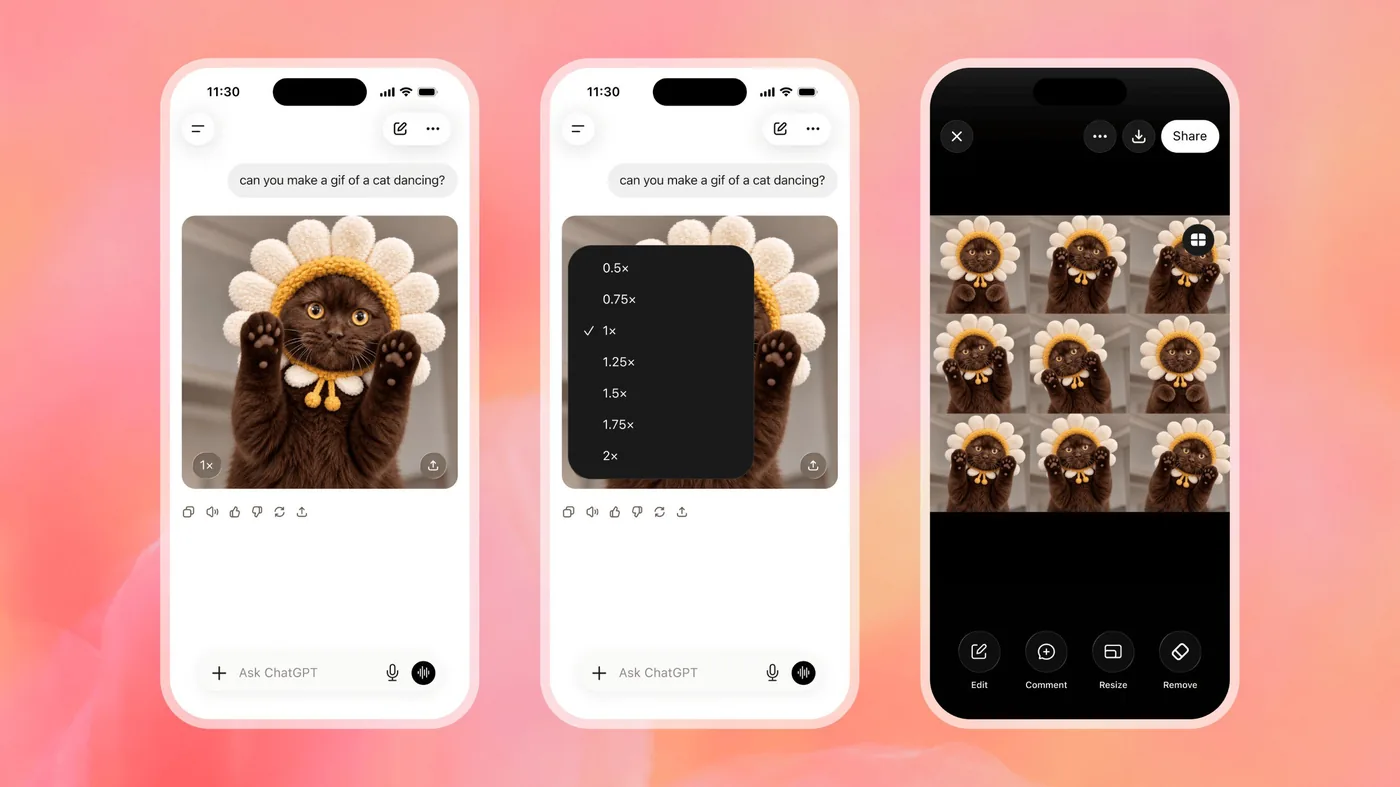
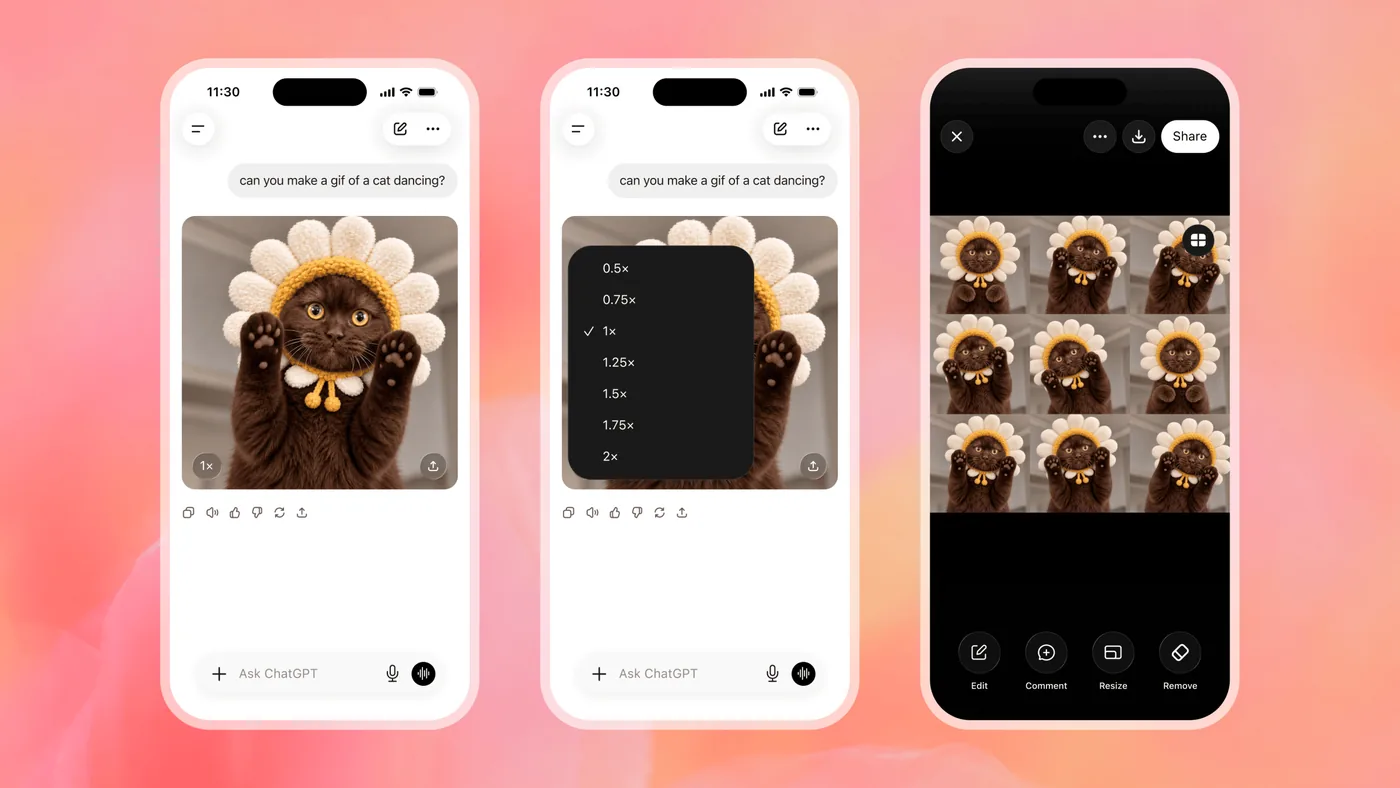
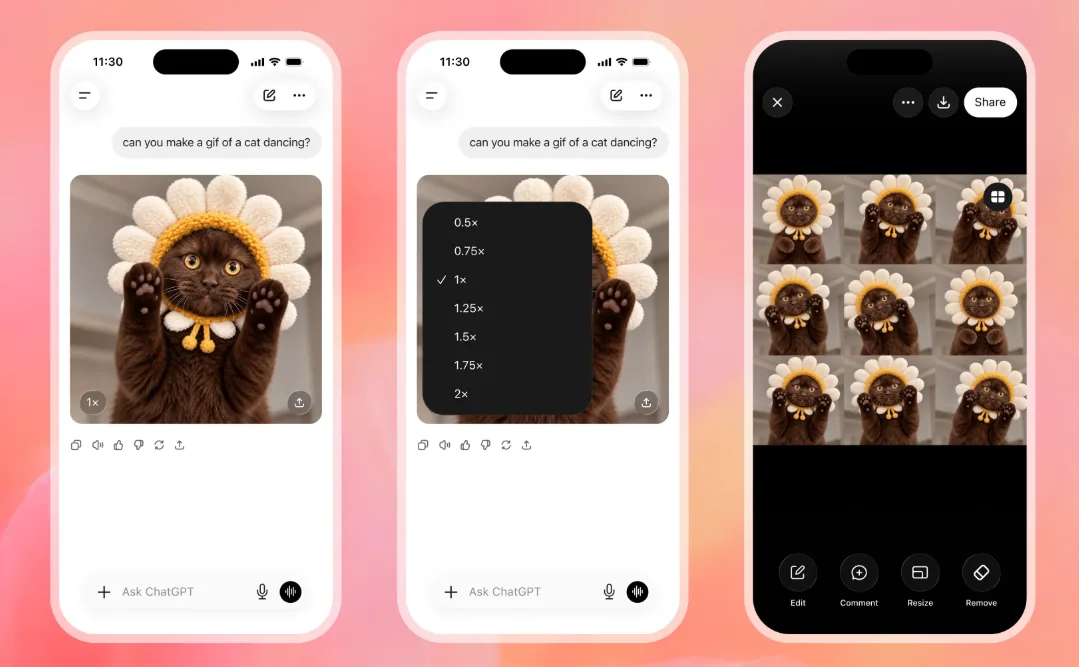
Images 2.6 replaces that multi-step workaround with a direct generation pipeline inside the main chat interface. Emma Roth of The Verge reported that OpenAI demonstrated the GIF-making capability by asking the chatbot to produce a dancing cat, which generated slight variations of an animal strung together flipbook-style. The resulting character remained recognizable in every single frame of the animation. That visual consistency prevented the sudden shifts in shape or color that ruined earlier automated attempts. Users can also upload personal photos and ask the chatbot to animate them into repeating loops. The entire generation process finishes inside the conversation, so people do not need third-party editing software or external video conversion tools [1].
OpenAI previously introduced features like ChatGPT virtual try-on for online shopping, but this new visual update focuses on casual social media assets. Ana Maria Constantin of The Next Web noted that the release follows several changes to OpenAI’s creative lineup this year, coming months after the company shut down its standalone video app, Sora, in March. Images 2.0 arrived in April with reasoning tools, followed by Images 2.5 and its Sketch feature in September [3].
How ChatGPT Animated GIFs Handle Playback Speed
Creators do not have to accept default movement when an animation finishes. Karandeep Singh Oberoi of Android Authority reported that the interface includes playback controls ranging from 0.5x to 2x speed, giving users a choice between half-speed slow motion and double-speed fast playback [4]. People can adjust the tempo using a simple slider. This speed adjustment lets users fine-tune comedic timing without re-running the prompt from scratch, which saves time when tailoring animations for platforms like Facebook or personal chats [5].
The update also exposes the individual frames that build the animation, letting people inspect each drawing in sequence. Emma Roth reported that users can edit these single frames directly in the chat window, while standard editing tools like prompt boxes remain available [4].
Matthias Bastian of The Decoder emphasized that beyond GIFs, Images 2.6 speeds up general image creation for everyday prompts. According to company figures, users now generate over 4 billion images per week through ChatGPT and the API. That number represents an increase of one billion weekly visuals compared to the 3 billion reported in September [2]. Simon Batt said that adding meme generation tools will likely push activity higher on social networks [5].


Frame Consistency Across Short Clips
Maintaining character consistency across sequential frames has long been a headache for AI image models. In older generators, even tiny prompt adjustments altered a subject’s facial structure, hair color, or clothing patterns. Matthias Bastian said that in OpenAI’s dancing cat demo, the animal stays clearly recognizable in each frame, showing that the model keeps character details stable enough for the animation to look coherent [2].
The underlying structure relies on stringing slight variations of a character together flipbook-style to preserve visual coherence in each frame [2]. That mechanical approach differs fundamentally from three-dimensional video simulation. Karandeep Singh Oberoi noted that people normally rely on online repositories like Giphy and Tenor for reaction memes, but ChatGPT now lets individuals turn personal photos into custom looping animations that convey emotions such as surprise, excitement, anger, or happiness [4]. The model generates multiple sequential frames in rapid succession.
Even with stronger consistency, automated animations can still suffer from visual drift between frames. Small elements such as company logos, background signs, or the number of fingers on a hand can shift or warp as the loop plays. Alex Lowe of The AI Career Lab said creators should inspect every single frame before sharing a GIF, because visual errors that look subtle in a still picture become obvious once the animation begins looping [6].
Using ChatGPT Animated GIFs in Workplace Software
While animated reactions are popular in personal messages, ChatGPT animated GIFs also serve practical functions in professional settings. Alex Lowe said short silent animations can explain workflow steps faster than paragraphs of text in team chat apps like Slack or Microsoft Teams. A simple looping graphic can show a status button turning from red to green or illustrate a short software process inside presentation decks, where both Microsoft PowerPoint and Google Slides support automatic GIF playback during meetings [6].
System limits can still complicate workplace distribution, especially when sending graphics through business email systems. Older desktop editions of Outlook for Windows (such as legacy office installations) do not play animations, displaying only the very first frame of a GIF file to the recipient. If that opening frame happens to be blank, blurred, or caught in an awkward transition, the visual message is lost before anyone sees the movement. Furthermore, animated image files grow in size rapidly as more frames are added. Large files can slow down inbox loading speeds or push messages over strict attachment limits in workplace channels. Consequently, shorter clips with fewer frames remain far safer for company distribution across varied employee devices [6].
Privacy concerns and workplace policies require careful oversight whenever employees turn photos of real colleagues into animated media. Consent is essential. Alex Lowe said workers must obtain explicit permission before animating photos of coworkers, clients, or customers, while strictly following internal corporate guidelines regarding the disclosure and labeling of AI-generated content. In contrast, competing assistants like Claude can’t generate or edit images or GIFs on any subscription tier [6].
Platform Rollout and Developer Models
OpenAI deployed the animation capability across its web interface, desktop clients, and smartphone applications for both ChatGPT and Codex user bases [1]. However, the company has not published an official help center article detailing exact plan limits or quotas. Free accounts typically maintain tighter daily caps on image generation, and live allowances show inside account settings [6].
For software developers, OpenAI is introducing two new API models named GPT-Image-2.6 Flare and GPT-Image-2.6 Sunburst. The Flare model variant is built for efficient processing speed, while Sunburst focuses on generating higher-quality graphics with sharper detail. OpenAI adopted that same tiered structure with Images 2.5 in September, when Adobe integrated one of the developer models into its Firefly creative suite. This separation allows engineering teams to choose between lower latency responses for interactive tools and heavier rendering pipelines for high-resolution publishing workflows [3].
Karandeep Singh Oberoi noted that the rollout started on Nov 4, 2026, yet neither Flare nor Sunburst appeared in OpenAI’s developer changelog that day. OpenAI has not yet published API documentation or pricing for animated GIF output, leaving developers to treat API support as unannounced until official guides appear [6]. Meanwhile, the company continues experimenting with monetization on consumer tiers, having recently tested advertisements inside image generation for selected users in the United States [3].
- ONLINE NEWS Roth, E. (2026, November 4). ChatGPT will now make you animated GIFs. The Verge. [Article Link]
- ONLINE NEWS Bastian, M. (2026, November 4). ChatGPT can now turn text prompts and photos into animated GIFs with OpenAI’s Images 2.6 model. The Decoder. [Article Link]
- ONLINE NEWS Constantin, A. M. (2026, November 4). ChatGPT can now make animated GIFs with OpenAI’s Images 2.6. The Next Web. [Article Link]
- ONLINE NEWS Singh Oberoi, K. (2026, November 4). ChatGPT finally adds the image tool the internet has been waiting for. Android Authority. [Article Link]
- ONLINE NEWS Batt, S. (2026, November 4). ChatGPT is getting GIF generation tools to make creating animated images a lot easier. XDA Developers. [Article Link]
- WEBSITE Lowe, A. (2026, November 4). Can ChatGPT Make Animated GIFs Now? The AI Career Lab. [Article Link]


1 comment