






The BitTorrent protocol coordinates decentralized file transfers by dividing large data archives into small fragments shared among personal computers. Designed in 2001 by programmer Bram Cohen, an alumnus of University at Buffalo, this peer-to-peer system replaces single download servers with cooperative swarms where every recipient uploads data back to other participants [17]. Understanding how BitTorrent works clarifies why swarm distribution handles massive files like Ubuntu Linux images or media archives without overloading the origin host. Instead of competing for speed against a single central pipe, downloaders join a shared swarm where capacity expands as more users join [10]. Seeing how BitTorrent works in practice reveals an elegant balance of incentives and network efficiency.
How BitTorrent Works in Swarms
At its foundation, learning how BitTorrent works shows a departure from traditional client-server networking. Standard HTTP file distribution sends complete data streams sequentially from one central host to individual clients, which quickly exhausts server pipes during peak release windows [12]. In contrast, BitTorrent creates a dynamic group of linked computers called a swarm. A client that possesses the entire file functions as a seed, while clients currently retrieving parts operate as peers or leechers [10]. Each peer downloads missing pieces from multiple swarm members at the same time while uploading finished segments back into the pool. This reciprocal balance turns every consumer into an active contributor across the network [17].
Before any transfer begins, the original distributor splits the complete payload into uniform pieces ranging between 256 kilobytes and several megabytes. Each piece receives a cryptographic checksum that allows recipients to verify data integrity independently before sharing it further [1]. Cohen announced the system at Defcon in 2001. Speaking at the Alexis Park Hotel in Las Vegas, Cohen explained the core economic challenge of distributed networks: “It turns out the hard part in peer-to-peer is paying for the resources used and to get people to offer uploads,” he said [8].
When a new user connects, their client advertises available segments through bitfield exchanges and requests needed pieces from nearby nodes [1]. Because no single machine must deliver every byte, distribution capacity scales with user demand [10]. Tom Walters from Bechtel Hanford observed early demonstrations at Defcon, noting how attendee swarms tested network resilience [8].
Metainfo Files and Bencoding Structure
Joining a swarm begins with obtaining a metainfo file, known colloquially by its .torrent file extension. This small descriptor uses a lightweight serialization format called bencoding, which represents text strings, integers, lists, and associative dictionaries as compact byte sequences [1]. The metainfo container includes key coordination parameters, such as the suggested file name, the uniform piece length, and the announce web address of the coordination tracker [17]. By standardizing these fields, bencoding ensures that clients running on Microsoft Windows, Apple MacOS, and Linux parse identical torrent structures reliably without conversion errors. When a participant joins an active swarm, the client reads the bencoded metainfo dictionary, establishes links with discovered peer IP addresses, and begins downloading missing pieces while serving completed blocks to other members [1].
The core of the metainfo file is the info dictionary, which holds the cryptographic blueprint of the payload. In the original protocol specification, known as BEP 3, this dictionary maps out the total byte length and a concatenated list of 20-byte SHA-1 hashes covering every piece in sequential order [1]. Computing the SHA-1 hash of the bencoded info dictionary produces the info-hash, a unique 20-byte identifier that distinguishes that specific torrent from all others on the internet [17]. Clients use this digest during handshakes to confirm they are exchanging identical content.
Metainfo files support single files and deep directory trees. Modern clients also support magnet links, which pass the info-hash directly as a Uniform Resource Identifier [16]. Early index sites like The Pirate Bay used magnet links to eliminate torrent hosting costs. BTDigg later indexed swarms without central trackers [17].
How Trackers Coordinate Peer Swarms
Although BitTorrent distributes data between peers directly, clients still need an initial directory to discover IP addresses of active swarm participants. A tracker is a central coordination server that maintains real-time records of connected seeds and leechers without ever handling payload files [10]. When a client opens a torrent, it sends an HTTP or UDP announce request containing its info-hash, port number, and downloaded byte counts [1]. The tracker logs these metrics and returns a list of peer IP addresses [17]. Examining how BitTorrent works without a central hub highlights why developers later added decentralized lookup tools to prevent single points of failure across global networks [12].
Trackers commonly return compact peer lists to save network data. The tracker packs each peer into six raw bytes. Four bytes store the IPv4 address. Two bytes hold the port number [1]. Clients re-announce at scheduled intervals, typically every few minutes, to refresh their peer pools and report transfer progress [17]. If a tracker fails or goes offline, existing peer connections remain active and continue transferring blocks [12].

To eliminate central servers, clients implement Distributed Hash Tables using Kademlia routing algorithms. Vuze and Mainline BitTorrent introduced DHT in 2005. Peer Exchange followed in 2006 [17]. Clients query swarm neighbors directly through these tools [16].
Rarest-First Piece Selection
Data transfer efficiency depends on the order in which pieces are requested from connected neighbors. Rather than downloading a file from beginning to end like an audio stream, the BitTorrent protocol employs a rarest-first piece selection strategy [17]. Each peer monitors which segments its neighbors hold by inspecting incoming have messages and bitfield maps [1]. The client identifies pieces possessed by the fewest peers and requests those rare blocks first, ensuring scarce data replicates quickly across the swarm [17]. This balance defines how BitTorrent works when managing swarm traffic. Because upload rates on residential broadband links are typically slower than download capacities, swarms balance data delivery by pulling distinct pieces from multiple sources at the same time [10].
Rarest-first piece ordering prevents swarms from degrading into deadlocks where only common pieces circulate while rare fragments vanish when early seeds disconnect. Furthermore, acquiring rare segments makes a peer more valuable to others, encouraging neighbors to trade data in return [17]. When a download begins, clients temporarily switch to a random first piece strategy so they can obtain a complete piece quickly and begin uploading immediately [1].
Clients apply a tit-for-tat choking algorithm to reward contributing peers. Each client unchokes fast neighbors while choking idle leechers. Optimistic unchoking opens random slots every few seconds [1]. This mechanism discovers new upload partners [12].


Why BitTorrent Download Speed Is Slow?
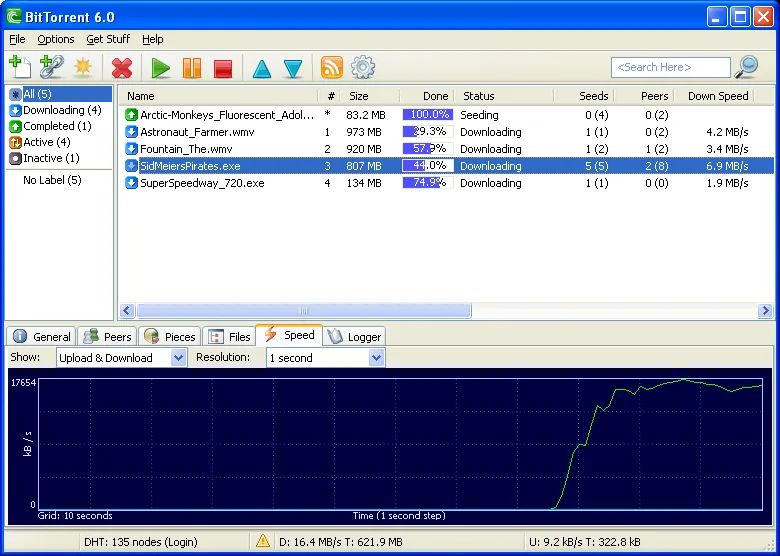
Users often encounter slow transfer speeds and wonder what causes performance bottlenecks in decentralized swarms. The most frequent reason involves the ratio between seeders and leechers within a specific swarm [10]. When many peers compete for chunks from only one or two seeds, upload capacity is spread thin across the entire swarm [17]. Academic research by Sebastian Kaune, Ruben Cuevas Rumin, and Ralf Steinmetz confirmed that seeder availability strongly shapes performance, noting that “the presence of seeders is not the sole factor involved in file availability,” as discontinuous cycles often pause downloads [3]. Explaining how BitTorrent works during network chokes helps users fix slow speeds.
Another common cause stems from firewall settings and local router configurations. Because BitTorrent requires peers to accept incoming TCP and UDP connections from external machines, restrictive NAT firewalls prevent external peers from reaching local clients. When two peers behind symmetric firewalls attempt to communicate, neither can initiate a direct handshake, cutting potential connections in half [12]. Enabling Universal Plug and Play (UPnP) or NAT Port Mapping Protocol (NAT-PMP) helps open necessary ports automatically [16].
Slow downloads also occur during endgame mode. When few final blocks remain, clients broadcast requests for those missing fragments to all connected peers [1]. If seeds leave before all pieces circulate, swarm health drops below 100 percent, stalling downloads indefinitely [10].
How BitTorrent Works in Version 2
The release of BEP 52 improved how BitTorrent works by replacing legacy SHA-1 hashing with SHA-256. After Google demonstrated practical cryptographic collisions against SHA-1 in 2017, protocol architects recognized that malicious actors could potentially craft colliding piece data to poison active swarms. Developer Steven Siloti and libtorrent author Arvid Norberg overhauled the metainfo format and wire protocol to establish BitTorrent v2. BiglyBT and libtorrent added early support for the updated standard to protect large swarms from data corruption. When multiple users download identical Linux distributions across independent trackers, SHA-256 hashing verifies that every downloaded block matches the official release bit-for-bit [15].
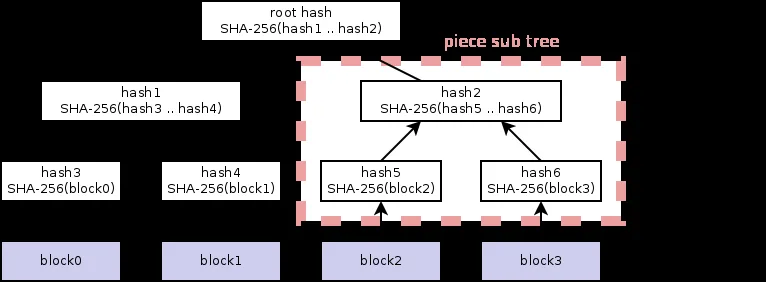
Instead of computing a single flat array of piece hashes across an entire concatenated dataset, BitTorrent v2 builds a Merkle hash tree for each individual file [2]. In this hierarchical tree, leaf nodes represent 16-kilobyte data blocks hashed using SHA-256 [15]. By organizing blocks into binary trees, clients verify individual 16-kilobyte blocks as soon as they arrive over the wire, without waiting to assemble an entire multi-megabyte piece [16]. This immediate validation prevents corrupt data from spreading through client buffers [15].
Per-file Merkle trees introduce automatic deduplication across distinct torrents. Matching files produce identical root hashes, allowing clients to pull data from separate swarms simultaneously. Hybrid torrents support both v1 and v2 clients sharing identical files [15].
Network Congestion and ISP Controls
The immense volume of peer-to-peer data transfers historically caused friction with internet service providers. In 2004, network measurement firm Cachelogic reported that BitTorrent accounted for roughly 33 percent of all internet traffic. By January 2006, peer-to-peer networks represented approximately 71 percent of global internet traffic, with BitTorrent generating about 30 percent of peer-to-peer traffic in the United States while eDonkey2000 led in South Korea and Taiwan [13]. High volume frequently saturated ISP upstream links [14]. During the early 2000s, centralized file distribution suffered severe bottlenecks whenever thousands of users attempted to download new software releases or operating system images from identical mirrors [17].
To curb network strain, some service providers implemented aggressive filtering. In 2007, customers discovered that cable giant Comcast used network hardware from Sandvine to disrupt BitTorrent connections by injecting forged TCP reset (RST) packets into active streams. Cybersecurity researcher Chris Soghoian pointed out that Comcast impersonated peer endpoints to terminate connections without notifying users [7]. The Federal Communications Commission under Chairman Kevin Martin scrutinized the practice, leading Comcast to agree in 2008 to transition to protocol-agnostic traffic management [6].

Developers introduced the Micro Transport Protocol (uTP) under BEP 29 to curb congestion. uTP monitors packet delay to yield bandwidth to web browsing [16]. BitTorrent upstream traffic dropped to 4 percent by 2024 as streaming platforms like Netflix and YouTube grew [14].
Legitimate Uses for P2P Distribution
While peer-to-peer technology frequently attracts headlines regarding copyright disputes, BitTorrent remains a legitimate tool for distributing open-source software and open-access data. Operating system vendors rely heavily on torrents to distribute massive installation images without incurring astronomical hosting expenses. For example, the Ubuntu Linux distribution provides official torrent downloads for its 3.6-gigabyte desktop ISO images, allowing volunteer swarms to shoulder server bandwidth during major release days [10]. Understanding how BitTorrent works helps institutions share public data at minimal cost. Legal audio archives from musical groups like Phish and the Grateful Dead on etree.org demonstrated how noncommercial communities distribute concert recordings efficiently through volunteer peer networks [8].
Scientific institutions and academic researchers deploy BitTorrent to share voluminous datasets. Space agencies, climate modelers, and distributed computing initiatives distribute genomic archives and satellite mapping catalogs via swarms [14]. In the commercial sector, media companies have explored peer-assisted delivery networks to accelerate video streaming. Former BitTorrent Inc. president Ashwin Navin noted that commercial distribution platforms could deliver higher video quality while reducing server load [18]. Today, open-source clients like qBittorrent, Transmission, and Deluge provide lightweight environments for exchanging public domain materials [10].
Users must maintain caution when participating in public swarms. In 2013, Joan Calvet at Eset and Rik Ferguson at Trend Micro discovered that Chinese client Xunlei distributed Win32/Kankan malware [9]. Trusted clients protect user devices [11].
- WEBSITE Cohen, B. (2008). The BitTorrent Protocol Specification (BEP 3). BitTorrent.org. [Article Link]
- WEBSITE Cohen, B. (2017). The BitTorrent Protocol Specification v2 (BEP 52). BitTorrent.org. [Article Link]
- ACADEMIC JOURNAL Kaune, S., Rumin, R. C., Tyson, G., Mauthe, A., Guerrero, C., & Steinmetz, R. (2010). Unraveling BitTorrent’s File Unavailability: Measurements and Analysis. IEEE International Conference on Peer-to-Peer Computing (P2P). [Article Link]
- ACADEMIC JOURNAL Lawey, A. Q., El-Gorashi, T. E. H., & Elmirghani, J. M. H. (2014). BitTorrent Content Distribution in Optical Networks. Journal of Lightwave Technology, 32(21), 4209-4225. [Article Link]
- ACADEMIC JOURNAL Hoong, P. K. (2012). BitTorrent Network Traffic Forecasting With ARMA. International Journal of Computer Networks & Communications, 4(4), 143-156. [Article Link]
- ONLINE NEWS Broache, A. (2008). Comcast and BitTorrent agree to ‘collaborate’. CNET. [Article Link]
- ONLINE NEWS Soghoian, C. (2007). Is Comcast’s BitTorrent filtering violating the law? CNET. [Article Link]
- ONLINE NEWS McCullagh, D. (2001). Defcon Keeps Hackers Hooked. WIRED. [Article Link]
- ONLINE NEWS Gibbs, S. (2013). Google-backed BitTorrent client spread malware to Windows PCs and Android devices. The Guardian. [Article Link]
- ONLINE NEWS Gewirtz, D. (2024). What is torrenting? BitTorrent, legal issues, how it works, and more. ZDNET. [Article Link]
- WEBSITE Kaspersky. (2018). What is BitTorrent? | Is Torrenting Safe? Kaspersky. [Article Link]
- WEBSITE Daniel.haxx.se. (n.d.). bittorrent vs HTTP. Daniel.haxx.se. [Article Link]
- ONLINE NEWS Van der Sar, E. (2006). BitTorrent: The ‘one third of all Internet traffic’ Myth. TorrentFreak. [Article Link]
- ONLINE NEWS Van der Sar, E. (2024). BitTorrent is No Longer the ‘King’ of Upstream Internet Traffic. TorrentFreak. [Article Link]
- WEBSITE Norberg, A. (2020). BitTorrent v2. Blog.libtorrent.org. [Article Link]
- WEBSITE Norberg, A. (n.d.). libtorrent manual. Libtorrent.org. [Article Link]
- WEBSITE Wikipedia. (n.d.). BitTorrent. Wikipedia. [Article Link]
- WEBSITE Wikipedia. (n.d.). BitTorrent (software). Wikipedia. [Article Link]


