






Git operates internally as a content-addressable filesystem rather than a simple history log. Developers seeking to understand how git works must look past standard user tools to inspect the object database. Linus Torvalds created Git in April 2005 for Linux kernel work after BitKeeper owner Larry McVoy revoked free access over Andrew Tridgell building SourcePuller [4]. Early tools like CVS, Subversion, and Perforce tracked changes through deltas, but Git records snapshots across a global database. The local repo keeps full project history on disk so programmers can inspect past revisions without contacting a remote host. As examined in Git Internals: How Version Control Stores Data and History, this storage setup gives teams fast branches and strong data protection.
How Git Works as a Content Store
At the base of every repo sits an object store in the hidden .git/objects folder. When a file enters this store, Git calculates a 40-digit SHA-1 hash from the payload and an added header string to produce a unique cryptographic key. The resulting key labels that specific data payload across the entire life of the project, with Git taking the first two letters of this key to name a subfolder while the remaining 38 letters form the compressed object file name on disk [2]. This key-value design explains how git works to prevent duplicate files across branches.
Coders inspect these low-level routines using plumbing commands like git hash-object and git cat-file. The command git hash-object -w writes raw content into the store and prints the 40-digit key [2]. For example, saving plain text returns a fixed string like 83baae61804e65cc73a7201a7252750c76066a30. To read that data back out, users pass the -p flag to git cat-file, which directs Git to detect the payload type and display the full body text. The companion -t flag reports whether an object is a blob, a tree, a commit, or a tag. What does this content addressability provide in practice? It gives every byte of data an unalterable address.
Because each object key comes from its data payload, no user can alter saved contents without altering the resulting cryptographic hash key across the repo [4]. Torvalds selected SHA-1 hashing to give the database built-in defense against disk corruption and code tampering. If a hardware fault flips a single bit, verification fails immediately. Git acts as an append-only store where past milestones stay intact.
Snapshots Replace Traditional File Deltas
Older version control systems like CVS, Subversion, and Perforce track project history as a chain of file-based deltas. Systems such as SCCS, RCS, and BitKeeper kept base files and stored diff records for subsequent revisions. Reconstructing an older file in those systems requires replaying every intermediate delta patch sequentially from the original base file, which imposes severe performance bottlenecks on large corporate software repositories [1]. That diff math creates heavy delay on big codebases.
In contrast, Git treats repo history as a steady stream of filesystem snapshots. Each time a programmer creates a commit, Git captures a complete picture of all project files at that moment, meaning that unchanged files never receive duplicate copies on disk [1]. Instead, the new commit points back to the existing blob in the local database. This snapshot model explains how git works so swiftly while keeping disk use modest. When Mozilla evaluated early version control speed across large repositories, tests showed that Git diffed large source trees an order of magnitude faster than GNU Bazaar and Mercurial. Torvalds noted that the nascent tool recorded 6.7 patches per second without data errors during early Linux kernel benchmarks [4].
By keeping snapshots on local disks, Git removes the network lag that slowed older tools. Coders can read full commit logs, inspect past code differences, and make new commits while traveling on trains or planes without connecting to a remote network server [1]. A survey found that nearly 95% of developers named Git their main version control system as of 2022 [4]. Teams running tools from BitKeeper to Subversion switched to Git across open-source hubs.
The Four Core Object Types
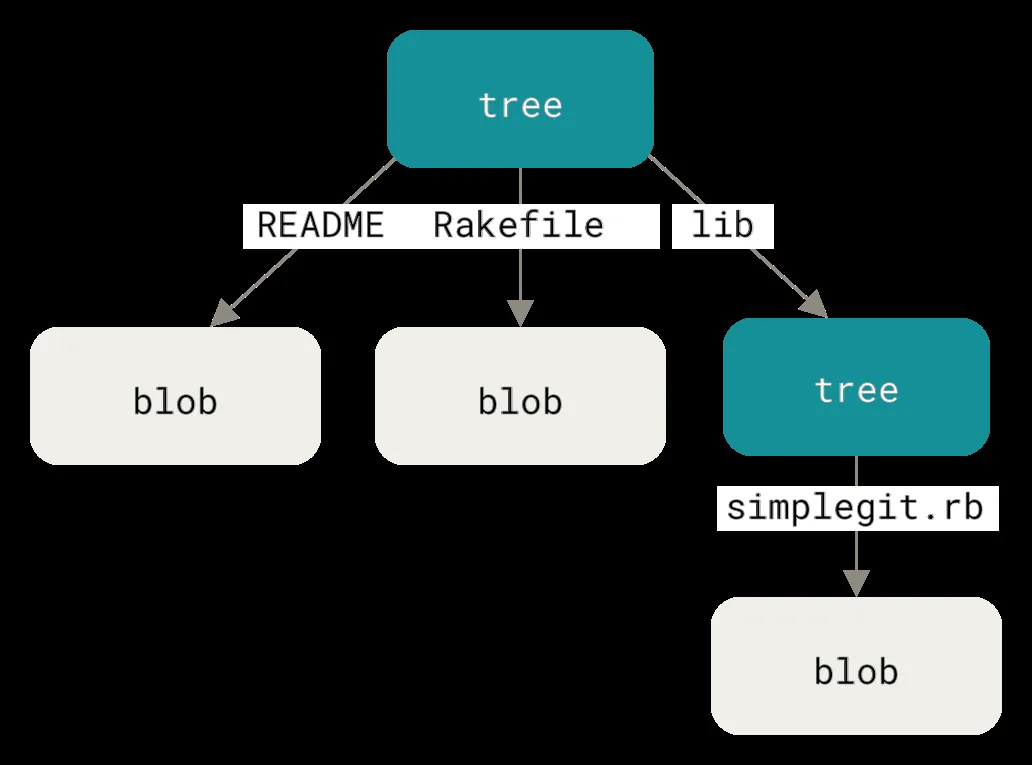
All data stored in a Git repo belongs to four basic object types: blobs, trees, commits, and annotated tags. The simplest type is the blob, short for binary large object, which holds raw file data such as text, images, or program binaries without storing any file name, timestamp, or folder path [2]. By separating content from metadata, Git shares one blob across multiple folders when files match. This deduplication saves storage across sprawling software projects.
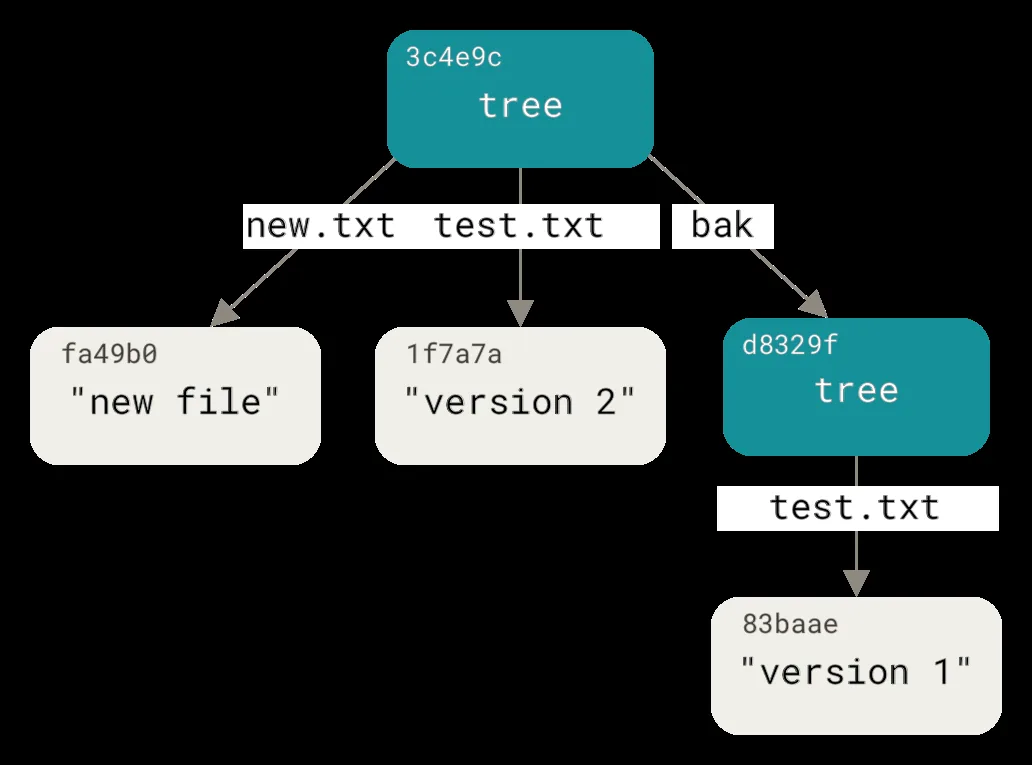
Folder layouts are stored in tree objects, which match folders in a Unix file setup. A tree holds a sorted list of entries where each line records a file mode, an object type, a 40-character SHA-1 key, and a file name [2]. Git uses set modes, such as 100644 for normal files, 100755 for executable scripts, and 120000 for symbolic links. A tree entry can point to another tree with mode 040000, which lets Git nest subfolders to any depth. When inspected with git cat-file -p, a tree shows how git works to map distinct file names to shared blob hashes.
Commit objects bind these trees into a shared history, while annotated tags mark notable release points [2]. An annotated tag contains a tag name, a target object hash, a tagger name, a date, and a message. Community projects like GIMP, VLC, and Notepad++ fled SourceForge after owner DHI Holdings bundled installers with unwanted software, moving toward Git-based tags for verified releases [4, 5]. Git handles complex software source trees with this four-object design.
Storing Directory Trees in Object Databases
Project folders in Git require building tree objects directly from the staging area. Rather than scanning the whole disk during a commit, Git uses an intermediate index file to track staged files. Coders manage this staging area using low-level plumbing tools like git update-index [2].
For example, the command git update-index --add --cacheinfo 100644 <hash> test.txt inserts a file pointer into the index without writing a physical file to disk. Once the staging area holds the intended files, running the git write-tree command creates a tree object from that index layout. The tool parses the index and outputs a 40-character root hash. If the project contains subfolders, Git creates a separate tree object for each folder and embeds those hashes into the parent tree. Because tree objects are content-addressed, a subfolder whose files have not changed keeps its old SHA-1 key, which saves processor time and disk space during commits [2].
Structured snapshotting makes version control useful for scientific research and lab workflows. In a study published in PLoS Computational Biology, researchers J. Blischak, E. Davenport, and G. Wilson showed that tracking code with Git keeps scientists from filling folders with numbered scripts like analysis_02.sh [8]. By saving tree objects, researchers connect exact code states with published data findings. High Performance Computing tools like DataLad use Git to manage data processing jobs scheduled with SLURM across distributed compute clusters. That computational audit trail ensures that outside teams can verify experimental findings years after the initial research ran.


Directed Acyclic Graphs and Commits
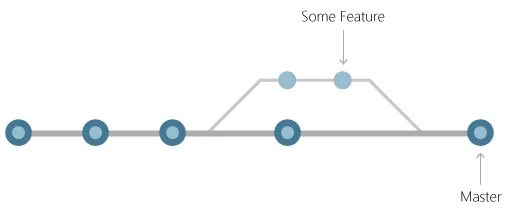
Each commit object in Git points to a top tree object and references one or more parent commits, forming a directed acyclic graph of project history [1, 2]. The commit record holds the 40-digit root tree hash, author and committer names, timestamps, and a commit note. Root commits created at repository initialization have zero parents, whereas standard commits have exactly one parent that links them into an unbroken chain of development [2]. Merge commits point to two or more parent commits, joining split lines of work.
Branches in Git are not heavy folder copies, but lightweight movable pointers that reference a specific commit hash. The default branch, named master or main, stores a 40-character SHA-1 string inside a plain text file in the .git/refs/heads/ folder on local storage [3]. A new branch creation merely writes a small file with the current commit hash. A branch switch moves the HEAD pointer to that branch file. How does Git isolate parallel work without copying large folders? Git updates reference files that point to existing graph nodes.
Because commit hashes depend on their tree pointers and parent IDs, the development graph remains safe from secret tampering. Any modification to an old commit message alters that commit’s SHA-1 hash and cascades through every child commit in the tree, making covert edits impossible to hide. Torvalds handed maintenance to developer Junio Hamano on July 26, 2005, who guided Git to version 1.0 on December 21, 2005 [4]. This graph design explains how git works to guard history across distributed teams.

Observing How Git Works Across Three States
Git manages local project files across three dedicated spaces: the active working folder, the index staging cache, and the underlying repository database [1]. The working tree holds active files uncompressed for a coder to edit. Files move across three matching states called modified, staged, and committed.
This three-part setup gives programmers careful control over what changes enter each commit snapshot [1, 3]. A developer might edit ten files during debugging but choose to stage only two files that fix a specific bug, leaving unrelated changes safely in the workspace. The other eight modified files remain in the working tree without cluttering the commit record. The staging area lets teams craft clean commits that simplify code review in tools like GitHub and Azure DevOps [3]. This staging setup clarifies how git works when preparing commits compared to older tools that committed entire workspaces at once.
Fine-grained tracking can even trace single code methods across software refactoring cycles. In a study published in the Journal of Systems and Software, researchers Y. Higo, S. Hayashi, and S. Kusumoto examined tracking Java methods using Git mechanisms across 182 open-source projects [9]. Their tool showed that treating code methods as single tracked units helps coders follow method changes across class renames. Git’s object model supports this research because it decouples raw content blobs from file names and directory paths.
Packfiles for Repository Maintenance
When Git creates objects, it writes each item as an individual compressed file in the objects folder. While this loose format allows fast writes, thousands of single files waste storage space and slow down operating system file access on large repositories. To fix this drag, Git bundles loose objects into unified archive containers called packfiles [4].
A packfile contains many compressed objects together with an associated .idx index file that records the byte offset of each object within the pack archive for fast lookup. During packing, Git uses delta compression to save disk space between similar file versions. Unlike older systems that store deltas in forward order, Git compresses similar files against one another while keeping the newest revision uncompressed for fast checkouts [4]. Coders can start this repack manually by running the git gc command to clear dangling objects and pack the database. Repo health can be checked with the git fsck diagnostic tool.

In Source Code for Biology and Medicine, researcher K. Ram noted that Git provides a sturdy framework for managing research outputs like data tables, statistical scripts, and manuscripts [7]. The append-only nature of Git objects prevents accidental data loss during multi-year science projects. Even when hard resets detach branch tips, Git keeps loose objects until garbage collection runs, which provides a safety net for retrieving lost commits.
Why Understanding How Git Works Matters
Developers who master the internal mechanics of how git works remove confusion when handling complex repo states. When coders understand that branches are simple pointers and commits are immutable graph nodes, solving merge conflicts becomes a calm routine rather than stressful guesswork [3]. Repo safety also ties into these storage rules. As documented in GitLab Project Email Addresses Expose Repositories to Rogue Commits, knowing how commit headers and author fields work helps teams shield codebases from spoofed contributions.
The strength of Git’s design enabled large code platforms to grow across the world. Platforms such as GitHub, GitLab, and Bitbucket built web interfaces, code review flows, and issue trackers on top of Git’s distributed object database [4, 5]. Co-founders Tom Preston-Werner, Chris Wanstrath, PJ Hyett, and Scott Chacon launched GitHub in 2008, which Microsoft later acquired under CEO Satya Nadella and Nat Friedman for $7.5 billion. In June 2025, GitHub passed one billion repositories when developer Aasish Pokhrel in Nepal created a repo [5, 10]. Across competing platforms like GitLab, founded by Dmytro Zaporozhets and Sytse Sijbrandij, the core Git protocol guarantees that every clone remains a full, standalone copy of project history [6].
In summary, Git succeeds because its design puts data integrity, speed, and distributed independence first. By turning files into blobs, folders into trees, and histories into acyclic graphs of snapshots, Git created a lasting standard for modern software engineering [1, 4]. Coders do not depend on remote network servers to preserve full project history. Understanding these inner mechanics turns Git from a confusing terminal command into a reliable foundation for software work.
- WEBSITE Chacon, S., & Straub, B. (2014). Getting Started – What is Git?. git-scm.com. [Article Link]
- WEBSITE Chacon, S., & Straub, B. (2014). Git Internals – Git Objects. git-scm.com. [Article Link]
- WEBSITE Microsoft. (2022). What is Git? Azure DevOps. [Article Link]
- WEBSITE Wikipedia contributors. (2026). Git. Wikipedia, The Free Encyclopedia. [Article Link]
- WEBSITE Wikipedia contributors. (2026). GitHub. Wikipedia, The Free Encyclopedia. [Article Link]
- WEBSITE Wikipedia contributors. (2026). GitLab Inc. Wikipedia, The Free Encyclopedia. [Article Link]
- ACADEMIC JOURNAL Ram, K. (2013). Git can facilitate greater reproducibility and increased transparency in science. Source Code for Biology and Medicine, 8(1), 7-7. [Article Link]
- ACADEMIC JOURNAL Blischak, J., Davenport, E., & Wilson, G. (2016). A Quick Introduction to Version Control with Git and GitHub. PLoS Computational Biology, 12(1), e1004668. [Article Link]
- ACADEMIC JOURNAL Higo, Y., Hayashi, S., & Kusumoto, S. (2020). On tracking Java methods with Git mechanisms. Journal of Systems and Software, 165(110571), 110571. [Article Link]
- ONLINE NEWS Tyson, M. (2025). Milestone one billionth Github Repo is just the word ‘sh*t’. Tom’s Hardware. [Article Link]


