






Linux namespaces partition global kernel resources so that processes run within isolated virtual environments on a single shared operating system kernel. Instead of virtualizing hardware through a hypervisor, the Linux kernel wraps shared resources such as process tables, network devices, and filesystem mount points into independent contexts [10]. Each process belongs to one namespace of each category, which determines the specific system resources it can view or alter [5]. Container runtimes like Docker, Podman, and LXC rely on this isolation model to replace hardware emulation with native kernel isolation [7].
- What Are Linux Namespaces?
- Kernel Architecture Behind Linux Namespaces
- PID Hierarchy in Nested Process Trees
- Mount Namespaces and Filesystem Boundaries
- Virtual Ethernet Pairs in Network Isolation
- User ID Mapping for Rootless Containers
- Linux Namespaces Compared to Control Groups
- Diagnostic Tools for System Inspection
What Are Linux Namespaces?
When software systems manage multi-tenant workloads, Linux namespaces divide shared system resources into isolated workspaces. By separating visibility at the kernel level, the subsystem prevents tasks inside one group from inspecting or altering files, network ports, or processes assigned to another. The design grew out of Plan 9 from Bell Labs [10]. Kernel developer Al Viro introduced mount isolation to mainline Linux in 2002 with version 2.4.19 under the system call flag CLONE_NEWNS, using a generic name because developers did not yet foresee the broader collection of namespace types that arrived in later kernels [5].
The kernel expanded this isolation model over later release cycles. Version 2.6.19 added UTS and IPC isolation in 2006, but process isolation arrived in 2008 when Linux 2.6.24 introduced PID namespaces so containerized tasks could manage independent process trees. Network namespaces landed in version 2.6.29 in 2009 to provide private interfaces and routing tables. Eric W. Biederman led work on user namespaces, which reached full mainline support in Linux 3.8 in 2013 [10]. As author David Cao summarized, “A namespace wraps a global system resource so that processes inside the namespace see their own isolated copy of it” [5]. These privilege boundaries let container platforms run multi-tenant workloads without root rights [8].
Linux provides eight namespace types. They cover mounts, process IDs, network stacks, inter-process communication, hostnames, user credentials, control groups, and system clocks [5]. Tejun Heo added cgroups in kernel 4.6, while kernel 5.6 added time. Rui Xiang at Huawei proposed syslog, and IBM helped design an IMA namespace [10]. Modern container engines rely on these kernel boundaries [7].
Kernel Architecture Behind Linux Namespaces
Operating systems rely on specialized kernel data structures to maintain Linux namespaces across running tasks. Every process points to an internal nsproxy struct. Defined in the kernel header nsproxy.h, this struct holds reference-counted pointers to the process’s UTS, IPC, mount, network, time, and cgroup namespace objects. When software calls clone() or unshare() with namespace flags, the kernel instantiates the necessary subsystem structures and increments their reference counters, freeing them only after all member processes terminate and release their held descriptors [7].
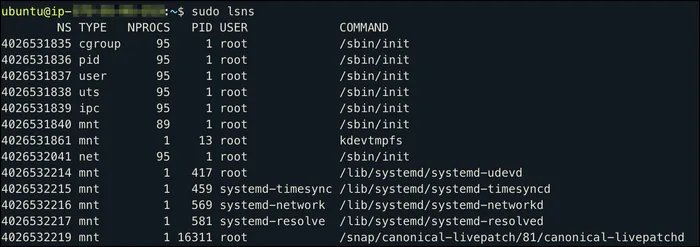
User namespaces do not reside inside nsproxy because credentials follow the kernel’s cred framework [1]. Each non-user namespace points to the user namespace that owns it [10]. The kernel exposes the /proc/[pid]/ns/ directory where entries appear as symbolic links formatted as type:[inode_number]. In Linux 3.7 and earlier versions, these entries appeared as hard links, but Linux 3.8 standardized them as symbolic links [2]. Processes sharing the same inode number share that namespace instance, such as root daemons sharing UTS inode 4026531838 as tracked by Umair Khurshid [1]. Holding an open file descriptor keeps a namespace alive after member processes terminate [2].
System calls control these boundaries. The clone() call creates child processes in new namespaces, unshare() moves callers into fresh namespaces, and setns() joins existing namespaces. Linux 4.12 added the pid_for_children handle to track child assignments. Creating user namespaces needs no privileges, while other types need CAP_SYS_ADMIN. Under /proc/sys/user/, Linux 4.9 introduced limits like max_user_namespaces, and Linux 5.7 added max_time_namespaces [2].
PID Hierarchy in Nested Process Trees
In traditional Unix systems, process IDs are managed globally, so no two processes can share an identifier [1]. The PID namespace isolates numerical process IDs, preventing collisions between separate application stacks [9]. The first task spawned inside a new PID namespace becomes PID 1, assuming the core tasks of the init daemon [1]. This first process adopts orphaned child tasks and reaps terminated zombie processes [5]. If this process exits, the kernel terminates all remaining tasks in that namespace with a SIGKILL signal [10].
PID namespaces form a parent-child hierarchy that enforces asymmetric process visibility across system boundaries, allowing root environments to monitor workloads while keeping nested applications isolated from neighboring containers. A parent namespace can monitor every process running in its child namespaces, but child namespaces can’t see or signal any process in parent environments [3]. Because a child process can’t inspect parent contexts, calling getppid() inside a new namespace returns zero [9]. Each process maintains distinct PIDs at each tree level, as developer Ajinkya Singh demonstrated with the Conti container runtime on GitHub. An application running as PID 1 inside a container might appear as PID 27656 or PID 52341 on the host machine [3]. Checking the NSpid line in /proc/[pid]/status reveals this translation list across nested contexts [5].

Running unshare with PID, fork, and proc options launches an isolated root shell. The --fork flag starts a new child process to act as PID 1 [5]. The --mount-proc flag mounts a fresh proc filesystem [3]. Without remounting, tools like ps display host tasks instead of container processes [5]. Dedicated container tools like tini and dumb-init run as PID 1 to ensure clean signal handling and process termination [6].
Mount Namespaces and Filesystem Boundaries
The mount namespace isolates the filesystem mount table, giving a process its own view of storage devices and directory trees [7]. When created, the kernel copies the parent mount table [10]. Later mounts and unmounts diverge without altering the host storage structure [5]. This design allows containers to assemble custom root filesystems while preserving the host layout intact [7].
Mount behavior across namespaces depends on propagation flags configured on individual mount points. Under the shared model, filesystem changes propagate automatically between linked namespaces, but private mounts prevent local events from leaking outward [7]. Init systems like systemd mark the host root mount as shared by default, creating a trap where new mounts inside an unshare session unintentionally surface on the host. Command-line tools handle this by setting private propagation automatically, but programs calling raw system calls must run mount --make-rprivate / to preserve isolation [5].
Container runtimes combine mount namespaces with directory switching mechanisms to assemble isolated root filesystems. Older utilities relied on chroot, but modern container engines use pivot_root because it swivels the root filesystem to a new mount point and unmounts the previous root, preventing breakout vulnerabilities. Container engines pair mount namespaces with an OverlayFS storage architecture to compose writable container layers over immutable base images without duplicating files on disk. By uniting upper writable directories with lower read-only image layers, the system presents a unified view while keeping the underlying host files untouched [7]. Anthony Heddings observed on How-To Geek that attempting to enter a mount namespace like kdevtmpfs without /bin/bash fails immediately because the apparent root directory has shifted [4].


Virtual Ethernet Pairs in Network Isolation
Within container architectures, Linux namespaces isolate the entire network stack to give applications private communication environments [5]. When the kernel initializes a network namespace with CLONE_NEWNET, it creates only a disabled loopback interface [10]. Any connection attempt to outside addresses fails with a network unreachable error. Port numbers belong entirely to the local namespace, allowing multiple containers to bind port 80 simultaneously without port conflicts [5].
To link an isolated network namespace with the host, administrators create a virtual Ethernet pair known as a veth device. This construct works like a physical patch cable connecting two network cards, where packets sent into one virtual interface emerge from the opposite peer. Using the iproute2 toolkit, an administrator keeps one interface in the host namespace and moves the other into the container network space, attaching the host end to a bridge like docker0 and assigning an IP address like 10.200.0.2/24 to the container. The virtual pair gives the container full network access while keeping host physical network adapters protected [6].
Forwarding packets completes the network route across namespaces. Enabling IPv4 forwarding and network address translation on the host allows the isolated container to communicate with external web services [6]. In modern deployments, operators often attach in-kernel eBPF engines to socket layers to filter network traffic safely without slowing down throughput. When the kernel destroys a network namespace, it automatically wipes attached virtual interfaces and returns physical adapters to the host [10]. This automatic cleanup prevents stale routing configurations from lingering on the host system after workloads terminate [6].
User ID Mapping for Rootless Containers
User namespaces isolate security credentials, allowing a process to hold root privileges inside an isolated workspace while remaining an unprivileged user on the host system. Michael Kerrisk said, “User namespaces allow per-namespace mappings of user and group IDs.” Calling clone() with CLONE_NEWUSER grants full permitted and effective capabilities inside the local boundary, even when launched by an account with UID 1000. But that process receives zero capabilities on the host [8].
Identity translation requires configuring the uid_map and gid_map files in procfs. Each entry specifies three numbers: the ID inside, the ID outside, and the range length. For example, writing 0 1000 1 maps host user ID 1000 straight to root UID 0 within the child namespace. This write is a one-time operation. Any identifier lacking an explicit mapping falls back to /proc/sys/kernel/overflowuid, which typically resolves to UID 65534 [8].
Rootless container tools like Podman rely on UID translation to launch environments without host privileges. Linux 3.8 removed privilege requirements for creating user namespaces, so an ordinary user can run unshare --user --map-root-user without sudo [6]. The tool works out of the box on RHEL, openSUSE, and Arch Linux, but Ubuntu systems historically managed access through the sysctl knob kernel.unprivileged_userns_clone [1]. Once inside, that unprivileged user can create isolated mount and network namespaces without host administrator privileges [6]. If a security vulnerability occurs within the container, the host operating system continues enforcing the unprivileged identity, restricting potential damage to the user’s existing permissions [10].
Linux Namespaces Compared to Control Groups
Developers sometimes confuse Linux namespaces with control groups because both mechanisms support container virtualization on modern Linux systems [4]. Both technologies form the foundation of container virtualization on Linux, but they govern entirely different aspects of system execution [10]. Linux namespaces control visibility by determining what processes, network ports, storage mounts, and user IDs an application can discover or access on the system. In contrast, cgroups restrict resource consumption by enforcing limits on CPU cores, RAM allocation, disk input, and active process counts. As author David Cao wrote, namespaces control what a process can see, but cgroups control how much it can use [5].
The control group namespace introduced in Linux 4.6 by Tejun Heo bridges these subsystems by virtualizing cgroup directory views. In older kernels lacking this feature, a process read its full host control group path directly from /proc/self/cgroup, revealing the broader system setup. Virtualizing this view with CLONE_NEWCGROUP makes the container’s control group appear as the root directory. Hiding the host path prevents information leakage and enables container orchestrators like Kubernetes to migrate workloads between nodes without conflicting cgroup directory paths [10]. These isolation layers keep containers portable across varied cluster environments [7].
Namespaces are not a full security barrier on their own. Any process holding CAP_SYS_PTRACE can attach to target programs in other environments and enter foreign namespaces using the setns() system call, completely bypassing the isolation boundary set by container runtimes. Kernel bugs strike below the namespace layer. When an attacker exploits shared kernel memory, process boundaries collapse immediately regardless of namespace configuration. Breakouts such as CVE-2019-5736 targeted runtime file descriptors. Production hosts pair namespaces with seccomp system call filters, AppArmor or SELinux access controls, and strict capability drops to build actual defense [6].
Diagnostic Tools for System Inspection
Administrators inspect active namespace environments across a running host using standard Linux diagnostic utilities. The lsns command from util-linux queries the kernel and lists every active namespace with its internal type, process count, owning process ID, and originating command. Running lsns -t pid filters the report to process ID namespaces, while adding the -J flag formats output as JSON for automated parsing in monitoring scripts [4].
To enter an existing namespace for live debugging, operators turn to the nsenter command-line utility. By specifying a target process ID with desired namespace flags, nsenter attaches the shell session to the target environment [4]. For example, running sudo nsenter -t 9843 --mount --net --pid places the administrator inside that process’s network stack and process tree to diagnose connectivity issues [6]. Anthony Heddings documented on How-To Geek that background daemons like Canonical Livepatch run in private mount namespaces even on standard desktop installations. If an administrator attempts to enter a mount namespace that lacks a local shell, such as the kernel’s kdevtmpfs mount, the command loads into the namespace but fails when searching for /bin/bash [4].
Shell utilities provide manual control, but container engines use direct system calls as documented in Linux man-pages version 6.19 released on 2026-02-08 [2]. Tools like runc and crun issue atomic clone() calls with combined CLONE_NEW* flags [6]. Container runtimes inspect /proc/[pid]/ns/ symlinks to track namespace membership across processes [2]. Docker keeps container namespaces alive after processes exit by bind mounting namespace files to /var/run/docker/ns/. Understanding how Linux namespaces operate enables administrators to design secure container deployments across large computing clusters [7].
- WEBSITE Khurshid, U. (2025, December 5). Complete beginner’s guide to Linux namespaces. Linux Handbook. [Article Link]
- WEBSITE Kerrisk, M. (Ed.). (2026, February 8). namespaces(7) — Linux manual page (man-pages 6.19). Linux Kernel Organization. [Article Link]
- WEBSITE Singh, A. (2025, October 6). Understanding Linux namespaces: A guide to process isolation. DEV Community. [Article Link]
- ONLINE NEWS Heddings, A. (2020, September 2). What are Linux namespaces and what are they used for? How-To Geek. [Article Link]
- WEBSITE Cao, D. (2026, September 26). Linux namespaces explained: How they work with practical examples. Howtouselinux. [Article Link]
- WEBSITE MyUnix.org. (2026, August 25). Linux namespaces: The tech behind containers explained. MyUnix.org. [Article Link]
- WEBSITE Systems Explained. (2026, June 15). Linux namespaces and cgroups — The foundation of containerization. Systems Internals. [Article Link]
- ONLINE NEWS Kerrisk, M. (2013, February 27). Namespaces in operation, part 5: User namespaces. LWN.net. [Article Link]
- ONLINE NEWS Kerrisk, M. (2013, January 16). Namespaces in operation, part 3: PID namespaces. LWN.net. [Article Link]
- WEBSITE Wikipedia contributors. (2026). Linux namespaces. Wikipedia, The Free Encyclopedia. [Article Link]


