





Security researcher Abdelhamid Naceri, who publishes research under the names MSNightmare and Nightmare Eclipse, released proof-of-concept code on GitHub on November 10, 2026, for a new Windows local privilege escalation zero-day bug [1]. The flaw targets the Common Log File System driver in Windows 11 and lets standard local users gain SYSTEM rights [2]. Sebastian Castellanos at Wccftech reported that the SignDrop exploit turns a security check Microsoft introduced last year into a path for attackers to gain full control of vulnerable personal computers [1].
How the SignDrop Exploit Abuses Windows CLFS
The Common Log File System manages application logs across Windows [1]. Because its kernel driver, clfs.sys, runs in ring 0 with kernel rights, any parsing bug gives attackers a direct path to take over the operating system [5]. Researchers frequently inspect its codebase. Past CLFS flaws tracked by CISA include CVE-2025-29824, which threat groups paired with ransomware tools, and CVE-2023-36424, a memory flaw listed in government vulnerability databases [2, 5].
To block persistent kernel memory corruption bugs, Microsoft began rolling out log-signing protections on October 28, 2025, for Windows 11 25H2 and Windows Server 2025. The feature binds a hash-based message authentication code to each log file, using a unique cryptographic key stored on the local PC [2]. New operating system builds run in learning mode, which lets the driver create cryptographic signatures for old logs before switching to locked enforcement after 90 days [4]. The transition happens automatically, so established Windows systems enable the check by default [2]. Pierluigi Paganini at Security Affairs reported that Naceri uncovered a design flaw in how the driver builds helper files [4].
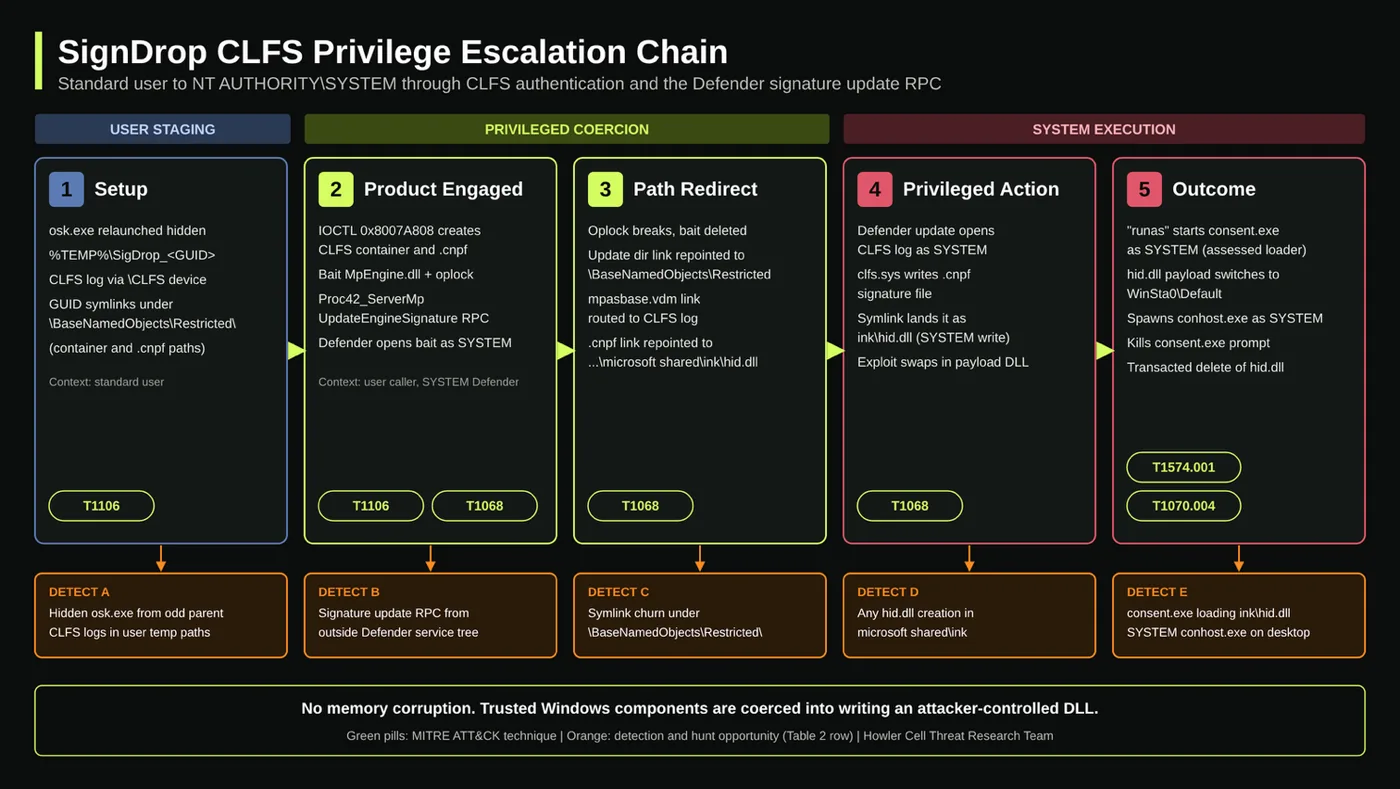
When a user writes a base log with a .blf extension, clfs.sys creates a companion .cnpf file to hold signature data and recovery records [2, 4]. The driver uses an AddLogContainer call to attach an empty container, but tries to sign the file even when no signature exists yet. An attacker can set up a low-level log container that later forces high-privilege system services to run file creation steps [5].
Defender Context and Arbitrary File Creation
Standard Windows user accounts can’t create files in system directories [1]. But opening a CLFS log file needs no special permissions, allowing any low-level app to pass a file path to other software. Unprivileged users can start these operations without triggering security prompts [4].
Naceri showed that an attacker can trigger Microsoft Defender by calling the ServerMpUpdateEngineSignature remote procedure call to force the antimalware service into opening prepared containers [1, 4]. The call forces the Defender engine, MsMpEng.exe, to process the user’s prepared log container with full SYSTEM rights [5]. While Defender opens the file, the exploit redirects file creation by altering Windows Object Manager symbolic links [2, 4]. The CLFS driver follows the path stored inside the container and builds the missing .cnpf file inside a folder chosen by the attacker [4]. Because Defender handles the request, Windows assigns SYSTEM ownership to the new file [2].
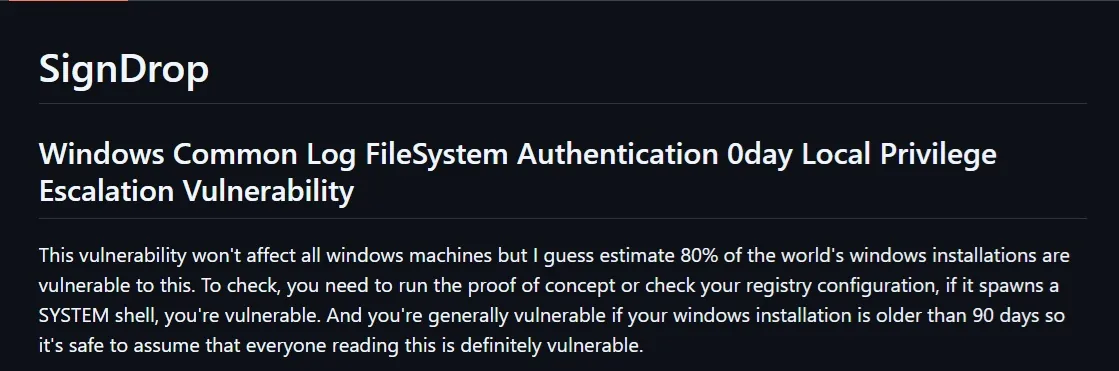
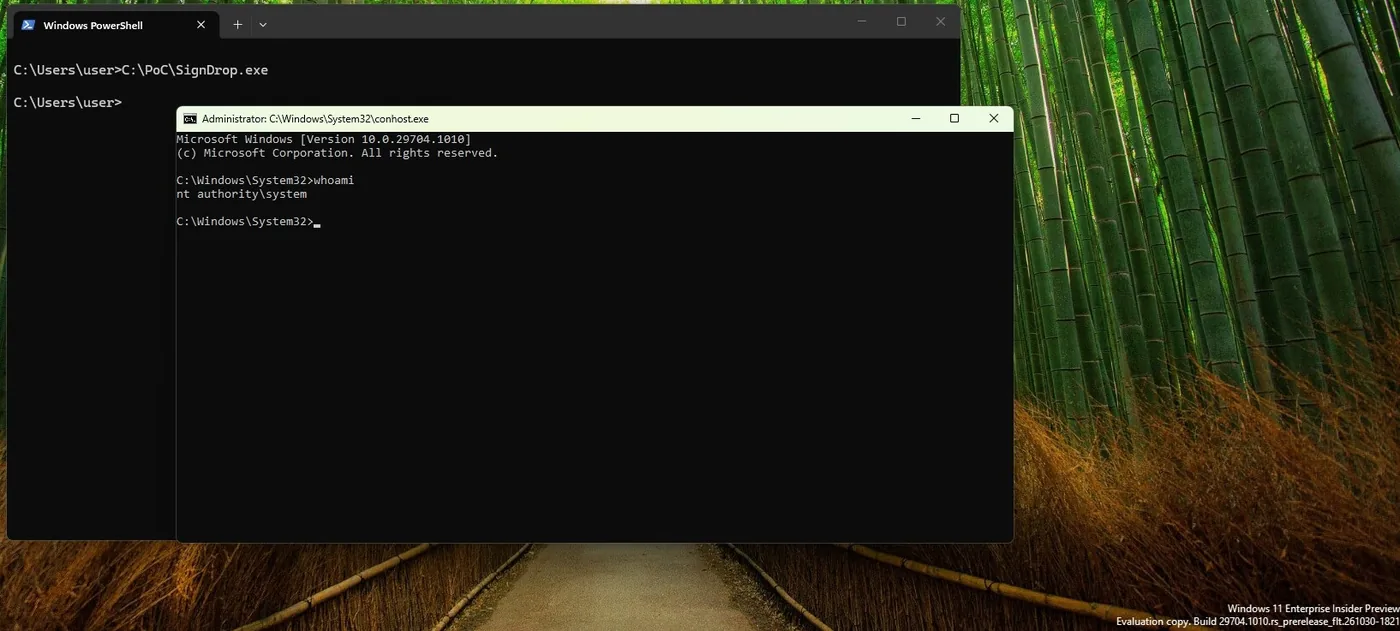
Crucially, the driver copies the discretionary access control list from the attacker’s original file, leaving the resulting SYSTEM file completely open for standard users to write to [4, 5]. The mismatch lets an attacker turn arbitrary file creation into a command shell running as NT AUTHORITY\SYSTEM [1, 3]. Naceri stated in his GitHub advisory: “Everything is done properly by Microsoft here but the logic allows abuse.” [2] Antivirus tools also fail to flag the step because the request comes from Microsoft’s own signed antimalware engine [4, 5].

Testing the SignDrop Exploit in Security Labs
Naceri confirmed his proof of concept on Windows 11 26H2, Windows 11 26H2 Experimental, and Windows Server 2025 Experimental builds. The researcher estimated that 80% of Windows installations worldwide could be vulnerable to the flaw [1, 4]. The calculation assumes systems keep CLFS log checks active in either learning or enforcement mode [4].
Security labs moved quickly to replicate the results. Cyderes researchers confirmed the bug after spawning a SYSTEM command shell on test hardware [1]. At South Korean security firm 78researchlab, research head Sungyup Nam said team member Heewon Song reproduced the bug using the PurpleHound offensive testing framework. Song confirmed the exploit works, but said it lacks the stability needed for regular field use [2].
The exploit faces clear operational hurdles because it disrupts the local desktop. Running the code modifies User Account Control prompts so that each approval pops open a standard command window and an elevated SYSTEM prompt together. The visual glitch freezes normal desktop work and tips off anyone sitting at the machine [2, 3]. Naceri has disclosed several Defender bugs before, including an issue where a Nightmare Eclipse zero-day freezes Microsoft Defender updates during background scans. Earlier exploits from Naceri include RoguePlanet, tracked as CVE-2026-50656, and ShieldBreak, patched under CVE-2026-69414 after security researcher Will Dormann verified that Defender must stay active for the bug to trigger [2, 6].

Risks of Disabling Kernel Mitigations
Admins can check whether a PC is exposed by opening the Windows Registry [1]. The setting lives under HKLM\SYSTEM\CurrentControlSet\Services\CLFS\Authentication, where the Mode value controls log handling [2]. Setting Mode to 0 turns on full enforcement, while 1 keeps the driver in learning mode [4].
Setting the registry Mode value to 2 or 3 turns off CLFS protection completely, which immediately stops the attack sequence from running on that specific machine [2, 5]. Yet vendor engineers strongly advise against it. Turning off verification forces clfs.sys to parse untrusted log structures without checks, which reopens older kernel memory corruption flaws that the new hash mechanism was built to eliminate in the first place [1, 4]. Security teams at Cyderes also warned against applying that workaround [5].
Kernel security fixes often involve difficult engineering compromises for Microsoft. In October 2026, Microsoft patched more than 1,400 security bugs, including CVE-2026-96951, a high-severity Mark of the Web bypass that attackers actively exploited before updates shipped. The October patch rolled out cumulative update KB5127648, which bumped Windows 11 26H2 to build 26300.9711 [7]. Varun Mirchandani at Digital Trends noted that administrators should focus on limiting unprivileged code execution rather than disabling kernel safeguards [3].
Vendor Guidance and Defensive Steps
As of mid-November 2026, SignDrop has received no official CVE tracker from Microsoft or MITRE [1, 2]. Microsoft did not include a fix for the bug in its November Patch Tuesday bundle. Security teams must rely on detection rules while waiting for an update [2].
In a statement provided to SecurityWeek, Microsoft said it is investigating the issue and noted Defender can detect known exploit attempts. The company said it found no evidence of real-world attacks using the flaw [1, 3]. Naceri previously worked for Microsoft in the UK and Germany before being dismissed. He contested the termination in a German court, which upheld Microsoft’s action [4].
SignDrop can’t spread across corporate networks on its own. Because local code execution is required before triggering clfs.sys, defense teams can reduce exposure by monitoring unexpected .cnpf and .blf file creation while auditing symbolic link modifications inside the Windows Object Manager. Engineers should also watch for suspicious file operations from MsMpEng.exe. Logging ERROR_LOG_METADATA_CORRUPT events provides valuable early warning for administrators until Microsoft ships an official patch through regular Windows Update channels [5].
- ONLINE NEWS Castellanos, S. (2026, November 15). Windows 11 “SignDrop” Zero-Day Exploit Turns Microsoft’s Own Security Fix Against Itself, Grants SYSTEM Privileges. Wccftech. [Article Link]
- ONLINE NEWS The Hacker News. (2026, November 12). New SignDrop Zero-Day Exploit Turns Windows CLFS Security Feature Into SYSTEM Access. The Hacker News. [Article Link]
- ONLINE NEWS Mirchandani, V. (2026, November 15). Microsoft’s Windows security fix has a loophole, and hackers could use it to gain full control. Digital Trends. [Article Link]
- ONLINE NEWS Paganini, P. (2026, November 13). New SignDrop Exploit Can Abuse Windows Defender to Bypass Security Protections. Security Affairs. [Article Link]
- ONLINE NEWS UNDERCODE NEWS. (2026, November 12). SignDrop Windows Zero-Day Exploit Turns Standard Users Into SYSTEM and Can Disable Antivirus Protection. UNDERCODE NEWS. [Article Link]
- ONLINE NEWS Whittaker, Z. (2026, August 12). After Microsoft threatened legal action, a security researcher publishes a new Windows zero-day bug. TechCrunch. [Article Link]
- ONLINE NEWS Gadget Hacks. (2026, October 14). Microsoft Patches Windows Zero-Day Already Used in Attacks — Here’s How to Protect Your PC. Gadget Hacks. [Article Link]


