





Samsung released its Android 17 firmware in late October 2026, but the Galaxy S24 battery quickly encountered heavy complaints from early adopters. The One UI 9 build adds features like Call Brief and My FanCam, but Galaxy S24 and Galaxy S25 owners reported sharp power loss during daily routines [2]. The drain affects both generations of Samsung hardware.
Galaxy S24 Battery Complaints
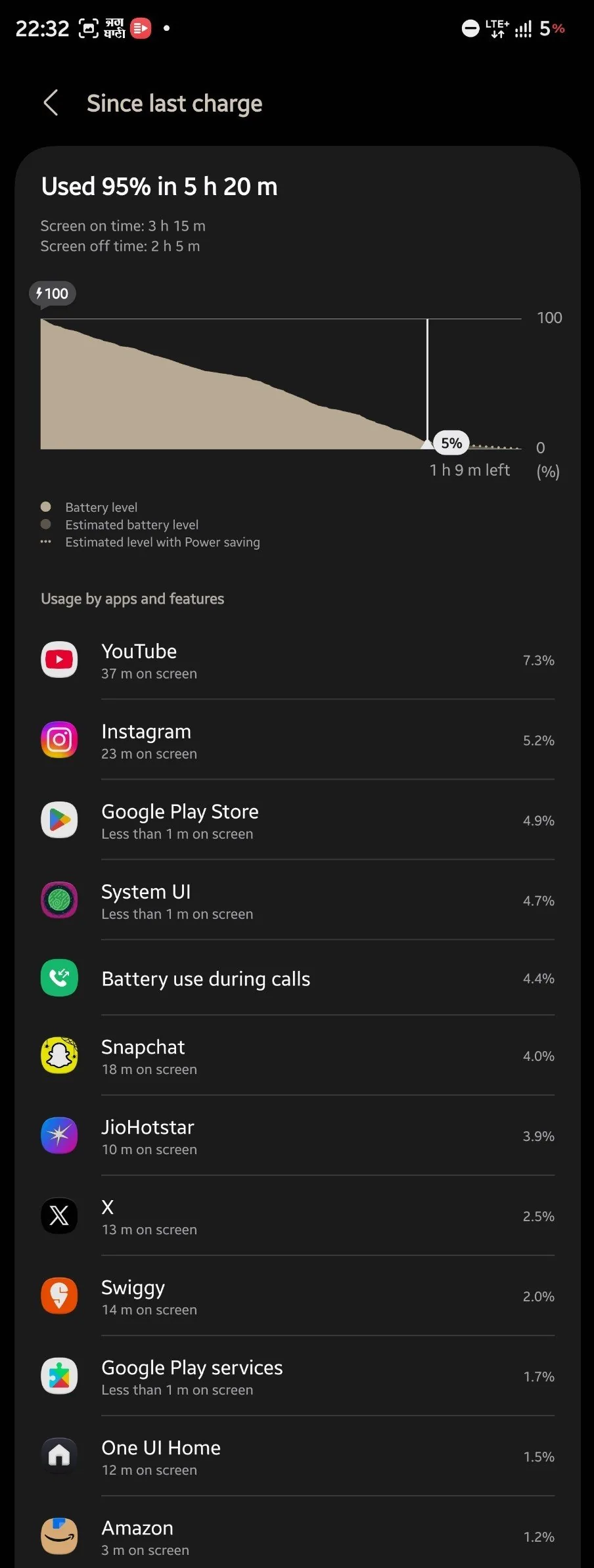
Early customer grievances surfaced on X and Reddit shortly after Samsung pushed the firmware build to unlocked devices. A Galaxy S24 Ultra owner posted on X that their handset consumed 95% of its stored energy in five hours and twenty minutes, even though the display stayed active for only three hours and fifteen minutes [1]. SammyFans documented the case, reporting that Samsung customer support reached out to book an in-person diagnostic check at a local Samsung store [2]. Nickolas Diaz of Android Central pointed out that when only a subset of Galaxy S24 users suffers from an issue, finding quick community solutions becomes far harder [1].
Discussion threads on Reddit and Samsung community boards showed that the defect reached past a single handset. Owners of the base Galaxy S24 and the larger Galaxy S25 Plus described an identical pattern where the Galaxy S24 battery dropped quickly during mixed social media use and mobile browsing. Earlier testing detailed in what Samsung One UI 9 delivers to the Galaxy S26 lineup outlined new interface features, but older chipsets appear to process those background tasks with far less efficiency. Several buyers reported having to recharge their Galaxy S24 handsets three times before evening [3].
The trouble does not hit every device in the exact same manner. Technology writer Chaudhry Arslan observed on Gadgets About that some Galaxy S24 handsets burn through capacity within a single morning, but others preserve steady power levels under light workloads. Samsung has not confirmed a hardware defect [5].
Standby Drain During Daily Use
Standby power loss represents the most frustrating symptom for many Samsung owners. A Reddit user shared battery logs showing that a Galaxy S24 lost 40% of its total charge over an eleven-hour span without any active interaction [1]. During that eleven-hour window, the screen stayed on for two and a half hours. Chethan Rao reported on Android Authority that idle drain generated more complaints than gaming sessions, as buyers expected Galaxy S24 hardware to sleep quietly when not in use [2]. The Galaxy S24 battery lost power without active screen time, which alarmed owners who depend on overnight standby [5]. In regional markets like Myanmar, where Galaxy S24 phones hold high market share, users raised concerns that fast drops disrupt daily communications during work hours [6].
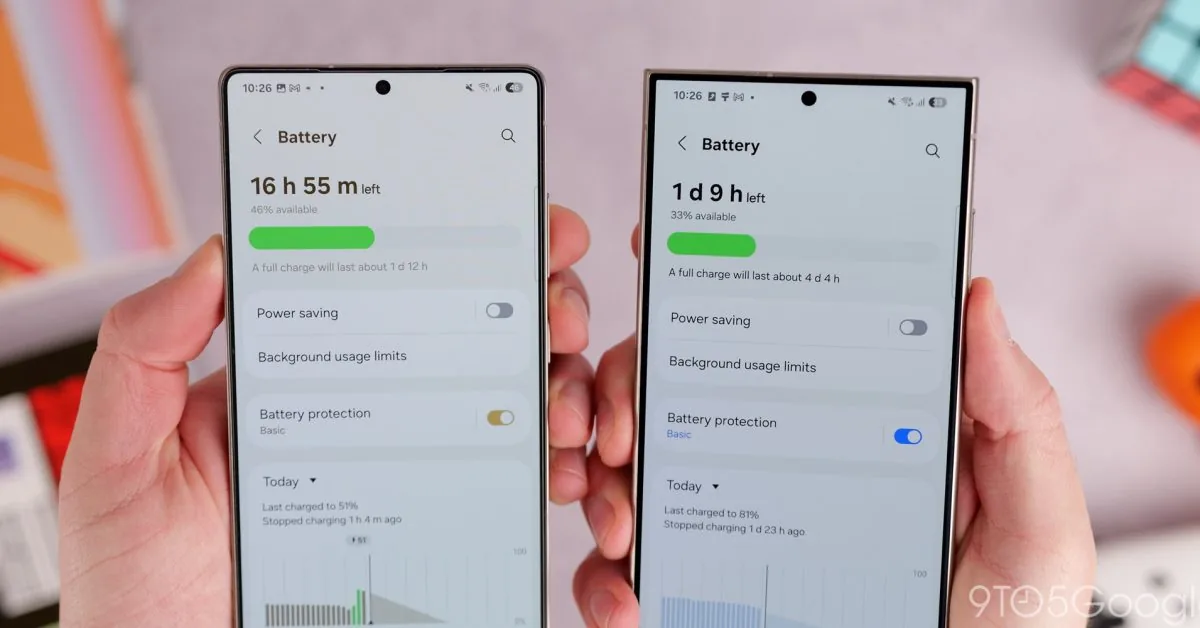
Reports from 9to5Google captured similar frustrations among Galaxy S25 owners. Ben Schoon documented accounts from buyers who now plug in their Galaxy S25 handsets three to four times a day to maintain regular mobile connectivity [3]. Beyond battery life, some regional users hit software blockers during setup. A Korean Galaxy S26 owner reported that their unit froze at the final setup screen with a webpage unavailable message after flashing the Android 17 package [1]. Samsung advised that customer to update browser packages and switch to a stable Wi-Fi connection.
Operating system upgrades often cause short-term battery fluctuations as background indexing finishes, yet the scale of these reports exceeds typical post-update settling. Writers at The Daily Tech Feed observed that losing thirty percent of charge during simple standby indicates unoptimized software behavior instead of standard re-indexing [7]. Samsung community boards show hundreds of identical battery logs [6].

Processor Clock Regressions in One UI 9
Developer LeoJulieta published diagnostic findings on DEV Community showing that the excessive consumption stems from a software regression, not failing battery hardware. One UI 9 introduced a new kernel background service called pm-daemon to classify running tasks. In software version 1.4.3, a logic bug mistakenly marks routine system jobs, including Samsung Cloud data syncing and Adaptive Battery routines, as top-priority operations. Because Android 17 believes these tasks need maximum processing speed, it locks the CPU at its performance governor near 2.2 GHz on the Galaxy S24 instead of scaling down to its powersave frequency of 800 MHz [4]. That continuous clock rate prevents the Exynos and Snapdragon silicon from resting.
Diagnostic benchmarks on DEV Community highlight the impact of that processor lock. LeoJulieta measured a 30% increase in CPU active time during idle periods, which caused Galaxy S24 back-panel temperatures to rise by 15 °C. Total endurance dropped from twelve hours under One UI 8.5 down to seven hours under One UI 9 in mixed daily use, an endurance loss of forty percent. Half an hour of 1080p video playback consumed 8% of battery capacity compared to 5% on older builds, as web browsing drain rose from 4% to 7% [4].
Standby battery consumption doubled from 1% per hour under One UI 8.5 to 2% per hour under One UI 9. These background routines interact with software layers detailed in Samsung packs One UI apps with advanced hardware controls, altering how system services allocate hardware resources. When wake locks remain open in system memory, power chips can’t throttle Galaxy S24 components into deep sleep [4]. The phone stays warm even inside a pocket.
Temporary Galaxy S24 Battery Fixes
Affected Galaxy S24 customers can apply several adjustments to curb excess power draw before Samsung issues an update. The most effective step involves turning off Adaptive Battery through system settings, which prevents pm-daemon from cycling high-priority checks [4]. Restricting background activity for Samsung Cloud stops unnecessary sync loops [5]. A phone reboot clears temporary system cache files.
Developers on DEV Community turned to command-line tools to stabilize processor behavior on Galaxy S24 and S25 units. A standard ADB shell command sets the CPU scaling governor to powersave, forcing cores to run at 800 MHz to curb heat and recover ten to fifteen percent of lost endurance [4]. Developer Options in Android 17 also lets users close background activities upon exit. These steps help preserve the Galaxy S24 battery during heavy work routines until Samsung distributes an over-the-air patch.
For owners who need full all-day battery life right away, rolling back to One UI 8.5 remains a viable option. Enthusiasts using the Odin desktop flashing tool can install official stock firmware without tripping the Knox security counter or voiding Samsung warranty coverage [4]. Official installation logs and stock firmware archives let Samsung service technicians verify the setup if hardware repairs become necessary later. A clean rollback takes time and needs backing up personal files, but it removes the kernel regression.

Official Investigation and Patch Timelines
Samsung has not yet issued a public bulletin detailing the cause of the battery drain, but the company is reviewing reports submitted through Samsung Members forums [6]. Editorial teams at Android Authority reached out to Samsung representatives for clarification on the complaints, but the manufacturer did not return comment by late October [2]. In isolated support interactions, Samsung technicians offered device appointments but avoided confirming a software bug. Affected Galaxy S24 owners continue to post battery logs on Reddit to build a clearer public record of the fault.
Community developers track Samsung firmware schedules and anticipate an over-the-air maintenance release within two to three weeks [4]. Chaudhry Arslan advised users on Gadgets About to document power drain patterns through the built-in One UI battery menu before installing future patches [5]. Samsung provides warranty coverage if cells fail diagnostic tests [4].
For the time being, Galaxy S24 and Galaxy S25 owners should verify that all installed apps stay updated through both the Google Play Store and the Galaxy Store [5]. Major Android version jumps often introduce temporary power irregularities, but technical logs on DEV Community point to a solvable software flaw, not permanent battery wear [7]. Galaxy S24 users facing steep power loss can apply basic CPU governor adjustments as Samsung prepares an official OTA update.
- ONLINE NEWS Diaz, N. (2026, October 24). One UI 9 is causing some Galaxy S24 users to charge their phones very often. Android Central. [Article Link]
- ONLINE NEWS Rao, C. (2026, October 23). It’s not just you: Galaxy S24 and S25 owners report excess battery drain after One UI 9. Android Authority. [Article Link]
- ONLINE NEWS Schoon, B. (2026, October 22). Some Galaxy S24, S25 owners say Samsung’s latest update is wrecking battery life. 9to5Google. [Article Link]
- WEBSITE LeoJulieta. (2026, October 23). One UI 9 battery drain on Galaxy S24/S25: Causes & fixes. DEV Community. [Article Link]
- ONLINE NEWS Arslan, C. (2026, October 24). Samsung One UI 9 battery drain reported on Galaxy S24 and S25. Gadgets About. [Article Link]
- ONLINE NEWS MyTech Myanmar. (2026, October 24). Samsung Galaxy S24 and S25 users report battery drain after One UI 9 update. MyTech Myanmar. [Article Link]
- ONLINE NEWS The Daily Tech Feed Team. (2026, October 25). One UI 9 update blamed for Galaxy S24/S25 battery drain issues. The Daily Tech Feed. [Article Link]


