



Foldable smartphone capabilities no longer remain confined to flexible hardware: Samsung One UI 9 officially reached standard flagship devices on September 16, 2026. Samsung opened the stable operating upgrade to the Samsung Galaxy S26, Samsung Galaxy S26+, and Samsung Galaxy S26 Ultra following extended beta evaluation. Does a conventional glass slab genuinely benefit from tools designed around dual-screen hardware? The immediate answer begins in South Korea, where the public rollout pairs these flagship additions with the September 2026 security patch. [1][2]
Samsung One UI 9 Expands to Galaxy S26
Samsung shifted its newest software tier beyond book-style hardware roughly five weeks following the market arrival of the Galaxy Z Fold 8 Ultra, Galaxy Z Fold 8, and Galaxy Z Flip 8. Samsung One UI 9 extends across conventional handsets, bringing utilities previously restricted to folding screens into standard pockets. Kris Holt of Engadget reported that the stable software reached the Samsung Galaxy S26, Samsung Galaxy S26+, and Samsung Galaxy S26 Ultra, while also arriving for the Galaxy S26 FE that debuted earlier this month. The update is free. The unified rollout bridges functional differences across form factors. [2]
The expansion marks a deliberate transition for consumers who prefer slate-style smartphones over folding mechanisms. Rather than isolating newer artificial intelligence workflows on premium foldables, Samsung pushed the complete upgrade package to its primary bar phones. The release ensures functional parity. Hardware pricing also influences that transition, as site reporting documented when the refurbished Galaxy S26 joined Samsung’s Re-Newed lineup at $759 to provide a lower-cost path into the S26 ecosystem. Users who wonder why on Samsung phone hardware these tools matter receive immediate answers through this rollout. [2]
Owners of standard flagships gain the central interface refinements that accompanied the summer folding generation. Kris Holt emphasized that extending Samsung One UI 9 gives conventional handsets identical access to automated video framing, notification filtering, and real-time on-device translation views during daily use. Samsung keeps the standard Samsung Galaxy S26 hardware aligned with its most expensive folding flagships by delivering these shared tools. The unified software approach demonstrates why Samsung is better positioned to maintain feature consistency across diverse hardware designs over long multi-year update lifecycles. [2]
Seven Betas Lead to South Korea Rollout
Reaching a dependable stable build required extensive public evaluation across several testing phases. Chandra Steele of Android Police reported that One UI 9 went through seven beta releases (pre-release test software) before Samsung officially approved the widespread general rollout. The official deployment started for handsets located in South Korea, while users in other countries are scheduled to receive over-the-air installation packages shortly afterward. That wait will end soon. [1][3]
Seven beta rounds preceded the release. Samsung launched the final package in South Korea first, bundling the September 2026 security patch. [1]
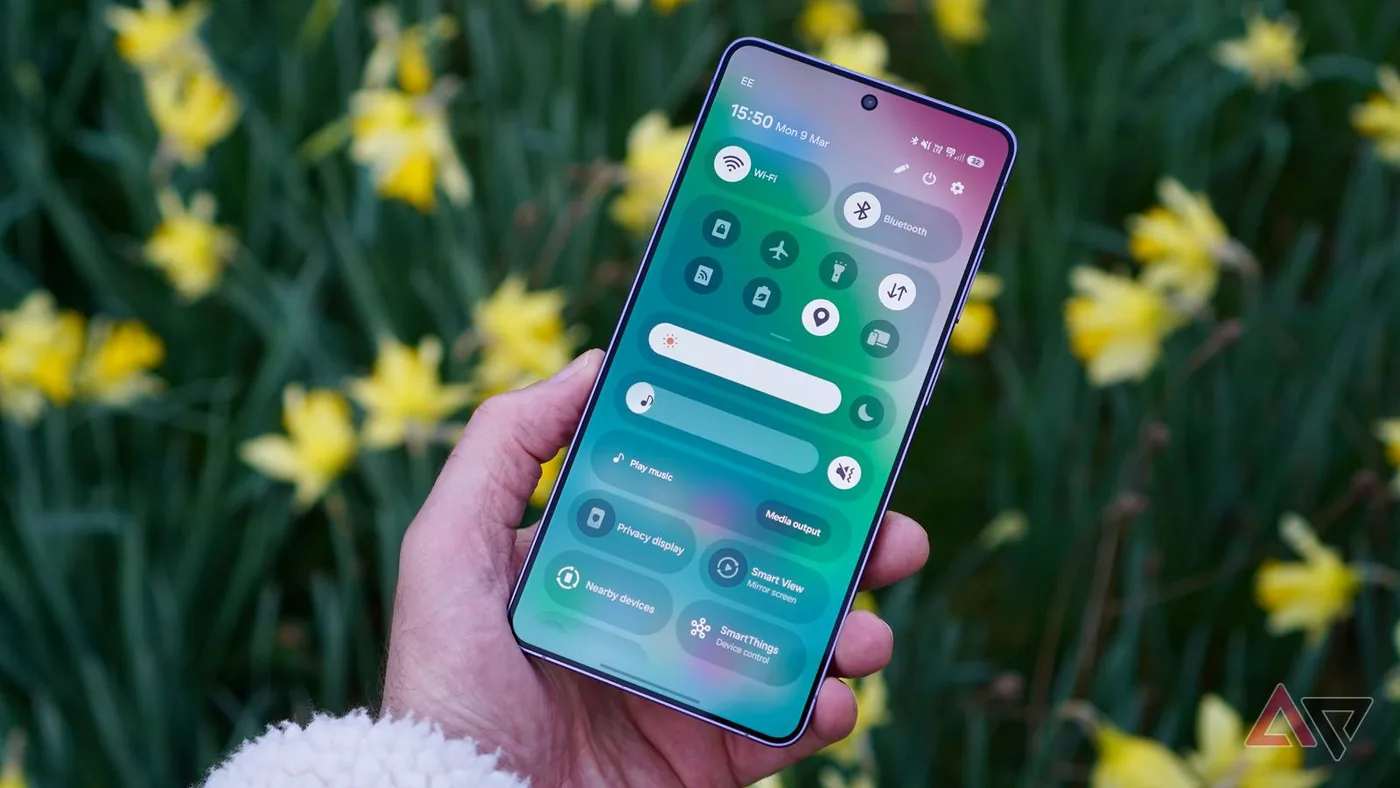
Installing the new software requires specific device conditions before the handset can begin its upgrade cycle. Android Police advised that phone owners must confirm their device has at least a 30% battery charge or keep the smartphone plugged into a wall charger during the installation process. The upgrade sequence proceeds through a familiar manual path: owners navigate to Settings, open the Software update menu, and tap Check for system updates to locate the waiting build. When the download finishes, choosing the restart command applies the update and reboots the phone into Samsung One UI 9. The entire installation process demands steady electrical power to prevent mid-cycle interruption. That transition requires steady power. Owners should monitor the download progress carefully until completion. [1]

Foldable Camera Tricks Reach Slate Screens
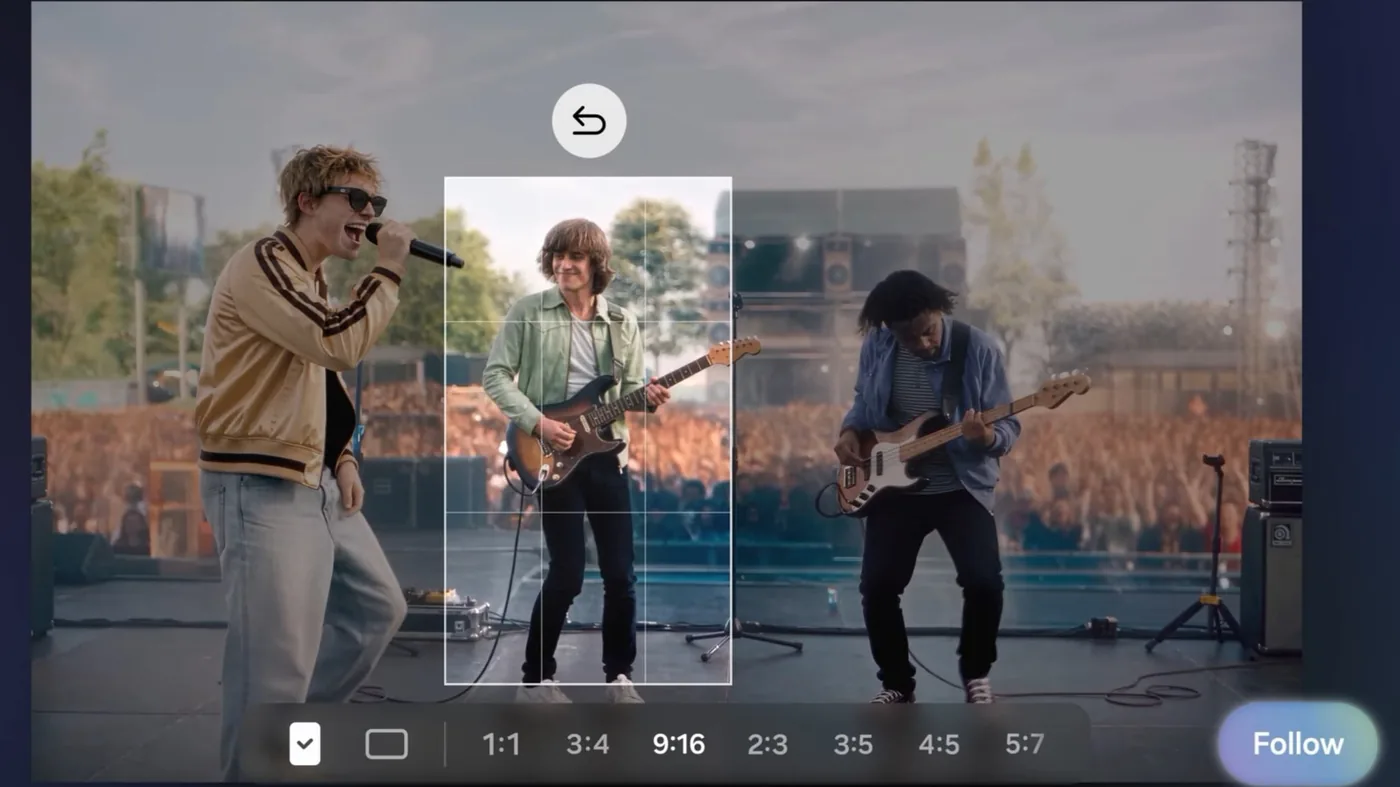
Mobile videography receives one of the most prominent additions with the arrival of My FanCam. The tool originally appeared on the Galaxy Z Fold 8 and Galaxy Z Flip 8 to help casual shooters track individuals without manual gimbal equipment. My FanCam automatically crops recorded video to center on a single person, keeping that selected subject in focus even while they move across the room or across a crowded concert stage. [1][2]
Kris Holt described a concert scenario where an attendee records an entire musical group across an ultra-wide composition, allowing My FanCam to crop the frame cleanly toward a favorite performer in a chosen aspect ratio. Users can select one person to center without worrying about personal camera operation or complex framing adjustments. Document scanning also received substantial mechanical enhancements in Samsung One UI 9, addressing persistent issues when capturing curved book pages or documents with bent corners. The scanner adjusts automatically. [1][2]
The scanning utility integrates Finger Eraser to remove stray thumbs and fingertips from digitized pages, producing clean document captures without manual editing. Chandra Steele of Android Police noted that Document Scan also adds large-screen-optimized views. Does a flat smartphone genuinely handle distorted pages better with automated curvature correction? Samsung software algorithms flatten distorted paper profiles automatically, saving users from tedious post-scan cropping and manual perspective alignment across multiple pages. [1]
Contextual AI Powers Now Nudge and Summaries
Everyday task automation expands through agentic artificial intelligence functions designed to anticipate user needs from live screen activity. Now Nudge analyzes contextual cues on display, turning passive text into immediate action items across apps. Chandra Steele explained that the software can detect plans inside text messages to schedule calendar appointments directly or surface travel reservations while someone reviews itinerary messages. Samsung confirms that several other AI-powered features operate continuously in the background. [1][2]
Personal summaries receive greater flexibility through updated cards inside Now Brief. Engadget reported that Now Brief adds generative and editable cards, granting users significantly closer control over the information presented in morning overviews and personalized daily digests. Spoken workflows also benefit from upgraded transcription: Voice Recorder now formats audio summaries using structured headings and organized tables rather than relying on flat text blocks. This structured layout makes complex audio transcripts significantly easier to navigate and review after extended executive meetings. [1][2]
Bilingual conversations gain practical utility through a redesigned Interpreter interface. Samsung added a dedicated Thread View (a chronological message log) to make reviewing past conversation exchanges faster during live translations. Kris Holt noted that translation processing in Conversation Mode operates with increased speed, while Samsung also expanded its automated scam call detection system into Japan, Canada, and India. Other regions will follow. [2]
Settings Hub Centralizes Diagnostics and Repairs
Hardware maintenance moves into an integrated configuration menu that consolidates device health functions. Chandra Steele of Android Police highlighted a newly constructed warranty and care hub situated directly inside the Settings application. The unified hub centralizes warranty tracking, diagnostics, repair requests, and customer support in one place, sparing users from hunting through disparate help menus or external web portals when troubleshooting device performance. [1]
An onboard diagnostic tool (a built-in hardware testing suite) evaluates critical smartphone hardware components, including battery health, charging throughput, sensor integrity, touch response, and network connectivity. If the diagnostic test detects an operational defect, the software suggests an immediate software fix or initiates an official repair ticket with customer care. Automated checks catch subtle component degradation early. Regular maintenance protects the phone. [1]
System security rounds out the software upgrade through specialized background monitors. Samsung introduced Security Brief, an automated protection layer designed to shield personal data within Now Brief against malware and suspicious permission requests. Privacy Alerts simultaneously employs machine learning to flag background privacy risks, while Creative Studio gains general editing updates. Samsung One UI 9 delivers these diagnostic and defensive layers directly to Galaxy S26 owners as the rollout advances worldwide. [1]
- ONLINE NEWS Steele, C. (2026, September 16). Samsung Galaxy S26 finally gets the Z Fold 8’s best features with One UI 9. Android Police. [Article Link]
- ONLINE NEWS Holt, K. (2026, September 16). Samsung brings One UI 9 to the rest of the Galaxy S26 series. Engadget. [Article Link]
- ONLINE NEWS Android Authority. (2026, September 16). The wait is over: Samsung rolls out stable One UI 9 for Galaxy S26 series. Android Authority. [Article Link]


1 comment