





Seagate released details on November 10, 2026, for the Seagate FireCuda Forge, an external hybrid hard drive that combines mechanical storage capacity with user-supplied solid-state speed. The enclosure ships in 8TB and 20TB versions, but it can’t function until buyers open the casing and install an M.2 2280 drive [2]. By pairing a standard 3.5-inch spinning disk with a fast caching module, the setup eases the sting of high solid-state prices while keeping active file transfers fast [1].
A Hybrid Design for Modern Storage Demands
Early hybrid caches stayed small. Seagate first added flash memory to mechanical drives back in 2010, when solid-state media was similarly expensive, pairing platters with modest caches between 4GB and 16GB. High flash costs have returned. The Forge revisits that architecture today because enterprise demands for artificial intelligence hardware have driven solid-state component prices sharply upward across the technology industry [2].
Seagate chose not to sell a sealed drive with fixed flash, opting instead to let buyers install their own stick [2]. TechRadar reviewer Alastair Jennings tested the Forge with a GMKtec EVO-X5 Pro desktop system, finding that the computer sees both storage layers as a single unified volume once connected over USB4 [1]. Users must supply their own drive because modern NVMe storage handles all incoming writes before passing colder blocks down to the slower spinning platters. Setup stays simple. Matt Safford from Tom’s Hardware said the unit appeared in Windows 11 as a standard 8TB volume without needing any separate setup software or special partition tools. Seagate confirmed that the 3.5-inch internal hard drive can be upgraded later by removing six internal hex screws [2].

How the Seagate FireCuda Forge Handles Internal SSD Setup
The retail drive will not work empty [2]. The package arrives with only the 3.5-inch hard drive mounted inside the chassis, which means buyers must provide a separate M.2 2280 module to initialize storage operations before connecting cables [1]. Matt Safford said Seagate omits the Phillips screwdriver needed for the mounting screw, so buyers must bring their own tool [2]. Seagate includes a small hex key.
Opening the outer plastic housing involves removing four base hex screws with the included tool before buyers slide the entire bottom cover away to expose the side M.2 bay. Seagate packs two thick thermal pads in the box to help pull heat away from the fast solid-state module. The bay sits inside plastic walls lined with a thin foil sheet that absorbs heat during short bursts. Heat stays manageable. During hands-on tests at Tom’s Hardware, the chassis edge near the SSD felt warm to the touch, but it never got hot [2].
Drive requirements for the user-supplied card are specific. Seagate states that the M.2 slot needs a PCIe Gen 3 or newer drive with onboard DRAM cache, officially recommending a 1TB capacity limit for balanced operation [1]. Seagate warned that using drives smaller than 1TB leaves less cache room, so “performance may be reduced”. The official qualified list is sparse, naming only Samsung 990 Pro, the WD and SanDisk SN850X or GX Pro 850X, and the WD and SanDisk SN710 or GX7100 [2]. Reviewers received larger drives. TechRadar received a 2TB FireCuda X1070 PCIe 5.0 stick, while Tom’s Hardware received a 2TB FireCuda 530R PCIe 4.0 module [1]. Both 2TB modules worked fine, though faster PCIe generations do not boost speeds beyond enclosure limits [2].


How the Alkemi Caching Architecture Works
The software engine running behind the unified storage volume is called Alkemi. Seagate describes Alkemi as an “on-device dynamic caching and workload-aware data-prioritization technology” that combines onboard processing with the internal hard drive and the added flash stick [2]. Instead of forcing users to drag files manually between two desktop volumes, Alkemi monitors active usage patterns and places frequently opened assets onto the flash module. Cold data stays on spinning platters [1]. Seagate said Alkemi adapts over time to individual habits, using machine learning routines to organize data without asking users for input. Importantly, Seagate pointed out in review materials that Alkemi does not use generative AI, distancing the drive from concerns over data deletion bugs that have plagued conversational tools [2].
Tiered storage creates clear day-to-day advantages over standard external hard drives. When launching large media files, system response feels almost as snappy as working from a pure solid-state drive. Alastair Jennings tested a 4TB Premiere Pro video project on the unit, reporting that timeline scrubbing and editing stayed smooth throughout the entire cutting process. When he switched that same edit to an older 5TB mechanical drive, timeline rendering slowed down significantly. Writes hit flash first. If a user jumps between distinct video projects that exceed the SSD cache size, the drive must pull assets from the mechanical platters, causing speeds to decline [1].
Real-World Seagate FireCuda Forge Transfer Speeds and Benchmarks
Synthetic benchmarks show how the USB4 connection helps the Seagate FireCuda Forge outpace conventional external disks, matching Seagate’s advertised claims of up to 2,500 MB/s for reads and 2,000 MB/s for writes. In CrystalDiskMark 8 testing by TechRadar on a GMKtec EVO-X5 Pro, sequential reads hit 2,248.52 MB/s while sequential writes reached 1,726.77 MB/s. ATTO Disk Benchmark recorded 2,320 MB/s read and 1,610 MB/s write speeds. Old hard drives crawl near 200 MB/s [1].
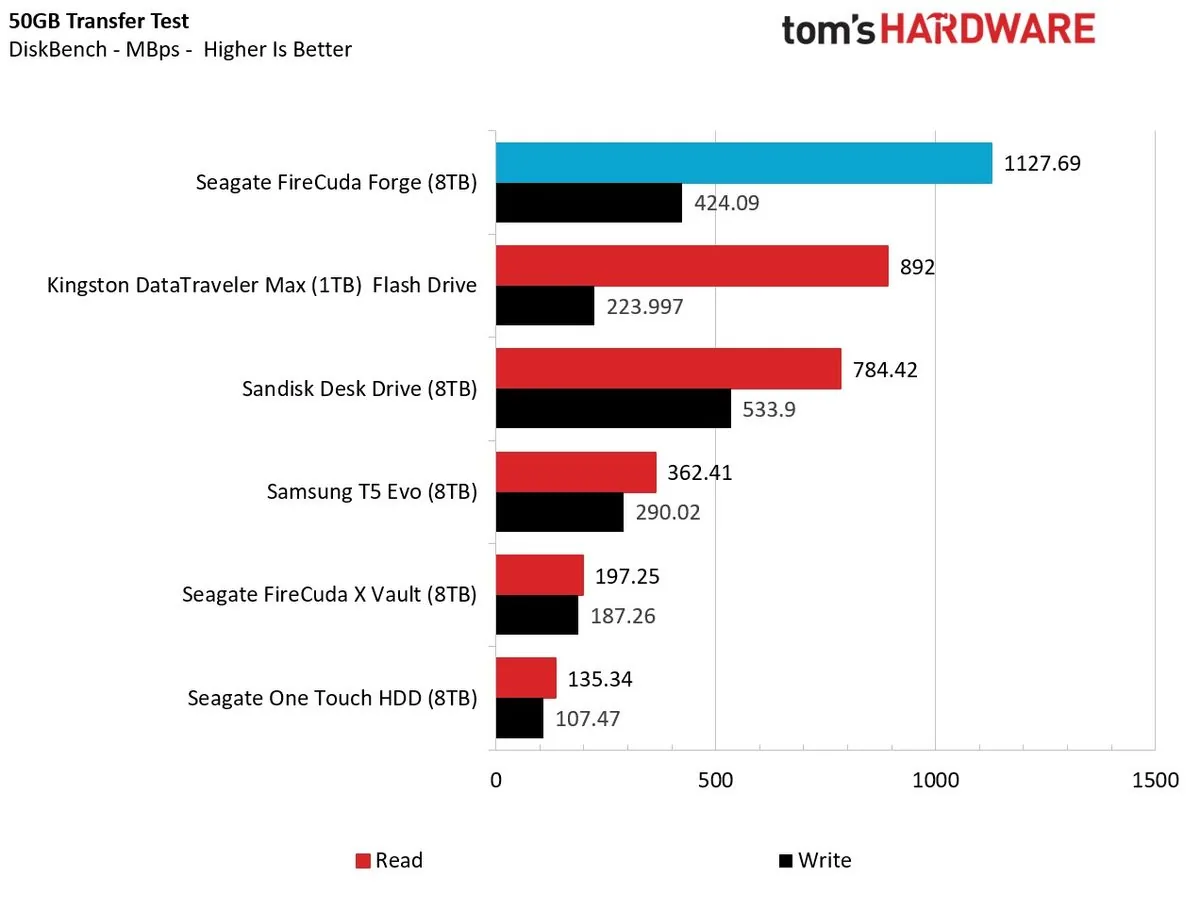
Real-world file tests conducted by Tom’s Hardware highlight both the strengths and the limits of the caching architecture. The publication evaluated the unit with DiskBench across a 50GB dataset containing 4,617 individual files made up of images, videos, and software ISO images. On write passes, the Forge beat traditional spinning hard drives and outpaced Samsung’s T5 Evo, trailing only SanDisk’s Desk Drive SSD. On read transfers, the Forge led the entire benchmark pack. In PCMark 10 trace tests, the drive easily beat recent mechanical disks, though SanDisk’s all-flash Desk Drive posted nearly twice the score [2].
Benchmark runs prove that the enclosure trades peak SSD speed for balanced bulk capacity. When buyers drop a fast PCIe 4.0 or 5.0 module into the bay, they will not see the 7,000 MB/s speeds that drive reaches inside a PC motherboard. Internal controllers cap throughput near 2,500 MB/s [2]. Still, getting sustained transfers near 2,000 MB/s out of a massive 20TB external drive marks a major step up from spinning disks that top out at 200 MB/s [1].
Pricing and Capacity Options
Seagate plans to sell the drive in two capacity tiers. The 8TB model carries an introductory price tag of $699, while the roomier 20TB version costs $899 [2]. In the United Kingdom, TechRadar reported that the 20TB version is expected to retail near £900, backed by a two-year warranty for European customers. Neither package includes an SSD, meaning buyers must spend roughly £100 or $100 more for a reputable 1TB M.2 module. Seagate offers its FireCuda X1070 1TB drive for £179 direct, though shoppers can find qualified Gen 4 alternatives from Samsung or SanDisk for less [1]. Total startup costs will climb above base sticker pricing once buyers purchase their required M.2 module [2].
The Forge makes its strongest economic case at the 20TB capacity point. At 8TB, full external SSDs like SanDisk’s Desk Drive sell for $999, narrowing the gap between hybrid storage and all-flash alternatives. At 20TB, consumer-grade solid-state drives simply do not exist in single-enclosure configurations. Single 20TB SSDs do not exist [2]. The physical unit measures 240.3 × 146.8 × 65.2mm, weighing 1.919kg in the 20TB trim and 1.845kg in the 8TB version. Power demands mean the drive can’t run off bus power alone, relying on an included external AC power adapter and a 50cm USB4 cable. For video editors juggling multi-terabyte project archives, the Seagate FireCuda Forge provides vast local space with fast transfer speeds [1].
- ONLINE NEWS Jennings, A. (2026, November 10). Seagate FireCuda Forge external HDD review: Is this the best portable hard drive ever? TechRadar. [Article Link]
- ONLINE NEWS Safford, M. (2026, November 10). Seagate resurrects hybrid storage: Hands-on with the FireCuda Forge – 8 or 20TB external hard drive requires you to bring your own NVMe SSD. Tom’s Hardware. [Article Link]


