





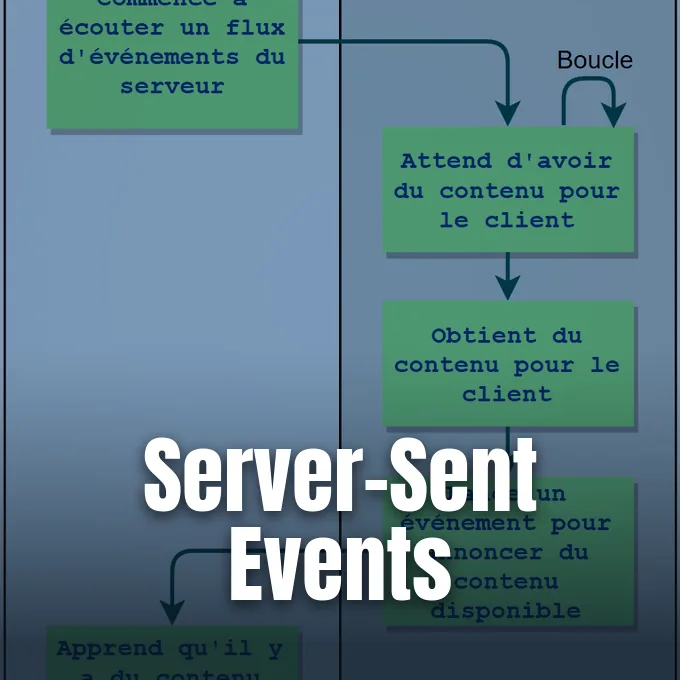
Web apps rely on live data streams to refresh screens without forcing users to reload their tabs. In this design, server-sent events provide a built-in mechanism that lets a web server push updates to client browsers over an open HTTP link [10]. Data flows one way. The standard handles continuous event delivery so that web pages can update stock feeds, news alerts, and hardware monitors as soon as events happen on the server [7]. Instead of managing raw socket handshakes, web teams use a native browser interface that reconnects on its own when links drop [9].
Origins in the Living Standard
The roots of server-sent events reach back to 2004, when Ian Hickson specified the first mechanism in the WHATWG Web Applications 1.0 proposal before Opera introduced an early experimental build. Opera shipped it first. In September 2006, the Opera web browser added that experimental feature under the official name Server-Sent Events to show push streaming without binary browser plugins. Standardization advanced through working drafts until the W3C published the technology as a Recommendation on February 3, 2015, incorporating the specification into the HTML Living Standard maintained by the WHATWG [10].
At its core, the technology sets up a model where a client opens an HTTP channel and waits for the host to send text blocks in UTF-8 format [8]. This design shifts control to the server. The host emits information whenever an event occurs instead of waiting for a client inquiry, cutting out empty network polling cycles [7]. S. Vinoski examined this model in 2012 while testing the Yaws web server written in Erlang for IEEE Internet Computing, observing that push notifications deliver live updates from sensor networks, social feeds, and system monitors [1].
Because communication flows downstream, browsers handle the incoming stream through a JavaScript interface named EventSource. When client code creates an EventSource instance pointing to an HTTP endpoint, the browser opens a persistent session and dispatches events to listener functions as text blocks arrive from the host [9]. Coders do not need to write manual socket handshakes or build custom binary parsers to receive text alerts. If a network drop cuts the link, the browser tries to restore communication on its own without help from outside scripts, keeping delivery dependable on fluctuating mobile connections [7]. S. Vinoski pointed out that persistent push streams help mobile hardware by avoiding the constant battery drain caused by short polling loops [1].
From Polling to Server-Sent Events
Early web tools struggled with live updates because standard HTTP relied on a request and response structure where browsers had to initiate every single interaction with remote servers. In basic polling setups, client scripts query the server at set intervals to ask for fresh data. The browser asks repeatedly. If no updates exist, the host returns an empty reply, yet every request adds HTTP headers and eats network bandwidth across cellular and broadband connections [7].
To reduce waste, teams tried long polling, often called the COMET pattern or a Hanging GET. Under this model, the server holds a client request open until new data arrives rather than sending an immediate empty reply back to the listening browser. Once data appears, the server replies, closes the link, and makes the client open another HTTP request to wait for the next event. Keeping those requests open often led to messy hacks, such as adding dynamic script tags to an infinite iframe inside the document [7].
The arrival of server-sent events replaced these fragile scripting tricks with a clean browser pipeline designed specifically for one-way server push. When using an event stream, the server can push updates whenever they occur without waiting for an initial client request [7]. For two-way messaging in multiplayer games or shared whiteboards, WebSockets provides a full-duplex protocol over dedicated sockets [9]. Sockets run both ways. In one-way scenarios, EventSource pushes updates while the browser sends user commands through standard fetch or XMLHttpRequest calls, avoiding the overhead of separate socket servers. Eric Bidelman explained on web.dev that server-sent events include native reconnection logic and event IDs that WebSockets lack by design [7].
Wire Format for Event Streams
The transport protocol for server-sent events relies on plain text delivered with the text/event-stream MIME type over standard HTTP connections [8]. Servers configure responses with specific HTTP headers to prevent intermediate proxies and browsers from caching payloads intended for real-time delivery [7]. Headers should include Cache-Control: no-cache. Behind reverse proxies, servers often send X-Accel-Buffering: no to disable proxy buffering that could delay event delivery to the client [8].
The spec defines four valid field names for each message line: event, data, id, and retry. Four field names handle everything. A line starting with a colon marks a comment that the client ignores. Programmers often use these colon comments as periodic heartbeats, stopping intermediate network firewalls and proxy gateways from closing idle streaming links due to apparent inactivity. When a server sends payload content, it prefixes each line with data:, followed by the text string and a newline [8].
If a payload spans multiple lines, consecutive data lines join together with newline characters, allowing web applications to transmit structured JSON strings cleanly without breaking message syntax [7]. Servers can also send different event types over the same stream by adding an event line. For example, a chat service might emit a userconnect event carrying JSON data for a user named bobby at 02:33:48, followed by a generic message or a userdisconnect alert. Later, another user named sean sends a message at 02:34:36 saying goodbye [8]. Financial tools can also stream stock updates, such as ticker symbol GOOG at price 556 with an assigned event ID of 12345 [7]. The browser client parses each field and routes it to matching event listeners on a single link [8].
Client Setup with EventSource
Browsers expose the EventSource interface to manage client links, which reached Baseline Widely Available status across major engines in January 2020 [9]. To start a stream, client code creates the object by passing the target URL, such as new EventSource(‘stream.php’) [7]. The interface inherits from EventTarget, giving coders standard event listener methods to handle incoming data [9]. Browser code stays clean.
The EventSource instance has a read-only readyState property that tracks connection status with three integer values representing whether the channel is currently opening, active, or shut down. When opening or reconnecting after a failure, readyState equals CONNECTING (0). Once the handshake succeeds and text begins flowing from the endpoint, readyState switches to OPEN (1) [9]. The numeric states remain predictable.
If the link closes or client code calls the source.close() method, readyState transitions to CLOSED (2) [9]. Client scripts can check this property inside an onerror callback to see whether the browser is retrying or if the stream has ended. By default, EventSource requests follow same-origin rules, but teams can connect to remote endpoints by enabling Cross-Origin Resource Sharing (CORS) on the host server [7]. When creating the client object, developers can pass an options dictionary with withCredentials: true if cross-origin requests need cookies or auth headers [8]. Because the interface runs inside Web Workers, apps can process incoming data streams in background threads without blocking user interface rendering on the main browser thread [9].

How Server-Sent Events Reconnect
One of the strongest features of server-sent events is built-in retry logic, which runs without custom client recovery scripts. If network noise or a server reboot drops the HTTP link, the browser pauses for roughly 3 seconds before trying to reconnect. The browser retries alone. This automatic recovery removes the need to write complex retry timers in front-end JavaScript, keeping client applications clean and reliable [7].
Servers can change this default interval by sending a retry line in their stream output with a new delay in milliseconds [8]. For example, sending retry: 10000 tells the client browser to wait 10 seconds before making its next attempt [7]. To prevent missed data during outages, the protocol uses the id field for state tracking between the browser and server. When a server assigns an ID to an event, the browser saves that value in local memory [8].
Upon reconnecting, the browser sends a Last-Event-ID header in its new HTTP request, carrying the ID of the last event handled by the client. The server reads this header to find what the client missed during downtime and replays those records before resuming normal broadcast data [7]. In an evaluation of a Digital Curling platform, researchers R. Katagiri, T. Sone, S. Aihara, and T. Kawamura tested how SSE handled network dropouts. Over a 24-hour test period, their system recovered from all 290 timeout-induced communication failures with a 100% reconnection success rate and an average recovery time of about 1 second. In 50 consecutive server-restart tests, the platform resumed every curling match with full state consistency, showing how native reconnection simplifies state persistence under adverse network conditions [4].
Connection Limits on HTTP Streams
Despite its perks, server-sent events face transport limits when running over older HTTP/1.1 connections across desktop and mobile browsers. Desktop web browsers enforce a limit of 6 simultaneous open connections per browser and domain name. The limit was six. Because an SSE stream stays open to receive real-time messages, each open stream takes up one of those six slots [8].
If a user opens multiple browser tabs pointing to the same web app, the available HTTP/1.1 links run out, blocking other page assets and API calls from loading. Google Chrome and Mozilla Firefox marked this six-connection cap as a permanent “Won’t fix” issue because the limit comes straight from the HTTP/1.1 specification. That design decision forced web architects to rethink how they serve streaming pages [9].
Modern web setups solve this bottleneck by serving traffic over HTTP/2 or newer protocols [9]. HTTP/2 fixed that limit. Under HTTP/2, a single TCP connection multiplexes multiple streams negotiated between the client and server [8]. By default, HTTP/2 supports up to 100 simultaneous streams over one connection, allowing users to open multiple tabs without exhausting host limits [9]. High-throughput streaming systems also need backpressure controls so servers do not overload browser memory during sudden spikes in data generation. When data volume spikes, browsers buffer incoming events, but limited browser memory can hurt performance. To protect client stability, servers use adaptive rate limiting by monitoring connection health and throttling update rates, while event batching groups rapid updates into larger transmissions [10].
Real-World Deployments in Control Systems
Beyond common web alerts, server-sent events provide messaging for industrial hardware and field sensors across remote environments. In a 2019 study on Networked Control Systems, L. de la Torre, J. Chacón, D. Chaos, S. Dormido, and J. Sánchez used SSE to build event-based control systems. In their design, the industrial plant acted as the HTTP server, while the remote system controller served as the client [3].
By reversing client and server roles, the plant pushed sensor events at will, sending telemetry to remote controllers without holding two-way socket handshakes [3]. Smart agriculture setups in Africa face similar needs, where managing water helps crop yields amid shifting weather patterns. In 2024, A. Morchid, B. Et-taibi, Z. Oughannou, and M. R. Abid built an irrigation control system using an ESP32 embedded controller with DHT22 sensors [2]. DHT22 sensors tracked the air.
The ESP32 sent live field readings over HTTP to web dashboards using SSE streams. By pushing soil and weather readings, the setup reduced water waste and supported crop health without overloading small chips with heavy networking code [2]. In a 2025 analysis of secure IoT connectivity, S. K. Penchala reported that SSE offers clear architectural advantages when linking field devices to mobile platforms like iOS [5]. Because SSE runs over standard HTTP ports without socket upgrades, mobile devices keep links open through enterprise firewalls while saving battery power on cellular networks [1]. R. Katagiri and colleagues ran their curling platform for 60 hours over six days at Expo 2025 Osaka, Kansai, reaching 1.97× throughput across two server workers without system faults [4].
Practical Trade-Offs for SSE
Choosing server-sent events for production depends on checking browser support and functional needs against other streaming options [7]. Browser support data from Can I use shows broad adoption across web platforms. The EventSource API is supported in Google Chrome from version 6 through 159, Mozilla Firefox from version 6 through 162, Apple Safari from version 5 through 27.2, and Microsoft Edge from version 79 through 155 [6].
Mobile browser support is wide as well, covering Android Browser versions 4.4 through 156 and Samsung Internet versions 4 through 30. Older desktop browsers like Internet Explorer 11 never gained native EventSource support. IE 11 lacked native code. Web teams solve legacy gaps with small JavaScript polyfills [6]. Polyfills fill that gap. A practical question is whether an app truly needs two-way client data transmission. How teams answer that question determines their streaming design [7].
For content feeds, sports tickers, real-time analytics, or updating client IndexedDB stores, server-sent events provide a lightweight design that avoids the maintenance of separate WebSocket servers [9]. When an app requires fast two-way messaging, WebSockets remains the better choice. Server-sent events offer a solid foundation for server push by delivering updates over standard HTTP with native reconnection and clean browser security integration [7]. The protocol gives engineering teams a dependable, standards-compliant tool to push live data to modern browsers without complex infrastructure [10].
- ACADEMIC JOURNAL Vinoski, S. (2012). Server-Sent Events with Yaws. IEEE Internet Computing, 16(5), 98-102. [Article Link]
- ACADEMIC JOURNAL Morchid, A., Et-taibi, B., Oughannou, Z., Alami, R. E., Qjidaa, H., Jamil, M. O., Boufounas, E., & Abid, M. R. (2024). IoT-enabled smart agriculture for improving water management: A smart irrigation control using embedded systems and Server-Sent Events. Scientific African, 27, e02527. [Article Link]
- ACADEMIC JOURNAL Torre, L. d. l., Chacón, J., Chaos, D., Dormido, S., & Sánchez, J. (2019). Using Server-Sent Events for Event-Based Control in Networked Control Systems. IFAC-PapersOnLine, 52(9), 260-265. [Article Link]
- ACADEMIC JOURNAL KATAGIRI, R., SONE, T., Aihara, S., & Kawamura, T. (2026). A Resilient and Extensible Digital Curling platform using Server-Sent Events and REST APIs. Applied Sciences, 16(14), 6886. [Article Link]
- ACADEMIC JOURNAL Penchala, S. K. (2025). Leveraging Server-Sent Events Architecture for Secure IoT Device Connectivity: An Enterprise-Grade Approach with iOS Platform Integration. Journal of Computational Analysis and Applications, 34(12). [Article Link]
- WEBSITE Can I use. (2026). Server-sent events. Support tables for HTML5, CSS3, etc. [Article Link]
- WEBSITE Bidelman, E. (2010). Stream updates with server-sent events. web.dev. [Article Link]
- WEBSITE MDN Web Docs. (2026). Using server-sent events. [Article Link]
- WEBSITE MDN Web Docs. (2025). EventSource. [Article Link]
- WEBSITE Wikipedia. (2026). Server-sent events. [Article Link]
Cover image: Mrharispe / Wikimedia Commons, CC BY-SA 4.0


