





The zfs file system merges volume management with transactional storage to shield files from silent corruption. First engineered at Sun Microsystems in 2001 by Matthew Ahrens and Jeff Bonwick, the software groups raw hard drives into shared pools instead of dividing disks into fixed partitions [1]. It computes cryptographic checksums for all user data and system metadata on the fly [4]. If disk platters suffer corruption, ZFS automatically pulls clean blocks from mirror copies or parity arrays to heal damaged sectors [7]. Because writes follow copy-on-write rules, system crashes never leave filesystem structures in an inconsistent state [1].
Early History at Sun Microsystems
Engineers Matthew Ahrens and Jeff Bonwick created ZFS at Sun Microsystems in 2001 [3]. Bill Moore joined the architecture team soon after [11]. They designed a 128-bit storage platform capable of addressing 256 quadrillion zettabytes, shattering capacity limits found in older 32-bit Unix systems [4].
Sun Microsystems announced ZFS on September 14, 2004 [11]. Development moved fast. In late 2005, Sun integrated the code into Solaris and published source files under the Common Development and Distribution License with OpenSolaris build 27 [3]. Enterprise customers gained production access when Sun launched Solaris 10 update 6/06 in June 2006 [11]. Outside programmers ported the software to FreeBSD 7.0 in 2008, while another team started porting the codebase to Linux [3].
When Oracle Corporation acquired Sun in 2010, executive leadership made Solaris closed-source and halted public repository updates. Two-thirds of the core ZFS development group left Oracle immediately [4]. The community founded the illumos project to maintain the open OpenSolaris heritage, and on September 2013, Matt Ahrens joined contributors from FreeBSD and Linux to announce OpenZFS [2], [3]. OpenZFS unified storage developers through shared cross-platform test suites, providing rock-solid storage for supercomputers at the Lawrence Livermore National Laboratory and establishing a vendor-neutral home for modern enterprise installations [14]. Today, OpenZFS uses feature flags to evolve on-disk formats smoothly [3].

Storage Pool Architecture in ZFS
Conventional server platforms position file systems like ext4, XFS, or UFS above standalone volume managers such as Linux LVM. Standard volume managers lack insight into directory trees, while file systems cannot control disk geometry [7]. The zfs file system unifies volume allocation and file indexing into a single cohesive architecture [1].
Rather than carving hard drives into rigid partitions, ZFS aggregates raw disks into a flexible storage pool known as a zpool [1]. Datasets draw storage dynamically from this collective reserve [7]. Storage capacity expands instantly. When administrators plug a new hard drive into a TrueNAS server running FreeBSD, every child dataset consumes the extra gigabytes automatically without requiring manual partition adjustment or service restarts [9]. The storage pool functions like virtual memory on Proxmox VE, absorbing drive swaps without forcing downtime on live services [1].
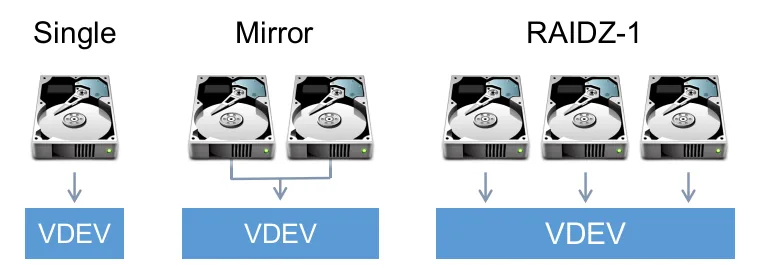
Under the hood, the Storage Pool Allocator arranges storage disks into a hierarchy of virtual devices, called vdevs. A vdev can be an individual disk, an n-way mirror, or a RAID-Z group. The Storage Pool Allocator stripes incoming data across all top-level vdevs in the pool, multiplying overall input and output performance by summing individual vdev capabilities across connected drives. But striping brings a hard architectural condition: if one top-level vdev fails without parity, the entire pool faults [8]. Furthermore, pool expansion is a one-way street, because administrators cannot shrink an existing pool or extract member vdevs once they are committed to storage duty [9].
Copy-on-Write Mechanics
Older POSIX file systems modify records by overwriting existing disk sectors in place. If a server loses power during a write cycle, directory pointers fall out of sync with raw data blocks. Administrators then run the slow fsck utility, which crawls disk platters without guaranteeing full file recovery [1].
To prevent data corruption, ZFS adopts transactional copy-on-write behavior, writing modified records to unallocated disk sectors instead of modifying original storage blocks in place [1], [7]. The original block stays untouched [5]. Once writing finishes safely across disk media, ZFS updates parent metadata pointers to reference the fresh block, releasing the obsolete block back to the pool without risking inconsistent file structures [1].
The Data Management Unit groups file operations into atomic transaction groups that commit to storage in two synchronized stages, ensuring on-disk structures always reflect the valid state of the last committed transaction [1], [8]. Servers reboot cleanly after power failures without running repair utilities [1]. For synchronous writes that cannot wait for regular transaction flushes, ZFS writes records to the ZFS Intent Log, known as the ZIL. If power cuts out abruptly, ZFS replays these ZIL records upon pool import, ensuring that Oracle databases, MySQL instances, and virtual machines on Proxmox VE retain their committed data safely [8].
How ZFS File System Checksums Guard Data
Storage media can suffer from subtle hardware faults that standard operating systems miss [5]. Voltage spikes, faulty disk firmware, and magnetic fade cause silent bit rot, flipping bits on platters without returning read errors [11]. Corrupt bytes can linger undetected inside long-term archives until someone attempts to read the files [5].
The zfs file system defends storage against silent decay by calculating 256-bit checksums for every block of file data and structural metadata. Rather than writing the checksum beside the data block where an errant drive head could destroy both simultaneously, ZFS embeds the checksum inside the parent block pointer. This design builds a hierarchical Merkle tree where every individual block verifies its child pointers all the way up to the pool’s primary root uberblock [5]. By separating data from checksum storage, ZFS easily catches phantom writes and misdirected writes caused by buggy drive controllers [1]. The software defaults to the fast Fletcher4 algorithm, while administrators can select cryptographic SHA-256 for maximum security [8].
When an application reads a file, ZFS validates the disk block against its parent checksum in real time [5]. If the numbers disagree, ZFS initiates automated self-healing by fetching an uncorrupted replica from a healthy mirror drive or parity calculation, serving clean data straight to the requesting application while quietly rewriting the bad sector on disk. Recovery happens without administrator intervention [1].
RAID-Z Parity Levels
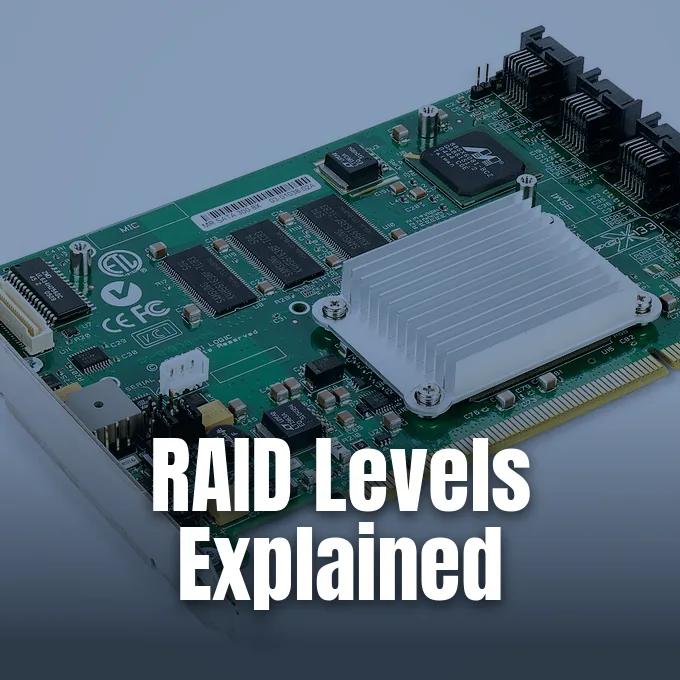
Enterprise hardware RAID controllers create single points of failure and vendor lock-in [5]. If a proprietary RAID card fails, accessing array data often demands finding an identical hardware card [11]. ZFS bypasses hardware cards by embedding software RAID directly into the filesystem engine through RAID-Z [6].
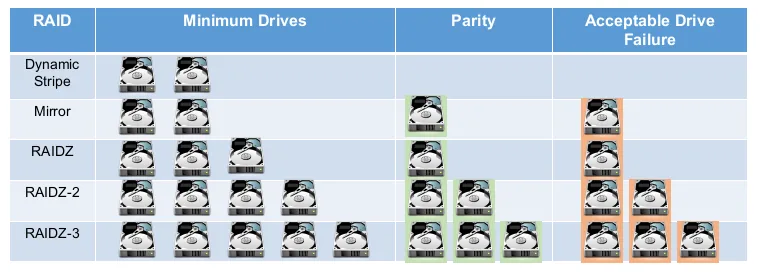
Why does dynamic striping eliminate the write hole? Standard RAID 5 and RAID 6 architectures write fixed-size stripes, risking parity misalignment when power cuts out during partial stripe updates. RAID-Z avoids this write hole by using a dynamic stripe width that sizes parity strips to match incoming write blocks. ZFS provides three parity tiers: RAID-Z1 tolerates single drive loss, RAID-Z2 needs four disks for double parity, and RAID-Z3 withstands three concurrent disk failures in dense storage shelves [6].
When a broken disk is replaced, ZFS rebuilds array data through an automated procedure called resilvering [9]. Hardware RAID cards blindly copy every empty sector on multi-terabyte drives, but ZFS resilvering copies only blocks holding actual file data [5]. Performance benchmarks by calomel.org on 24-drive arrays revealed that mirrored vdevs achieved 696 megabytes per second in write throughput, while 24-disk RAID-Z2 reached 434 megabytes per second under synchronous Bonnie++ tests [10]. Because RAID-Z calculates parity across member disks on every write, storage teams trade raw write speed for the higher usable capacity offered by double parity arrays [6].
Snapshots and Data Replication
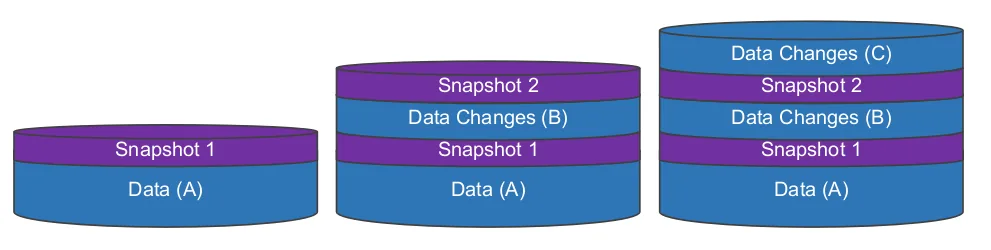
Managing historical datasets with the zfs file system is straightforward thanks to lightweight copy-on-write pointers [11]. Taking read-only snapshots takes less than a second [5]. A new snapshot merely references existing on-disk blocks, consuming zero bytes of storage space at the moment of creation [1].
When users edit or delete files, live datasets write to new blocks while the snapshot holds pointers to the original data [1]. Sysadmins can maintain thousands of snapshots to roll back botched software deployments, neutralize ransomware attacks, or recover accidentally deleted documents [5]. Users can browse the .zfs/snapshot directory to recover past files without requesting IT intervention. Writable clones allow engineers to branch new test datasets from any snapshot instantly without duplicating storage [7].
For offsite backups, ZFS provides native zfs send and zfs recv commands to stream datasets between networked hosts. The send command serializes snapshot blocks into an efficient binary data stream that pipes over standard OpenSSH network connections directly to an offsite backup server running OpenZFS. After sending an initial baseline image, subsequent runs transmit only incremental byte changes that accumulated between snapshot intervals. This block-level transfer mechanism completely avoids the heavy directory walks that bog down standard file synchronization tools like rsync on storage datasets holding millions of individual files. Remote backup pools store exact block duplicates with checksums intact, providing verifiable recovery for data centers [10].
Adaptive Replacement Cache Demands
ZFS accelerates read throughput by deploying its own in-memory cache called the Adaptive Replacement Cache, or ARC. ARC replaces the standard operating system page cache, balancing both recently used and frequently used data blocks [8]. This sophisticated cache algorithm regularly achieves hit rates exceeding 80 percent in production environments [11].
Because in-memory caching tables and cryptographic checksum indexes consume memory steadily, storage architects recommend allocating one gigabyte of RAM for each terabyte of storage pool capacity [5]. Production servers hosting Proxmox VE or FreeBSD jails need at least 8 gigabytes of RAM to sustain heavy I/O workloads [7]. Mission-critical servers run best with ECC memory. If an ordinary unbuffered consumer memory stick flips bits before ZFS calculates a block checksum, corrupt data gets committed to storage media with a matching checksum [5].
To expand read caching without buying expensive RAM sticks, administrators can add high-speed solid-state drives as a secondary read cache known as L2ARC. When read queries miss main memory ARC, ZFS checks L2ARC before querying slower spinning mechanical disks [7]. Write workloads benefit from a Separate Intent Log, or SLOG, configured on enterprise NVMe drives equipped with Power Failure Protection [9]. The SLOG absorbs synchronous ZIL writes instantly, freeing clients from waiting on mechanical drive latency while the system batches writes for the next transaction group commit [8]. Mirroring SLOG devices protects arrays from write cache corruption [9].
Linux Platforms Running OpenZFS
OpenZFS enjoys robust platform support on contemporary Unix operating systems [14]. FreeBSD integrates OpenZFS directly into its base kernel and installer, providing a native Root-on-ZFS setup option during installation [7]. The illumos project maintains native kernel integration, serving as an ongoing development ground for cutting-edge storage innovations [3].
Running the zfs file system on Linux requires addressing licensing friction between open-source ecosystems. Because the Common Development and Distribution License used by Sun Microsystems conflicts with the Linux kernel’s GNU General Public License, OpenZFS cannot be included in the mainline Linux kernel [4]. Distributions solve this problem with Dynamic Kernel Module Support, compiling kernel modules during system upgrades [5]. Debian, Ubuntu, and Proxmox VE provide pre-built packages, letting sysadmins deploy enterprise storage pools on commodity x86 servers [4], [7].
Academic benchmarks demonstrate the performance advantages of ZFS in clustered server environments. In an empirical study published by Robbi, Prasetijo, and Widianto in 2019, ZFS block storage outperformed Ceph in IOPS, read and write throughput, and data replication duration on two-node Proxmox VE servers [13]. Meanwhile, community collaboration on GitHub issue 12014 demonstrates continuous engineering rigor, resolving edge-case snapshot bugs when pairing native dataset encryption with unencrypted send operations [12]. OpenZFS stands as an exceptional modern storage foundation, delivering rock-solid data integrity, transparent inline compression, and flexible pool administration to production enterprise data centers and virtualization clusters worldwide [2].
- WEBSITE Sun Microsystems. (2005). What Is ZFS? docs.oracle.com. [Article Link]
- WEBSITE OpenZFS. (2013). Announcement: OpenZFS launch announcement. openzfs.org. [Article Link]
- WEBSITE OpenZFS. (2014). History of ZFS. openzfs.org. [Article Link]
- ONLINE NEWS Wohlscheid, J. P. (2018). What is ZFS? Why are people crazy about it? It’s FOSS. [Article Link]
- ONLINE NEWS Wright, A. (2026). Backing up isn’t enough: A modern guide to ZFS on Linux. How-To Geek. [Article Link]
- WEBSITE DiskInternals. (2024). Understanding ZFS RAID levels: Types, modes, and configurations. DiskInternals. [Article Link]
- WEBSITE FreeBSD Documentation Portal. (2026). Chapter 23: The Z file system (ZFS). FreeBSD Handbook. [Article Link]
- WEBSITE OpenZFS. (2026). System administration. openzfs.org. [Article Link]
- WEBSITE Starline Computer. (2021). TrueNAS RAIDZ ZFS ZPool VDEV FAQ: Understand ZFS servers. Starline Computer. [Article Link]
- WEBSITE Calomel. (2007). ZFS raidz performance, capacity and integrity. calomel.org. [Article Link]
- WEBSITE Wikipedia. (2026). ZFS. Wikimedia Foundation. [Article Link]
- WEBSITE AndrewJDR. (2024). Proposal: Consider adding warnings against using zfs native encryption along with send/recv in production (Issue #494). GitHub. [Article Link]
- ACADEMIC JOURNAL Robbi, F. A. A., Prasetijo, A. B., & Widianto, E. D. (2019). Perbandingan kinerja block storage Ceph dan ZFS di lingkungan virtual. Jurnal Teknologi dan Sistem Komputer, 7(1), 7-11. [Article Link]
- ONLINE NEWS Infostor Admin. (2024). LinuxCon: OpenZFS moves open source storage forward. Infostor. [Article Link]


