





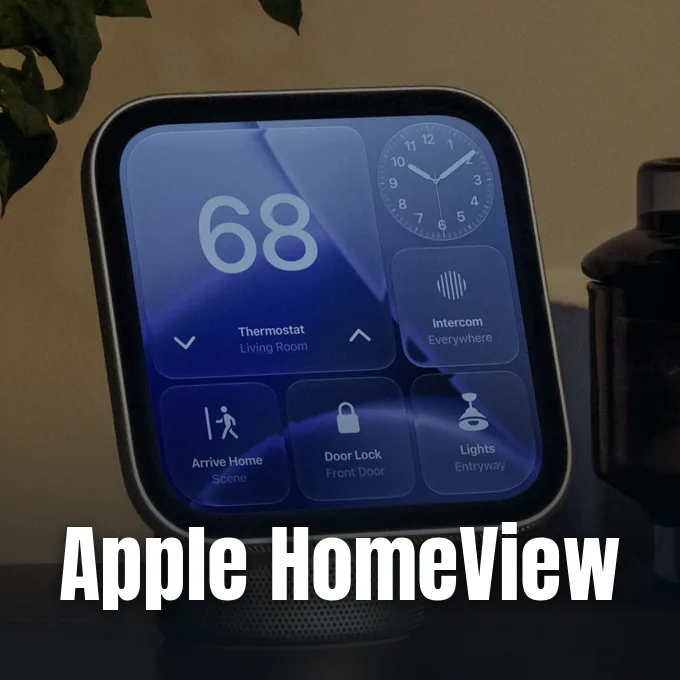
Apple unveiled its first standalone smart display during the “Welcome home” media event on October 13, 2026, establishing a dedicated physical anchor for household automation. With Apple HomeView explained, the $299 system pairs hands-free communication, household appliance control, and local Apple Intelligence on an upright square screen. Rather than functioning as an iPad stripped of its battery, the hardware relies on specialized firmware built for shared kitchen counters and nightstands. Deliveries begin on November 13, 2026 [1].
What Is Apple HomeView?
Apple built HomeView to resolve a persistent friction between personal iOS hardware and shared domestic accessories. While an iPhone or Apple Watch remains tied to a single user profile, smart speakers like the HomePod handle audio without offering a visual interface for complex room controls. The new 7-inch display bridges both worlds by adapting widgets and private notifications to whoever stands before the glass. Greg Joswiak, Apple senior vice president of Worldwide Marketing, said in a press release that “Apple HomeView is designed to be shared by everyone in the home yet feel completely personal to each user.” [6]
When evaluating Apple HomeView explained from a broader market perspective, the terminal arrives with new audio and television gear to strengthen Apple’s living room presence. Analysts tracking consumer tech noted that Apple lacked a direct counterpart to countertop displays sold by Amazon and Google. Ben Wood, chief analyst at FDM CCS, said that “the company has undoubtedly been waiting for the upgraded Siri experience, given how important the voice interactions are with this product.” [6] Earlier coverage on PerEXP Teamworks tracked how Apple launched the HomeView smart display at a $299 base price to counter rival countertop hubs from Amazon and Google. That rollout signals a direct push into residential automation after a decade of relying on screenless speakers and Apple TV set-top boxes.
The terminal contains no battery cells. It must stay connected to household power [8]. The system runs custom software named HomeView software, which borrows code from tvOS and iPadOS. It lacks an App Store. Third-party developers cannot distribute standalone applications directly to the screen [11].

Two Hardware Form Factors
Apple developed two distinct hardware builds, with both options retailing at $299 in the United States. The standard tabletop model features an aluminum enclosure mounted on a weighted hemispherical speaker base through a stainless steel hinge [1]. Raymond Wong of Gizmodo said the physical layout recalls the vintage iMac G4, featuring a balanced pivot that allows users to tilt the display up or down with light finger pressure [3]. The tabletop package includes a 1.5-meter woven USB-C cable and a 30W wall plug [8].
The alternative wall-mounted model drops the speaker base to achieve a 9.8mm profile that mounts flat against interior walls [8]. Shoppers can select silver or space gray aluminum finishes. Crucially, Apple does not include wall brackets or power bricks in this package. Homeowners must purchase Schneider Home mounting hardware separately, choosing between a $59.95 plug-in USB-C adapter plate, a $79.95 hardwired AC box, and a $129.95 Power over Ethernet mount scheduled for early 2027 [7]. Combining the display with Schneider’s entry mount brings the real hardware cost to $358.95 before tax [8]. That separate purchase structure makes the wall installation noticeably more expensive than the tabletop alternative for household budgets.
Internal audio components differ sharply between the two variants. Both units place twin drivers inside the screen casing. But only the tabletop version adds a dedicated downward bass woofer and dual force-canceling acoustic radiators inside its base. The wall variant relies on computational equalization tuned for drywall surfaces [2].
Screen Output and Sensor Behavior
Both form factors use the same 7-inch Liquid Retina display with a square 1088-by-1088 pixel grid and broad color reproduction [8]. Integrated True Tone tech measures ambient room warmth through light sensors to tune screen tint automatically [1]. With peak brightness reaching 500 nits, the panel remains clear under direct kitchen lighting while resisting distracting surface reflections [9].
The display panel’s low-end luminance is unique across modern smart home hardware. Screen output can drop down to 0.3 nits, representing the lowest minimum brightness Apple has built into a consumer display [1]. That subtle illumination prevents the screen from disturbing sleep when placed on a dark bedroom nightstand [5]. Integrated light sensors adjust brightness automatically as rooms grow darker [9].
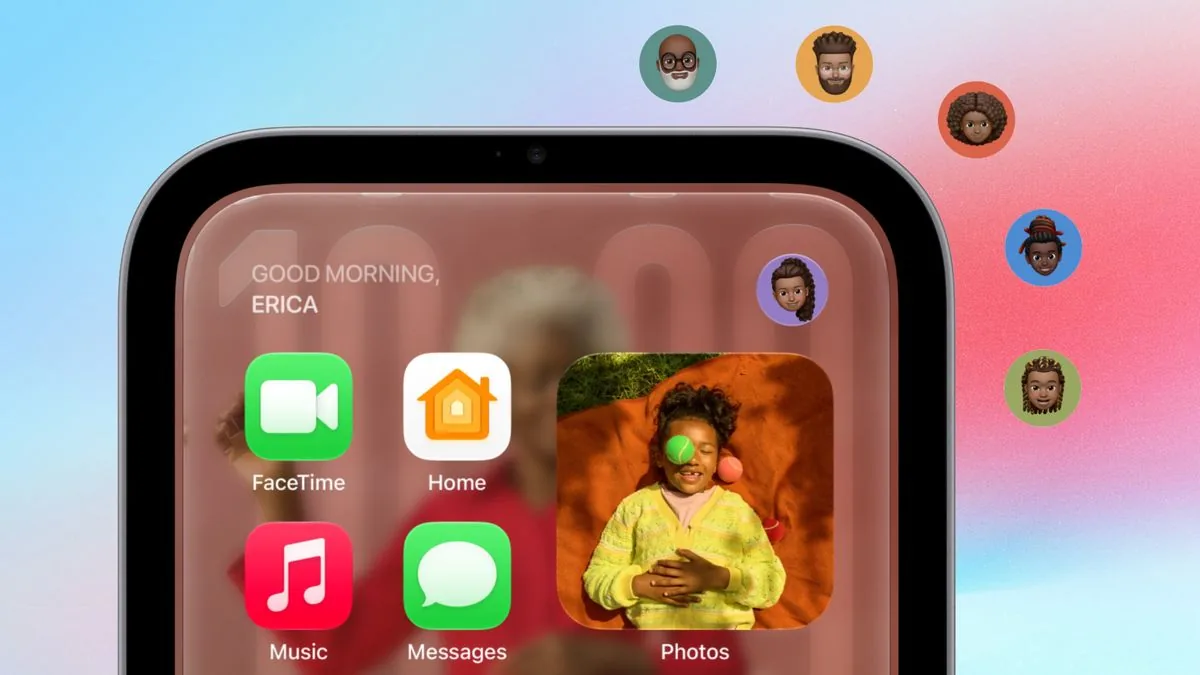
The graphical interface shifts appearance based on how far away a person stands from the sensor cluster. Proximity detection reads user position across the room, showing glanceable clock digits, calendar appointments, and weather icons in bold type [7]. When someone approaches the counter, the layout transitions smoothly to reveal detailed family schedules, interactive HomeKit switches, unread communication summaries, and active kitchen timers [8]. Homeowners can customize this standby view using modular watch complications, personal photo albums, or an animated Snoopy clock face from Peanuts that changes according to holidays and weather conditions [5]. That dynamic scaling keeps the display helpful whether viewed from twenty feet away or touched up close during cooking tasks.
Apple HomeView Explained at the Silicon Layer
At the processor level, HomeView runs on an A18 processor fabricated using TSMC’s 3-nanometer manufacturing process [11]. This silicon platform gives the desktop console sufficient machine learning throughput to run conversational language models and multi-stream computer vision locally [5]. Four beamforming microphones work with noise filtering algorithms to capture spoken requests over humming kitchen appliances and television dialogue [9].
Visual input relies on a front-facing 12-megapixel Center Stage camera that automatically pans and zooms to keep household members framed during FaceTime calls [7]. Because an active lens in domestic spaces creates privacy worries, Apple isolates raw video and audio feeds inside hardware-fenced Secure Exclaves directly on the A18 processor die [9]. The host operating system cannot inspect these sensor channels directly, protecting living areas from software tampering or unauthorized camera streaming [10]. Computer vision routines run locally to identify up to six enrolled family members by facial geometry and voice tone without uploading biometrics to external servers [1].
Julian Chokkattu evaluated this architecture for WIRED, examining how local silicon boundaries reassure privacy-conscious buyers who hesitate to place cameras inside shared family living spaces. Anshika Jain, principal analyst at Counterpoint, told WIRED that “trust is becoming increasingly important with rising consumer expectations around privacy and security,” adding that Apple benefits from keeping biometric data strictly on the physical device [5]. Facial recognition models and household voiceprints never leave local storage without explicit owner permission [9].


Siri AI Privacy Safeguards
Siri AI provides the conversational framework for the display, executing requests through Siri AI models running either locally on the A18 chip or through Private Cloud Compute [9]. Users can ask open-ended questions about everyday trivia, cooking conversions, or smart home scenes using conversational speech rather than rigid voice commands [7]. Private Cloud Compute operates on Apple silicon nodes that do not retain user request logs or stored history [9].
To protect personal privacy in multi-person households, Apple enforces a strict dual-authentication barrier before revealing private communications on the shared desktop screen. Recognizing a resident’s face unlocks their customized Home Screen, but sensitive apps including Messages, Calendar, and Reminders remain hidden behind a secondary device verification [8]. The recognized person’s paired iPhone or iPad must be present on the local Wi-Fi network and must have been unlocked recently [1]. If an unrecognized guest stands before the screen, the system conceals personal data and presents only communal smart home accessories and shared music playback [5].
Initial device configuration requires specific Apple hardware within the household. The primary administrator in the Apple Home app must own an iPhone 15 Pro or newer device running current system software to activate conversational Siri AI capabilities [1]. Family members with older devices can still speak basic room controls, but personal context queries won’t execute [8]. Tech reviewer Marques Brownlee expressed reservations about these hardware requirements, calling the device “a skip for most people” who already rely on iPads for kitchen media [11].

HomeView Smart Display Kitchen Tools
Tailoring software for meal preparation represents one of HomeView’s primary everyday applications. The built-in Safari browser includes a dedicated Start Cooking mode that extracts recipe steps directly from food websites, eliminating distracting introductory prose and advertisements [1]. The screen reformats ingredients into clean checklists and presents numbered instructions on readable cards [7]. Users can tap to start multiple concurrent timers, which remain visible in screen corners as Live Activities while navigating other system tools [9].
Continuity features allow users to transition media and calls between devices without interrupting their workflow. Bringing an iPhone near the display triggers AirPlay Handoff, transferring ongoing podcasts, audiobooks, or FaceTime video sessions directly to HomeView [7]. Built-in Intercom functionality lets residents broadcast quick audio announcements to HomePod speakers, Apple Watches, and iPhones across various rooms, coordinating family dinners without raising voices [8].
Entertainment features center on ambient audio and light visual media. The platform includes native apps for Apple Music, Apple Podcasts, and Apple TV, showing synced lyrics against dynamic album art [7]. While the system lacks an App Store and native Netflix or YouTube clients, developers can cast media through the CarPlay framework. Users who want to view web video tutorials must load video streams through the Safari browser [5].
Camera Feeds and Home Hub Roles
Beyond its touch panel, HomeView operates as an integrated smart home hub for residential automation. The terminal incorporates radios for Wi-Fi, Bluetooth, and Thread, allowing it to serve as a Matter controller and Thread border router [11]. It manages legacy HomeKit-compatible accessories like Philips Hue bulbs, Eve door sensors, Lifx strips, Honeywell thermostats, and Schlage deadbolts, all configured through system Settings menus. It also connects with the D-Link Omna camera and smart wall plugs without requiring an Apple TV 4K or HomePod to bridge communication [12]. Internal temperature and humidity sensors can trigger heating or cooling automations based on real-time climate readings [11].
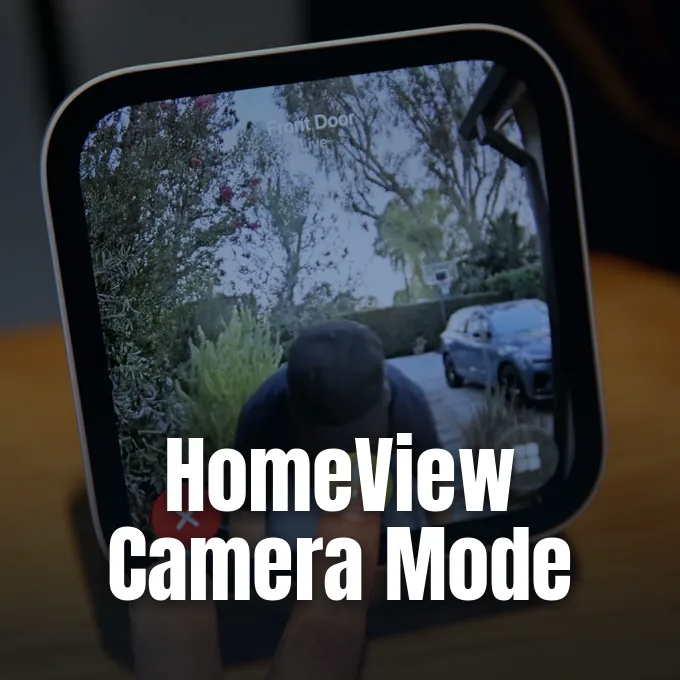
Visual surveillance represents another major capability for the smart display. The Home Camera face allows users to watch up to nine live camera feeds simultaneously in an organized screen matrix [5]. Subscribers with an eligible 2TB iCloud+ tier receive automated video summaries generated by Apple Intelligence, describing events when visitors, vehicles, or pets enter designated camera zones [4]. Pre-release software leaks first detailed these surveillance options, as documented when PerEXP Teamworks uncovered early references to HomeView security camera mode in testing builds.

Apple also introduced the Apple Home Collection, co-developed with LG Electronics and Schneider Electric. The lineup features indoor and outdoor security cameras, a dual-camera video doorbell, and smart thermostats. A companion smart door lock uses ultra-wideband chips, unlocking automatically as users walk toward the entrance with an Apple Watch or iPhone [1]. Built-in Sound Recognition monitors the environment for smoke and carbon monoxide detector alarms, sending warning notifications to connected family devices like iPhones and Apple Watches [8].
Mounting Solutions, Pricing, Global Release
With November 13, 2026 marked as the retail release date, buyers must decide whether the countertop build or wall-mounted display suits their domestic space. Both editions retail for $299 in the United States and £299 in the United Kingdom. Pre-orders opened on October 13, 2026, with customer shipments starting on Friday, November 13, 2026 [7]. Initial retail distribution covers eight countries: the United States, United Kingdom, Canada, Australia, India, New Zealand, Singapore, and South Africa [8].
Retail launch plans exclude the European Union for now. Apple confirmed that regulatory timelines regarding Siri AI and Apple Intelligence deployment across European Union member states prevented a simultaneous European rollout on November 13. This phased distribution accompanies the broader smart home portfolio, which PerEXP Teamworks explored when detailing the Welcome Home product lineup alongside updated streaming boxes. Schneider Home mounting plates range from $59.95 for basic USB-C connections to $129.95 for Power over Ethernet wall hardware launching in early 2027 [7].
Professional installation is available through ADT in most launch territories for homeowners who want clean in-wall electrical connections [9]. As connected homes adopt open standards like Matter, HomeView represents Apple’s bid to place an intelligent command center on kitchen counters. Whether the device succeeds depends on how quickly consumers adopt conversational Siri AI routines and whether families feel comfortable adding camera-enabled displays to communal living spaces [5].
- ONLINE NEWS Kozuch, K. (2026, October 13). I saw Apple’s HomeView early — 7 things you need to know about the new smart home display. Tom’s Guide. [Article Link]
- ONLINE NEWS Christoffel, R. (2026, October 13). Apple’s two HomeViews have one big hidden difference. 9to5Mac. [Article Link]
- ONLINE NEWS Wong, R. (2026, October 13). Apple HomeView hands-on: It’s pretty damn cute, but do you need one? Gizmodo. [Article Link]
- ONLINE NEWS Wong, R. (2026, October 13). Apple officially announces its smart home hub: the HomeView. Gizmodo. [Article Link]
- ONLINE NEWS Chokkattu, J. (2026, October 13). The Apple HomeView is like a giant Apple Watch for the home. WIRED. [Article Link]
- ONLINE NEWS Collins, K. (2026, October 13). Apple’s $299 HomeView is ready to take over your countertops and walls. CNET. [Article Link]
- WEBSITE Sykes, T. (2026, October 13). Apple HomeView: Everything you need to know about Apple’s new smart home display. The Apple Post. [Article Link]
- WEBSITE Levytam, S. (2026, October 14). Apple HomeView: 20 things to know before you buy. iClarified. [Article Link]
- WEBSITE Apple. (2026, October 13). Apple HomeView. Apple. [Article Link]
- WEBSITE Apple India. (2026, October 13). Apple HomeView. Apple India. [Article Link]
- WEBSITE Wikipedia contributors. (2026). HomeView. Wikipedia, The Free Encyclopedia. [Article Link]
- WEBSITE Wikipedia contributors. (2026). Apple Home. Wikipedia, The Free Encyclopedia. [Article Link]


