



Microsoft is trimming its artificial intelligence features inside Windows 11 to simplify how people interact with cloud files on the desktop [1]. In an update sent to enterprise tenants, the software maker confirmed that it will retire eight dedicated OneDrive Copilot shortcuts from the File Explorer right-click menu. The change begins rolling out worldwide in mid-November 2026 and should finish by early December, leaving a single entry point called Ask Copilot for conversational tasks [5].
Eight OneDrive Copilot Shortcuts Removed
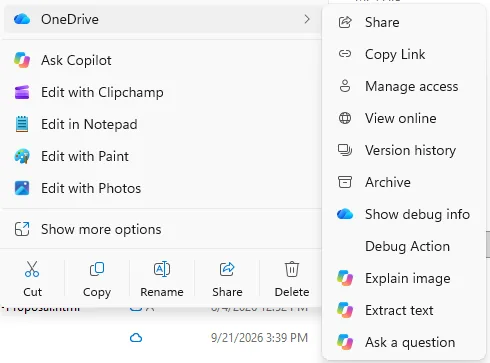
The retirement affects eight actions that previously appeared when workers right-clicked files stored in cloud folders [6]. Users saw options like Summarize, Create FAQ, Compare Files, and Ask a question directly in the shell menu. Microsoft is dropping all four document tools [5].
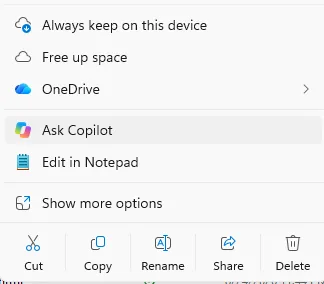
Image tools are also leaving the interface. Right-click entries for Explain image, Explain images, Compare images, and Extract text will vanish from File Explorer as the update reaches devices. Microsoft outlined the decision in message MC1515940, telling administrators: “We’re simplifying how people use Copilot with their OneDrive files in File Explorer.” While the dedicated OneDrive Copilot Summarize entry and companion image buttons disappear, the underlying systems continue running in other Windows spaces [5]. Writing for XDA Developers, technology writer Simon Batt observed that users who still wish to send their documents over to a Microsoft LLM can simply click Ask Copilot to open a chat session instead [1].
Right-clicking a OneDrive folder previously produced an unruly list of commands that crowded the display. Users saw regular system commands next to three separate Copilot entries. Publication Windows Latest first spotted the retirement announcement, which signals that Microsoft wants a cleaner desktop environment [1].
Why Microsoft Is Trimming Windows Menus
The decision marks a shift in how Microsoft handles artificial intelligence across Windows 11. When Microsoft first introduced agentic AI plans into Windows 11, the company faced unexpected user outrage over desktop bloat. Instead of spreading lightweight AI buttons into every menu, the company is now prioritizing deeper tools that focus on core productivity [1].
Windows leader Pavan Davuluri pointed to this strategy in March 2026, stating that “We are reducing unnecessary Copilot entry points”. Davuluri signaled a plan to tidy up context menus that had become slow to navigate. When Microsoft first announced these OneDrive features in September 2025, the team promised to bring “the power of AI directly into your daily file management experience,” but users found that multiple buttons with identical icons made the right-click menu harder to read. File Explorer had become cluttered and sluggish over successive Windows 11 releases, prompting plans to give users an experience closer to the cleaner menus seen in Windows 10 [3].
Can a desktop interface carry too much AI? Richard Speed reported in The Register that the clear-out follows broader shifts in how Microsoft distributes its automated tools across hardware [2]. The pushback in File Explorer suggests that repetitive buttons frustrate users who simply want to organize folders [1].


Alternative OneDrive Copilot Actions for Files
Microsoft is not removing AI file tools from the operating system entirely [3]. Users can still right-click any cloud file and choose Ask Copilot to launch a conversational side panel. The panel attaches selected files (such as PDFs or Word documents) by reference, allowing workers to ask questions, request detailed summaries, or draft outlines through plain language prompts [5]. This single entry point replaces the individual OneDrive Copilot shortcuts while preserving the same core generative functionality [6]. Users can handle multiple files inside that same chat window [5].
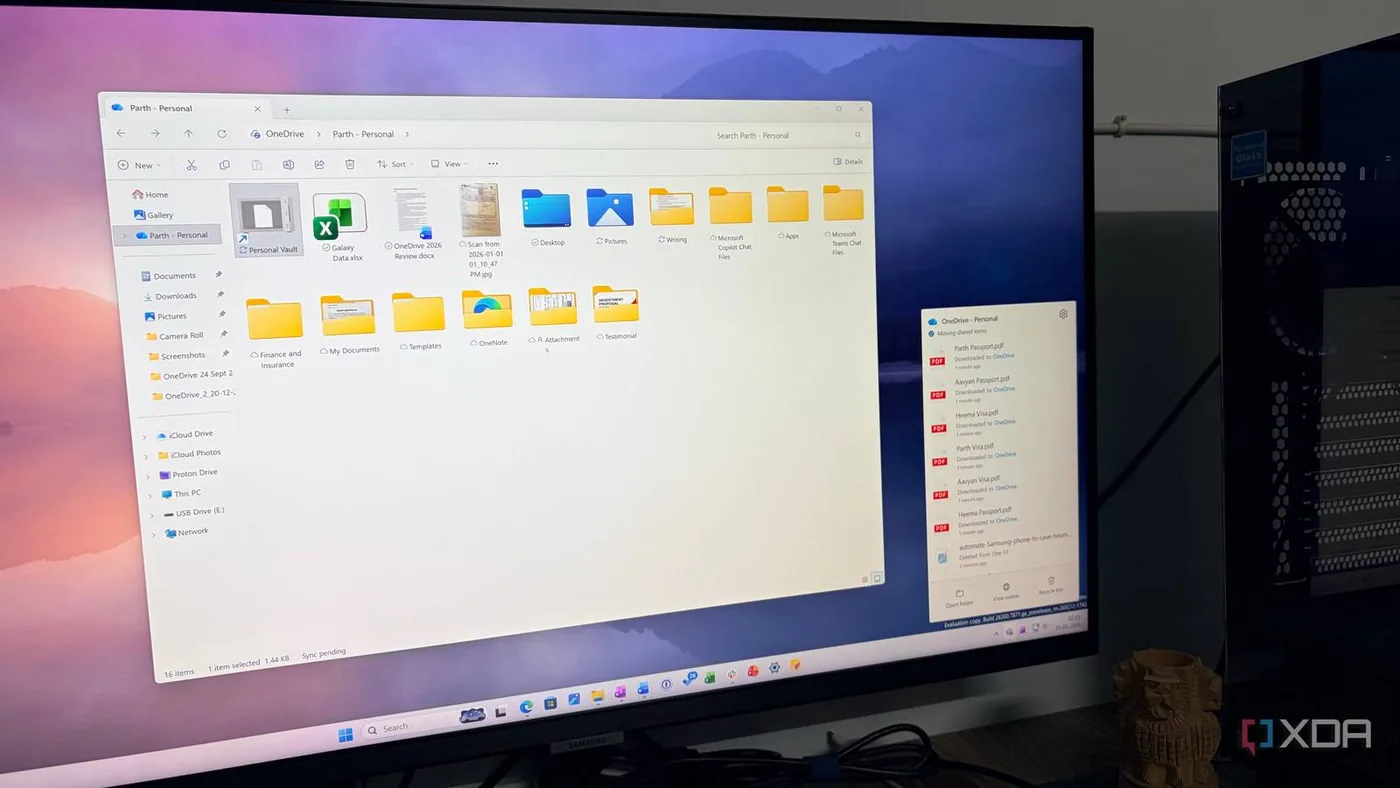
Another route remains available in File Explorer Home, where hovering over any OneDrive item reveals a Copilot icon. In addition, employees who prefer working in a browser can use the OneDrive activity center. The activity center keeps its full suite of file operations intact [5].
Adjusting to a single chat window requires a minor habit change for people who previously relied on instant image extraction or file comparisons. Workers must now type prompts into the chat box instead of picking a command from a list [6]. Related reporting from PerEXP Teamworks previously detailed the silent Excel copy paste bug, showing how minor software modifications frequently disrupt daily routines for spreadsheet users.
Rollout Schedule and File Permissions
The transition follows a gradual rollout schedule instead of arriving in a single mandatory software patch [4]. Microsoft plans to begin the worldwide rollout in mid-November 2026, with full completion expected by early December across all supported regions [5]. The change requires no client updates [4].
Organizations often raise questions about data privacy when generative models inspect business files, but Microsoft confirmed that existing security boundaries remain untouched. Because files are attached by reference instead of copied to external servers, all underlying permissions, access rights, and security protections continue to apply during every Copilot session [5]. In a technical report by Let’s Data Science, analysts noted that the rollout does not require a specific Windows build number, meaning machines in the same office may see the old context menu vanish on different days [4]. Companies that already restrict sensitive folders do not need to rewrite their storage policies for this menu retirement [6].
Security teams can confirm that the interface cleanup does not weaken data loss prevention policies. Users can’t bypass folder restrictions simply by opening a file through Ask Copilot. Writing for Dellenny, author John Edward stressed that the update focuses on menu cleanliness without altering cloud storage architecture [6].

Guidance for Workplace Administrators
IT administrators do not need to push registry modifications to enable the cleaner right-click menu. Microsoft stated in its message center notice that no administrative intervention is required. The change happens automatically across tenant accounts [5].
Organizations that created onboarding materials or training videos based on the old shortcuts should update their documentation before December [4]. Help desks will likely field questions from confused staff who assume their account permissions were revoked when the quick actions vanish from view [6]. Technology teams should update internal training portals to highlight Ask Copilot, the File Explorer Home icon, and the OneDrive activity center. Prompt guidance will prevent unnecessary support tickets as employees adapt to the revised menu layout [4].
As Microsoft removes these OneDrive Copilot shortcuts, businesses gain a more stable desktop interface with less visual distraction. The move confirms that user feedback against rushed AI additions is shaping Windows 11 [1]. A cleaner File Explorer lets people focus on everyday work without navigating repetitive AI commands [3].
- ONLINE NEWS Batt, S. (2026, October 21). Microsoft’s rollback of Copilot continues as it scales it back from OneDrive’s File Explorer options. XDA Developers. [Article Link]
- ONLINE NEWS Speed, R. (2026, October 20). OneDrive loses bunch of Copilot shortcuts in File Explorer clear-out. The Register. [Article Link]
- ONLINE NEWS Navi. (2026, October 21). Microsoft Copilot Shortcuts Removed from OneDrive File Explorer. TheOutpost.ai. [Article Link]
- ONLINE NEWS Let’s Data Science. (2026, October 20). Microsoft Plans to Retire OneDrive Copilot Context-Menu Actions. Let’s Data Science. [Article Link]
- WEBSITE Microsoft. (2026, October 19). MC1515940 – Microsoft OneDrive: Copilot actions in the File Explorer context menu are being retired. Microsoft 365 Message Center Archive. [Article Link]
- ONLINE NEWS Edward, J. (2026, October 20). Microsoft Is Removing These OneDrive Copilot Actions From File Explorer in 2026. Dellenny. [Article Link]


