





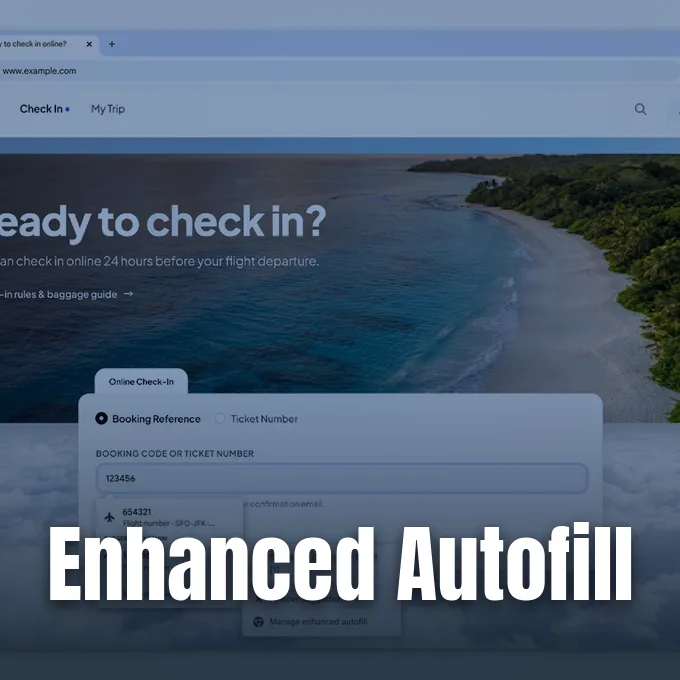
Google launched an update on October 28, 2026, that connects Chrome enhanced autofill to personal messages in Gmail. Google Chrome uses Gemini and Google Personal Intelligence to scan Gmail records and surface text as people complete online forms in Chrome. While standard Chrome tools have long inserted saved names, home addresses, and credit cards from Google Accounts, this update searches Gmail to locate transaction details that shoppers or travelers need during checkout sessions. The rollout begins in the United States for desktop computers running Windows and macOS, as well as mobile devices running Android and Apple iOS. The update gives Chrome users quick access to order receipts, FedEx tracking numbers, and flight reservations without tab switching during active sessions [2].
How the Autofill Suggestion Box Works
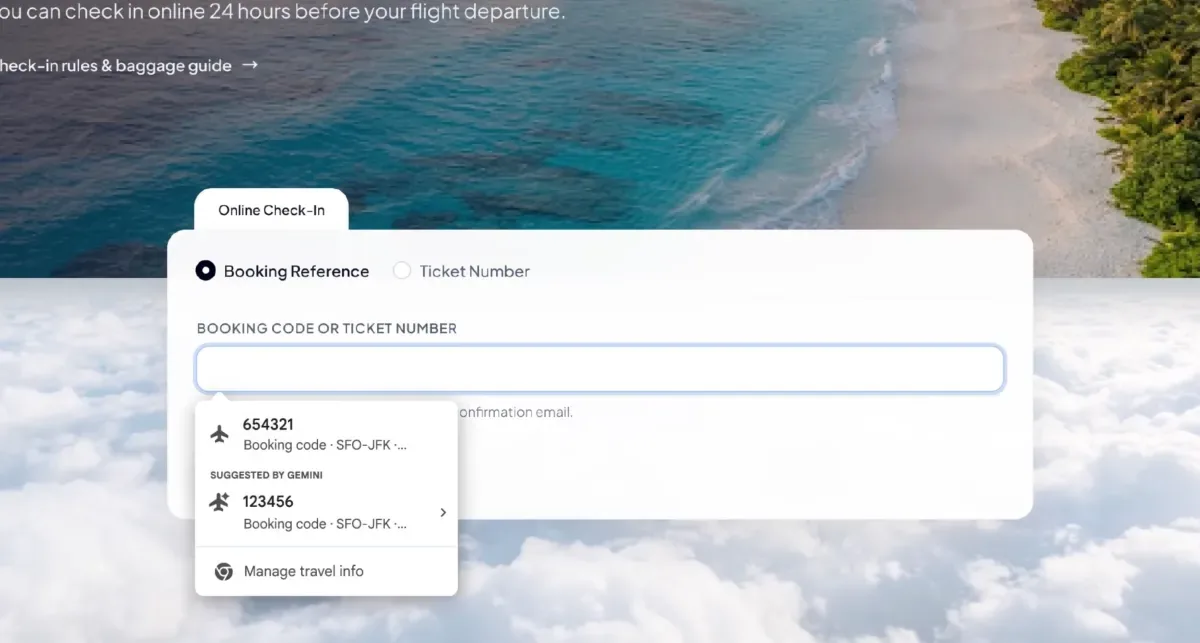
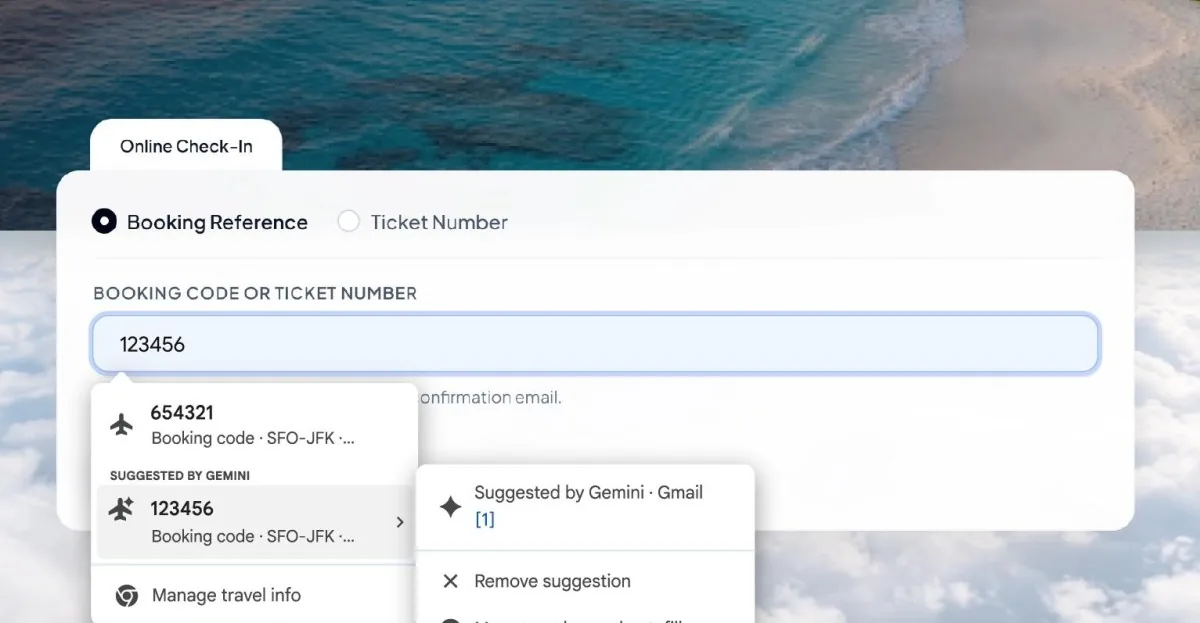
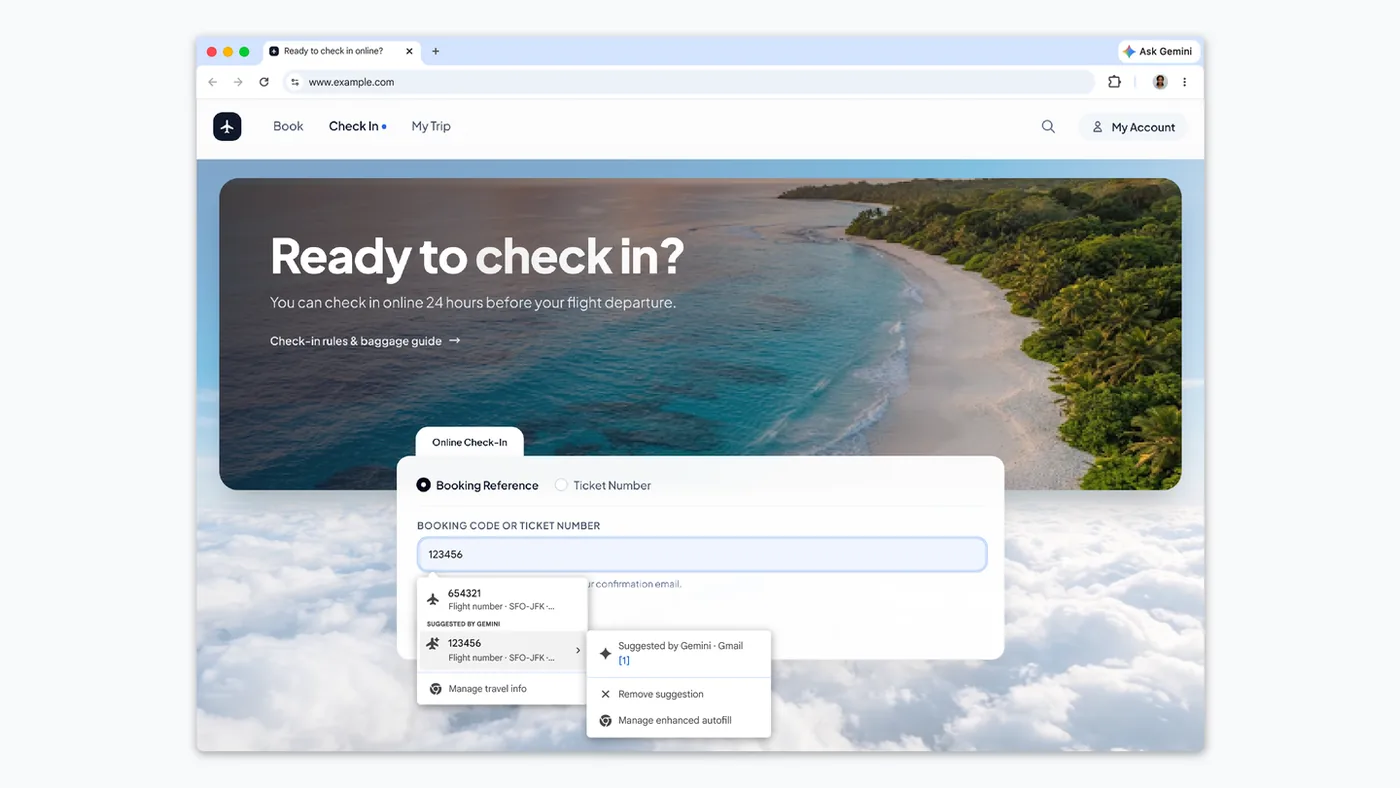
When people click on an empty form field in Google Chrome, a suggestion box appears below the input area. Google places this data under a distinct “Suggested by Gemini” banner that identifies the exact Gmail message where the text originated. Karandeep Singh Oberoi said in Android Authority that travelers can check airline booking codes before submitting forms. Chrome users can also dismiss individual suggestions [1].
Amanda Lim wrote for Google Blog that the feature aims to eliminate repetitive tab switching between Chrome and Gmail during everyday checkouts. “Filling out online forms can be tedious, especially when you have to switch between tabs or search through your inbox to track down information,” Lim said. Google designed Gemini with Personal Intelligence so that Chrome can identify specific numbers and text blocks that match open form fields. The Chrome interface also lets people dismiss individual recommendations or open Chrome settings to adjust what Gemini reads, so users keep control over personal entries during online checkout [2].
Sarah Perez reported in TechCrunch that Google designates this update as Chrome AI-powered Autofill, expanding on its Personalized Intelligence framework. That system already connects Google apps to Gemini to answer complex questions across personal files. The mechanism operates like Apple iOS features that automatically detect SMS verification codes sent to users, displaying those credentials above the software keyboard so people can log into accounts with a single tap. Chrome brings that speed to web forms [3].
Supported Forms and Data Types
Google Chrome searches for structured travel details when users begin airline check-in processes online. If an airline website asks for a confirmation code or ticket number, Chrome pulls the six-character alphanumeric record straight from confirmation emails in Gmail. Flight numbers follow a standard format [1].
Package shipments represent another common target in Chrome. When courier websites prompt shoppers for tracking numbers, Chrome retrieves active shipment codes from couriers like FedEx. Shoppers track FedEx delivery dates without opening separate tabs in Chrome [1]. Andrew Liszewski reported in The Verge that Chrome expanded its automated tools last year to store passport numbers and Google Wallet items. The new update builds on those Google Accounts records by scanning recent order receipts for membership identification numbers, hotel reservations, and transaction codes, saving travelers from digging through cluttered Gmail folders [4].
Standard online shopping checkouts also gain extra support from the Gmail scanning tool in Chrome. If an order form asks for recent transaction numbers, past purchase receipts in Gmail supply the missing digits [2]. Karandeep Singh Oberoi said in Android Authority that while Chrome handles flight bookings and order codes, it leaves basic credentials to traditional browser storage [1]. Names, home addresses, and credit card numbers still come from existing Google Chrome autofill vaults [2].


Privacy Settings for Enhanced Autofill
Connecting Chrome forms to personal correspondence raises user questions about data security in Gmail [1]. Inboxes store private financial statements, medical appointments, and confidential messages. Google says all sensitive Gmail data accessed by Chrome enhanced autofill remains encrypted during retrieval and form completion, so Chrome never exposes raw inbox archives to external website scripts when suggesting text for an input box. Only the specific text chosen by the user enters the active webpage in Chrome [2].
Users retain manual control over the entire system inside their Chrome settings menu. People can turn the feature off completely or restrict which connected applications Gemini can read in Chrome [2]. Karandeep Singh Oberoi reported in Android Authority that recent changes to Google data policies allow Personal Intelligence interactions to influence ad personalization across Google services [1].
That advertising policy prompted scrutiny from privacy advocates who question how Google handles cross-product data streams between Gmail and Chrome. Google maintains that form suggestions stay separate from advertising profiles, but people can review their Google account toggles to decide what Chrome accesses. Each recommendation highlights its source Gmail message so shoppers can confirm the origin before accepting it. Users can also delete any inaccurate suggestion with a single tap in Chrome [1].
Testing Chrome Enhanced Autofill in Canary
Google began testing this automated inbox feature earlier in 2026 within experimental developer builds known as Canary channels. The early test version appeared in Chrome Canary, where Google engineers explored broader integrations with multiple Google services. The test started in Canary. Google engineers gathered feedback from early adopters during these initial trial runs in Chrome Canary [1].
In those early test builds of Chrome Canary, the tool pulled data from Google Photos and other connected Google cloud apps in addition to Gmail. The stable release narrows that reach to Gmail messages [1]. Sarah Perez said in TechCrunch that keeping users inside Google software gives Google an incentive to refine everyday Chrome utilities, encouraging people to stay on Chrome instead of migrating to rival browsers. Tying personal records to native browser tools deepens account engagement across both desktop systems and mobile operating software [3].
The initial rollout remains limited to users in the United States who have enabled Gemini features in Chrome alongside Personal Intelligence, running across desktop operating systems like Windows and macOS as well as mobile applications on Android and Apple iOS [4]. Google has not announced international expansion dates [1].
Cross-Device Continuity
Browser makers have turned automated convenience into a major battleground for user retention in Chrome and rival applications. Modern browsers compete not just on page loading speeds, but on how effectively they handle repetitive digital tasks. Companies measure user retention by tracking how often people rely on native Chrome autofill rather than external password managers or clipboard tools [3].
This update aligns with earlier cross-device capabilities developed by Google. Google previously introduced Chrome tab sharing with saved scroll positions across linked devices, helping users resume reading sessions on Android and desktop Chrome without losing their place on different screens. By combining Chrome tab sharing continuity with Gmail-assisted form completion, Chrome connects desktop browsing and mobile workflows into a synchronized experience without requiring manual file transfers [4].
As online services require more verification steps, automated tools reduce friction during complex digital interactions. Apple gained praise on mobile devices for auto-filling SMS verification codes above the software keyboard, and Google now applies similar logic to business receipts and flight confirmations in Gmail [3]. For users in the US with Personal Intelligence active, Chrome enhanced autofill turns buried confirmation emails into one-tap form entries without leaving the active tab in Chrome [2]. The rollout shifts Gemini machine learning tools from separate chat windows into background utilities that handle tedious digital chores during everyday web browsing in Chrome [4]. Personal Intelligence continues to connect Google services together [2].
- ONLINE NEWS Oberoi, K. S. (2026, October 28). Chrome can now pull autofill suggestions straight from Gmail. Android Authority. [Article Link]
- PRESS RELEASE Lim, A. (2026, October 28). Chrome’s enhanced autofill helps you fill out forms with suggestions pulled from Gmail. Google Blog. [Article Link]
- ONLINE NEWS Perez, S. (2026, October 28). Chrome’s AI-powered Autofill can now dig through your Gmail to fill out forms. TechCrunch. [Article Link]
- ONLINE NEWS Liszewski, A. (2026, October 28). Chrome’s enhanced autofill can now pull info from Gmail to help you fill out forms. The Verge. [Article Link]


