






Google published a report on October 26, 2026, gathering feedback from 15 college ambassadors on how Gemini student features support university coursework [1]. The ambassadors, enrolled at schools including New York University and the University of Southern California, use the software to summarize long readings, draft practice tests, and organize weekly schedules. Rather than relying on simple text queries, the students combine voice chats, browser sidebars, and uploaded class materials to streamline their academic routines.
How Study Notebooks Organize Coursework
Beverlyn T., a student ambassador studying at the University of Southern California (USC), uses study notebooks to break down large volumes of class materials before semester final exams begin [1]. When an entire semester of lectures and slide decks piles up, the tool extracts main concepts into structured outlines that are easy to digest. “They make studying more manageable, especially right before finals when I have a semester’s worth of material to review,” said Beverlyn T. Her routine shows how structured notes help prevent cramming during busy exam weeks.
At the University of California, Santa Barbara, undergraduate Nina R. turns to study notebooks to prepare for morning seminar discussions based on 50-page research papers. She uploads complex academic readings with opposing arguments so the assistant can map out contrasting viewpoints and summarize theoretical differences before class meets. “Study notebooks have made refreshing my memory on 50-page papers before class so much faster,” said Nina R. Jamie C., another student at the University of Southern California, creates a dedicated Google Drive folder for each course and connects it to the software so lecture slides and personal reflections stay organized in one place [1]. This file structure allows the assistant to pull together professor lectures and student commentary without losing track of assignment deadlines.
Students can also upload homework drafts together with an instructor’s grading rubric to verify that their written work meets every assignment requirement [1]. Chaeyeon H. from Boston University explained that unlimited uploads give the model the exact context needed to evaluate work accurately.
Gemini Student Features for Exam Preparation
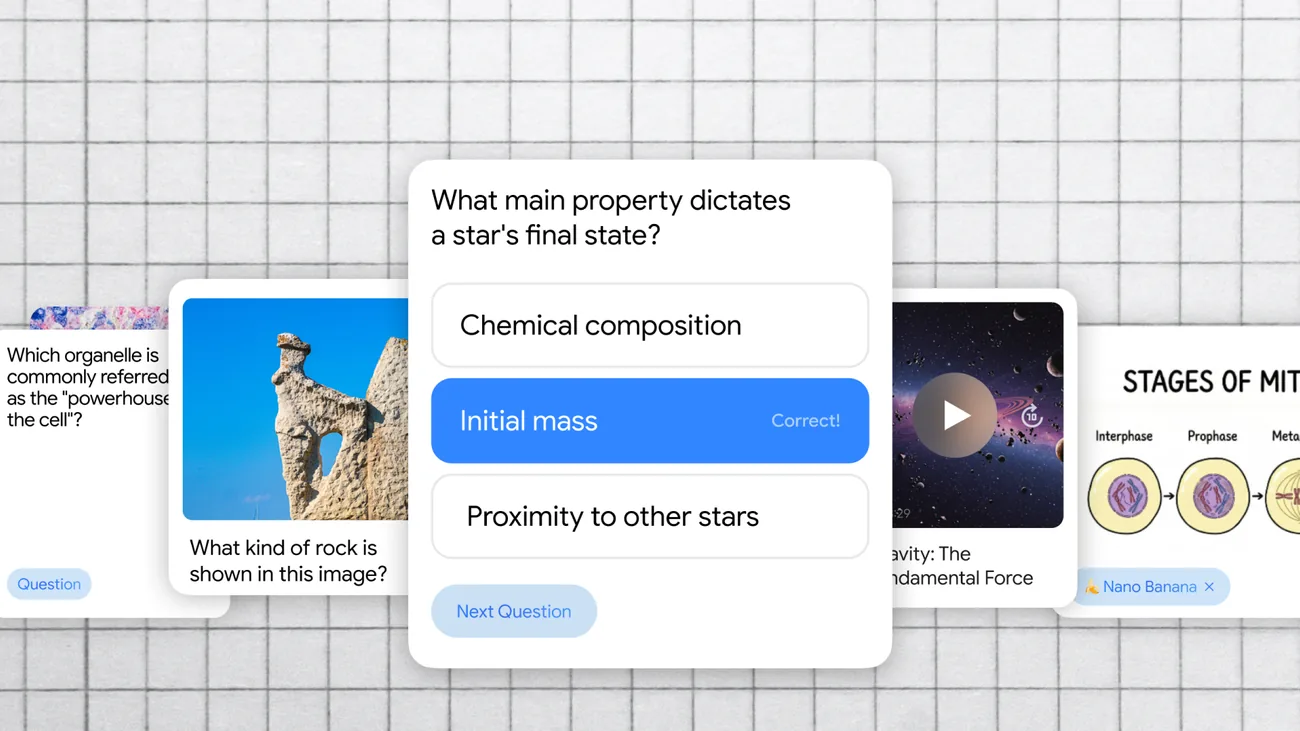
Preparing for major tests represents one of the most common ways learners use Gemini student features during stressful midterm weeks [1]. At New York University, Shuang P. builds practice tests from lecture notes to check knowledge gaps before taking tests that determine course grades. “Practice quizzes help me build confidence going into high-stakes tests,” said Shuang P. When faculty members hand out sample practice exams without answer keys, students rely on the tool to explain the step-by-step logic and reasoning behind difficult test questions.
Beyond informal classroom prep, Google partnered with The Princeton Review to deliver full-length digital Scholastic Aptitude Test (SAT) practice tests directly inside the system [2]. High school and college applicants can also access practice tests for the competitive JEE Main exam. Once a student finishes a test, the software calculates an overall score, identifies specific skill areas needing improvement, and suggests targeted review tasks to fix weaknesses.
The platform also handles step-by-step reasoning in technical academic disciplines, guiding students through complex calculus problem sets and foundational biological mechanisms like DNA replication [4]. Tobi U., an ambassador at the University of California, Riverside, uses custom questions to discover which concepts might be misinterpreted on real tests [1]. Working through sample problems helps learners grasp why a particular calculation succeeds before test day arrives.


Socratic Tutoring with Guided Learning
Instead of simply handing out quick homework answers, Guided Learning acts as an interactive Socratic tutor that encourages university students to work through problems on their own [1]. Fehmaan K., an ambassador at George Mason University, relies on this mode whenever computer science code or essay outlines produce unexpected errors. “I paste in my work, and instead of asking for the fix, I let Gemini walk me toward what went wrong,” said Fehmaan K. The model poses open-ended questions at each step to probe student understanding.
This pedagogical approach is rooted in educational research. According to an evaluation by education specialist David Chen, the system incorporates LearnLM, a specialized model trained on learning science principles [3]. In controlled evaluations, teaching experts rated LearnLM higher than general systems like GPT-4o and Claude 3.5 on instructional quality. Furthermore, a randomized controlled trial revealed that students using LearnLM were 5.5 percentage points more likely to solve novel math problems compared to peers working with human tutors alone. Because the system breaks down intricate problems into guided steps, students build genuine comprehension instead of memorizing superficial formulas for an exam.
Educators can also share Guided Learning links directly into Google Classroom assignments [3]. This integration lets students explore difficult homework problems at a comfortable speed while receiving real-time guidance that reinforces independent thinking.
Gemini Student Features in Campus Routines
Beyond structured study sessions, college ambassadors weave Gemini student features into daily communication, speech preparation, and extracurricular projects [1]. At San Diego State University, Skylar E. practices upcoming interviews out loud using Gemini Live to hear how responses sound before meeting employers. Meanwhile, design student Debbie C. at The University of Texas, Austin, shares her smartphone camera feed during live sessions so the tool can guide her through unfamiliar design software.
Audio Overviews also provide a hands-free study option while walking across campus. At Rutgers University, student Parikshit M. uploads academic articles with contrasting opinions so two synthetic hosts can discuss both sides of an issue in a conversational audio format [1]. Spoken dialogue turns dense reading lists into conversational summaries, expanding on advances where Gemini text-to-speech models produce natural audio output. Nina R. listens to these generated discussions during campus commutes to review key arguments without looking down at a screen.
Students also link the assistant to Google Calendar, Google Drive, and Gmail to manage busy academic schedules [1]. At Michigan State University, Aaryaman B. logs daily assignments into a master tracking Sheet, while Megan J. at the University of Illinois Urbana-Champaign uses Gemini in Chrome to identify urgent student emails that need quick replies. Creative students like Nelson G. at Morehouse College use the built-in Nano Banana model to refine graphics for campus events.
Testing Partnerships and Student Access Plans
To support writing and technical development, Google introduced Canvas as an interactive workspace beside standard chat windows [2]. Students can paste early paper drafts into the workspace to catch grammatical slips, reorganize key arguments, or transform unstructured research notes into complete presentation decks with a single prompt. Computer science undergraduates also use the environment to debug programming assignments and prototype interface ideas before submitting final projects.
To make these tools widely available, Google launched a free one-year subscription to Google AI Pro for eligible college students in the United States [4]. The student offer includes access to Gemini 3.1 Pro, advanced research tools in NotebookLM, and 2 TB of cloud storage [3]. Under university privacy rules, student data is not reviewed by human staff or used to train commercial machine learning models.
Undergraduates must verify their university enrollment annually to maintain access to the pro tier [4]. While earlier international offers in countries like Canada ended on December 9, 2025, eligible American students can claim the free plan through April 30, 2026 [3][5].
- PRESS RELEASE Lanquist, L. (2026, October 26). 15 college students share their favorite Gemini features. Google Blog. [Article Link]
- PRESS RELEASE Shen, J. (2026, February 13). 5 ways Gemini can help students work smarter. Google Blog. [Article Link]
- ONLINE NEWS Chen, D. (2026, August 6). Is Google Gemini Good for Students? Features & Study Tips. Unanswered. [Article Link]
- WEBSITE Google. (2025, January 1). Gemini for Students — your AI study buddy from Google. About Gemini. [Article Link]
- WEBSITE Google. (2025, December 9). Gemini for Students – your AI study buddy from Google. About Gemini. [Article Link]


