






Pickup dashboards are stepping back from full-screen phone dominance: the new GM CarPlay update introduces a picture-in-picture interface for the 2027 Chevrolet Silverado 1500 and 2027 GMC Sierra 1500. General Motors announced that its redesigned full-size trucks will debut the software overhaul later this year. Can third-party phone casting coexist smoothly with native vehicle functions on a single glass panel? The Detroit automaker resolved that tension by confining projection to a dedicated contextual card while preserving physical dashboard buttons. [1, 2]
Picture-in-Picture Cards Define the GM CarPlay Update
General Motors rebuilt the cockpit software around a split-screen layout, moving away from systems where external smartphone projection monopolized the entire touchscreen. Apple CarPlay and Android Auto now occupy a large contextual card on the right side of the central display instead of swallowing the cabin’s entire visual space. When a driver links a smartphone, the default phone icon switches to a CarPlay icon. Tapping that icon reveals phone apps within the contextual card, while pressing the physical home button returns the driver to the primary home view without disconnecting the projection session. [1, 3]
The underlying system runs on Android Automotive OS, presenting high-contrast visuals designed to replace previous software generations. InsideEVs first noted the interface rebuild before GM outlined how jet black backgrounds and crisp iconography supplant older pale blue accents. Colin McCormick, GM group product manager for Google built-in, projection, and profiles, explained that drivers can spread their attention across 60-plus inches of screen real estate without losing essential vehicle telematics. Drivers using the new GM CarPlay update can keep media playback visible while queue panels slide in from the side through animated transitions. [1, 3, 4]
Truck owners no longer choose between navigation maps and native trailering menus. Both systems operate simultaneously across divided windows. [1]
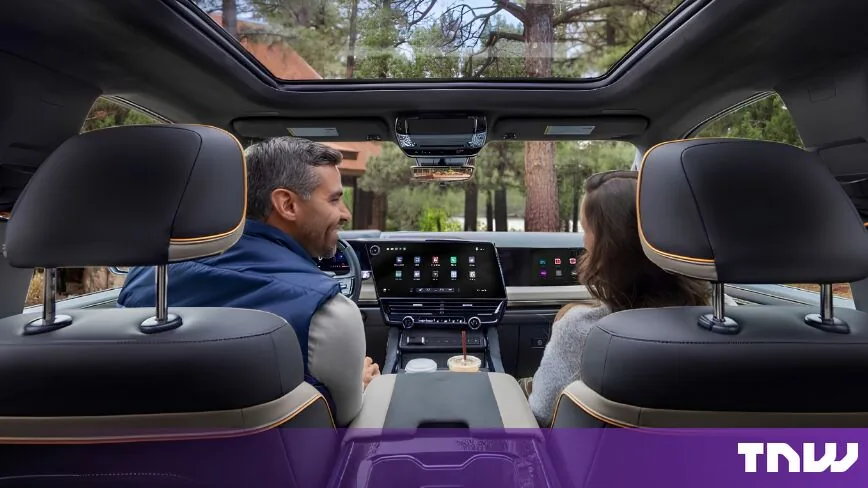
Preserving Physical Buttons for Cabin Ergonomics
While digital displays expand across modern vehicle cabins, General Motors deliberately avoided moving every basic control onto the touch panel. Physical controls for heating, ventilation, and air conditioning remain anchored below the center display, including rotary dials for cabin temperature and dedicated tactile buttons for blower fan speed. When occupants choose to adjust airflow direction, a contextual flyout menu glides across the touchscreen rather than permanently monopolizing screen real estate. Headlight buttons remain physical. [1, 3, 4]
Ergonomic practicalities in demanding driving environments directly informed this conservative balance between glass screens and mechanical hardware. Colin McCormick cited the punishing winter roads of Michigan (a region infamous for severe asphalt potholes) to emphasize why oversized interactive tap zones are essential when heavy vehicles jolt over broken pavement. Drivers attempting to tap miniature software icons on rough terrain frequently miss their intended target, increasing driver distraction during transit. By pairing larger touch targets with tactile climate switchgear, GM sought to reduce dangerous tapping and swiping without forcing truck drivers to navigate multiple submenus for frequent adjustments. Certain mechanical items have nevertheless transitioned into software: the physical oil dipstick is now replaced by a digital status reading on the instrument cluster, while a smartphone-style pull-down notification shade provides rapid access to microphone privacy controls and device pairing. [1]
Software architects also separated infrequent vehicle configurations from daily driving controls. Settings that owners configure once during initial setup remain isolated in dedicated menus, whereas dynamic functions like garage door toggles appear proactively when needed. Sebastian Bauer, GM executive director of human interface design, noted that user research showed drivers were previously hunting through excessive operational steps. Feedback feels immediate. The team redesigned visual, auditory, and haptic cues across the system. [2, 3]


Cluster Visuals Expand for Super Cruise
Beyond the central console, the digital instrument cluster received substantial graphical revisions focused on driving safety and automated assistance. Super Cruise gains its most extensive visual upgrade to date, rendering surrounding traffic participants directly in front of the driver. Where GM’s hands-free driver assistance system previously showed limited contextual environment data, the 2027 pickup cluster actively displays nearby automobiles, commercial trucks, and pedestrians. Sebastian Bauer told CNBC that visualizing surrounding obstacles reassures motorists that vehicle sensors accurately perceive road conditions during hands-off operation. [2]
Cockpit personalization extends across several distinct cluster display profiles. Drivers can configure traditional circular gauges for vehicle speed and engine RPM, switch to dedicated off-road telemetry, or select an uncluttered night mode reminiscent of classic Saab instrument panels. In this minimalist view, extraneous dial graphics disappear, leaving only large white digital numbers indicating forward velocity. A permanent status strip fixed along the lower edge of the screen continuously reports remaining fuel levels and the active drive mode without cluttering the upper horizon. [4]
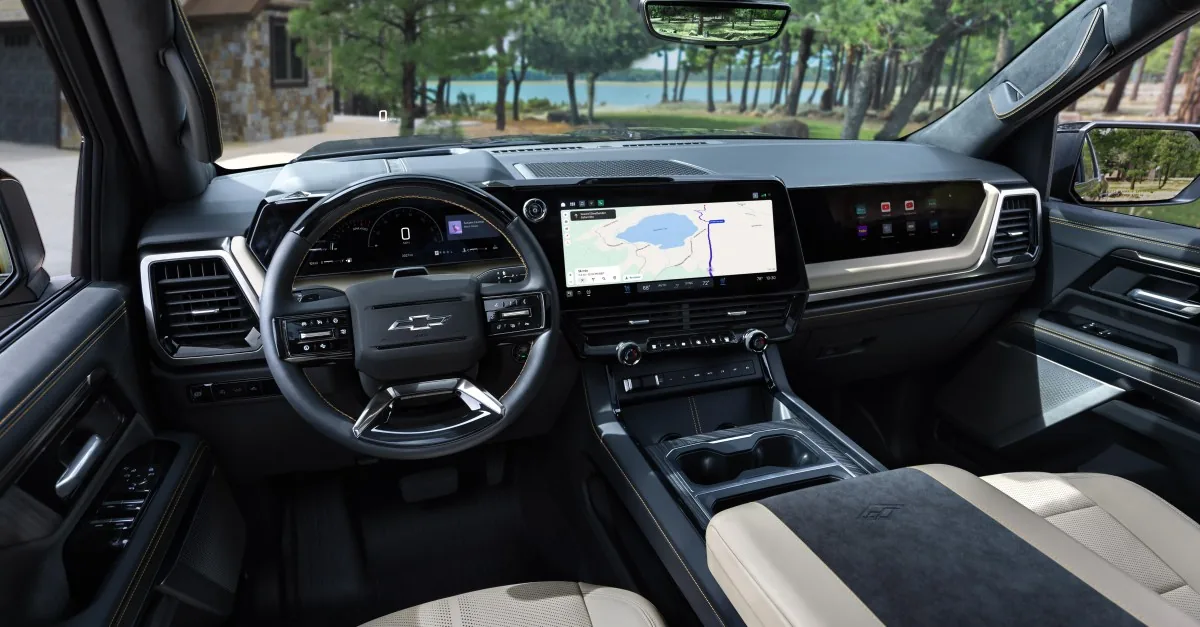
Digital speedometer integration reflects broader shifts across automotive infotainment platforms. Similar functional persistence was highlighted when Android Auto kept the speedometer on screen without an active destination during recent mobile navigation updates. Critical travel metrics remain permanently legible. Does eliminating unnecessary visual clutter measurably reduce driver fatigue during long night journeys? GM structured the minimalist mode specifically to lower cognitive strain across long highway routes. [2, 4]
Passenger Displays and Built-in Trailering Tools
Utility remains the defining characteristic of GM’s full-size truck lineup, and the revised software architecture introduces specialized tools tailored for hauling heavy loads. The trucks incorporate built-in trailer-aware navigation powered by Google Maps, automatically calculating travel routes that accommodate trailer height, weight, and turning clearances once hitch connections are recognized. Trailer dimensions are stored directly in the owner’s GM online profile, allowing drivers to transfer towing specifications across multiple fleet vehicles seamlessly. [1]
Cabin entertainment expands simultaneously through an optional passenger-side infotainment screen equipped with a specialized polarized filter (an optical privacy film preventing driver distraction). Front-seat passengers can stream high-definition video through a physical HDMI port or browse web pages without diverting the driver’s attention from the highway. Audio connects to paired Bluetooth headphones. Passengers may also pair their personal smartphone to serve as a handheld remote input device. [4]

Multitasking handling inside the central interface prevents abrupt app disruptions that previously frustrated pickup drivers. Incoming telephone calls no longer hijack the active screen or boot drivers out of ongoing navigation views. PiQMarkets noted that phone prompts appear as subtle overlay notifications, allowing motorists to accept or decline voice calls while maintaining unbroken map guidance. Michael Wahlstrom, director of software product management at GM, highlighted that truck buyers demand software simplicity while maintaining rapid access to foundational truck telematics during daily towing routines. [3, 4]
Shifting Strategy and Global Cockpit Standards
The decision to support phone projection in redesigned pickups marks a pragmatic adjustment in GM’s broader infotainment strategy. In 2023, General Motors triggered consumer pushback by removing Apple CarPlay and Android Auto from its electric vehicles, arguing that native software offered superior integration. GM CEO Mary Barra previously suggested on Decoder that phone mirroring bans would extend to petrol trucks, though she walked back those comments days later. General Motors sells close to 900,000 Chevrolet Silverado and GMC Sierra trucks annually, representing the automaker’s core commercial foundation. [1]
Regulatory mandates and reliability concerns also influenced cockpit architecture decisions. J.D. Power’s 2026 U.S. Vehicle Dependability Study found that infotainment connectivity remains the least dependable component across automobiles. Safety regulators are also pushing back against all-touchscreen interiors. Euro NCAP’s 2026 safety protocol requires separate physical switches for five functions (indicators, hazard lights, horn, wipers, and emergency calls) to achieve five stars, while China mandates 19 physical controls measuring at least 10mm square by July 2027. [1, 2, 3]
While GM does not market full-size pickups in Europe, it sells the Cadillac Optiq (starting around EUR 65,000), Cadillac Lyriq, and Cadillac Vistiq across the continent. General Motors confirmed that the new interface will spread across its lineup over time, though existing truck owners will not receive retroactive updates. Rivian excludes phone projection entirely. By allowing phone mirroring to share display space with native controls through the new GM CarPlay update, GM resolves customer friction on its most lucrative vehicle lines. [1, 3]
- ONLINE NEWS Hawkins, A. J. (2026, September 15). GM updates its trucks’ native software to coexist with CarPlay. The Verge. [Article Link]
- ONLINE NEWS Wayland, M. (2026, September 15). GM launching new customer software experience with redesigned Chevy, GMC pickups. CNBC. [Article Link]
- ONLINE NEWS Popa, D. (2026, September 16). GM’s new UI for trucks gives CarPlay its own window. TNW. [Article Link]
- ONLINE NEWS PiQMarkets. (2026, September 15). GM trucks to feature new UI with CarPlay support. PiQMarkets. [Article Link]
- ONLINE NEWS Ars Technica. (2026, September). GM gives its most important trucks a new UI—and includes CarPlay. Ars Technica. [Article Link]


