





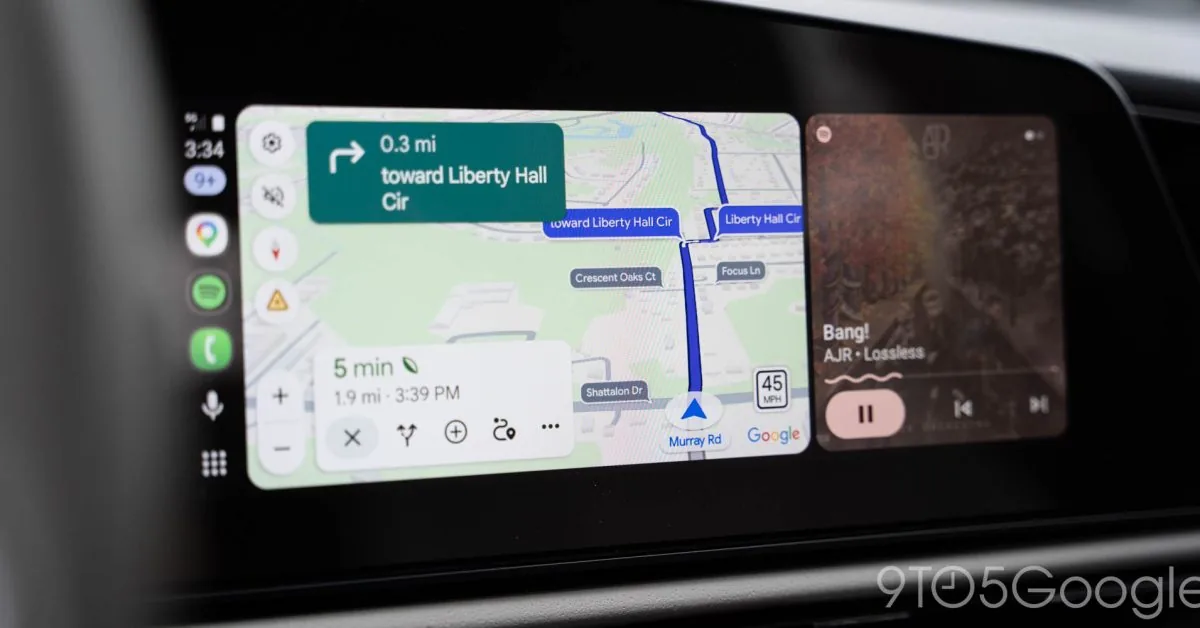
A vehicle cruises down a familiar avenue without an active route plotted on the dashboard, yet the Android Auto speedometer remains fixed in view. Google Maps is expanding road indicators so travel speed, posted speed limits, traffic signals, and stop signs stay on the center screen at all times. The change untethers basic driving assistance from active turn-by-turn guidance, answering weeks of contradictory behavior across car consoles. Mishaal Rahman, community engagement manager for Android, confirmed on Reddit that the persistent interface is actively rolling out to vehicles. [1][2]
Disappearing Indicators Prompt Outcry on Reddit
The confirmation followed days of growing bewilderment among commuters who suddenly noticed their speed indicators missing entirely. About a week ago, drivers discovered that the speedometer and accompanying road alerts had vanished from Google Maps displays inside their vehicles. Frustrated vehicle owners gathered on Reddit to report the sudden loss, asking whether a software malfunction had broken their setups or if developers had intentionally stripped the feature away. Ben Schoon reported for 9to5Google that the disappearing speedometer had sparked confusion across multiple discussion threads as motorists compared varying screen layouts. [1][2]
Google clarified two separate issues. The Android Auto engineering team is actively investigating the vanishing speedometer as an unintended software bug rather than a planned feature rollback. Rahman also explained that under ordinary operation, speed limits and live velocity had previously been coded to appear only after entering a formal navigation destination. Most drivers simply had not realized that active routing was required. A subset of motorists had briefly seen persistent readouts during earlier server-side feature experiments, but clearing the application cache wiped those temporary test profiles and reverted their screens to standard behavior. [1][2]
Cache wipes erased the experimental flag. Motorists who attempted standard app troubleshooting ended up eliminating their own access ahead of the broader release. [1]
The outcry prompted Google to clarify how the Android Auto speedometer functions across different account tiers and app updates. Rather than pulling the tool from circulation, engineers verified that persistent navigation graphics remain an active production commitment for the platform. [1][2]
Active Routes No Longer Bound to Gauges
Drivers routinely rely on Google Maps for complex highway itineraries, but everyday errands tell an entirely different story. Commutes to local grocery stores, school drop-offs, and familiar neighborhood streets rarely warrant setting turn-by-turn navigation. Yet even on daily neighborhood paths, motorists still find value in seeing the posted speed limit alongside their current pace. Uncoupling this data from programmed routes means the map functions as an informative driving companion without demanding unnecessary address input. [1][2]
Consolidating this driving information directly within the line of sight supports road safety. Chandra Steele observed in Android Police that glancing between an instrument cluster behind the steering wheel and a separate console map divides driver attention. Presenting vehicle speed, posted regulations, traffic signals, and upcoming stop signs together on a single screen creates a more cohesive driving experience without requiring drivers to alternate views. Drivers gain awareness without constantly shifting focus across competing displays. [1]

Rahman emphasized that the ability to view the speedometer, speed limits, and traffic controls without a set destination remains an ongoing rollout. Not everyone has received it. Because the server-side deployment proceeds gradually across regions and hardware configurations, wide availability will take time to materialize fully. [1][2]
Familiar roads present everyday driving hazards where speed awareness remains essential. Having the Android Auto speedometer present without active navigation ensures that routine errands retain the same digital safeguards as unfamiliar cross-country road trips. [1][2]


Speed Limits and the Long Road to Android Auto
The arrival of persistent gauges highlights an unusually prolonged development trajectory for Google’s automotive software. Google Maps originally introduced speed limits in 2019, yet the live speedometer remained absent on Android Auto until late July of this year. Navigation enthusiasts celebrated that midsummer launch, even as many questioned why a core driving metric required so many years to reach Google’s primary in-car platform. [1][2]
Waze offered the tool early. The crowdsourced navigation platform featured an integrated speedometer well before Google acquired the company in 2013. More striking still for dedicated Android enthusiasts, Google Maps on Apple CarPlay supported a live speedometer for two full years before Android Auto received equivalent functionality. The disparity frustrated Android owners. Discussion boards frequently reflected bewilderment over why Google prioritized competing automotive interfaces ahead of its own in-house operating system. [1][2]
Motorists on technical forums voiced annoyance when iOS updates routinely gained navigation features months before matching Android builds appeared. Platform parity remained a persistent grievance among vehicle owners. With the recent addition of prominent street labels, real-time transit intelligence, and now persistent speed limits, Google has narrowed that software gap. The Android Auto speedometer finally brings Google’s native car platform into line with long-standing user expectations. [1][2]
GPS Math Versus Mechanical Dashboard Gauges
The precision of digital velocity readouts introduces an important technical contrast with conventional dashboard instruments. Built-in vehicle speedometers calculate travel speed by monitoring wheel rotation and axle revolutions, making the final reading vulnerable to variations in tire pressure, tread wear, and manufacturer calibration. Regulatory standards require production speedometers to remain within an accepted accuracy band without ever underreporting velocity. Mechanical instruments intentionally skew slightly higher than true travel speed. In contrast, the Google Maps reading represents a pure calculation derived from satellite positioning, calculating velocity directly by dividing traversed distance by elapsed time. [1]
GPS relies on simple arithmetic. Because satellite calculations assess the vehicle’s position continuously across physical space, the resulting velocity figure is arguably more accurate than dashboard gauges influenced by mechanical drag and tire inflation. Satellite positioning architectures continue to adapt across modern mobile ecosystems, mirroring shifts such as recent satellite system changes in wearable devices, yet smartphone GPS receivers still compute vehicle motion through direct time-of-flight trigonometry. However, drivers occasionally ask whether satellite calculations can ever fail. Deep urban street corridors flanked by skyscrapers and mountain tunnels can temporarily obstruct line-of-sight satellite signals, creating brief velocity lags until the receiver reacquires orbital geometry. The Android Auto speedometer balances these satellite calculations against ongoing road mapping to sustain steady velocity tracking. [1]
Enabling the Android Auto Speedometer in Settings
Activating the feature requires a quick check inside mobile app preferences. Drivers must ensure both Google Maps and the Android Auto companion software carry the latest software updates available on their devices. Both builds must be current. Once updated, opening Google Maps on the phone grants access to configuration controls. Tapping the personal account avatar in the upper-right corner brings up the main Settings menu. From there, navigating into Navigation settings reveals the Driving options submenu, where the toggle switch for Speedometer can be switched to the on position. [1]
Drivers should note that turning on the toggle establishes the baseline capability, but server-side activation determines when the persistent view activates without a plotted course. Because Google is rolling out the feature in stages, individual vehicles may experience a brief delay before road speed limits and stop signs stay on screen without an active destination. The setting is easily toggled. The Android Auto team continues to patch the vanishing gauge bug while expanding persistent indicators across the wider driver network. [1][2]
When will the update reach every car console? Google has not published an exact completion timeline for global vehicle availability. Timing remains unannounced. Until the server rollout concludes, motorists must keep their apps updated and watch their dashboard screens on their next neighborhood drive to verify whether the Android Auto speedometer stays permanently visible. [1][2]
- ONLINE NEWS Steele, C. (2026, September 14). Google Maps on Android Auto is finally getting a speedometer that’s always on. Android Police. [Article Link]
- ONLINE NEWS Schoon, B. (2026, September 14). Google Maps rolling out Android Auto speed limits and speedometer that show even without navigation. 9to5Google. [Article Link]


