





Optical character recognition (OCR) is the core technology that turns typed, printed, or handwritten text inside image files into machine-readable digital data. Standard computer programs cannot search or edit raw pixel grids produced by flatbed scanners and smartphone cameras without custom image analysis pipelines that inspect light values on the sheet. How do software tools translate flat pictures of letters into editable sentences? Systems separate text blocks, classify letter shapes, and convert the visual findings into standard computer text codes like ASCII and Unicode. Automating this work saves office labor by replacing slow manual typing with direct software ingestion [5].
Early Reading Machines
Early efforts to read characters mechanically grew out of telegraph tools and reading aids for blind people. In 1915, inventor Hyman Eli Goldberg received a patent (US Patent 1165663) for a machine that read characters written in conductive ink and converted them into standard telegraph transmission code [15].
At the same time, researcher Edmund Fournier d’Albe constructed the Optophone. This handheld instrument scanned over printed paper and emitted different musical sounds for each character shape. Sensors read raw light. In the late 1920s and early 1930s, German engineer Emanuel Goldberg expanded optical retrieval by building his Statistical Machine to search microfilm records, securing US Patent 1,838,389 in 1931. These early photoelectric setups matched light beams against fixed templates. While early machines proved slow and struggled with faded ink, they proved that optical sensors could translate paper text into electrical signals for automated sorting by computers [15].
Computer pioneer Ray Kurzweil founded Kurzweil Computer Products in 1974 to create an omni-font system capable of reading almost any printed typeface. Working with leaders from the National Federation of the Blind, Kurzweil connected his software to a flatbed scanner and speech synthesizer, unveiling the reading machine on January 13, 1976. LexisNexis bought the software in 1978 to build legal databases, and Xerox purchased Kurzweil’s firm in 1980 [5, 15].
How Text Recognition Works
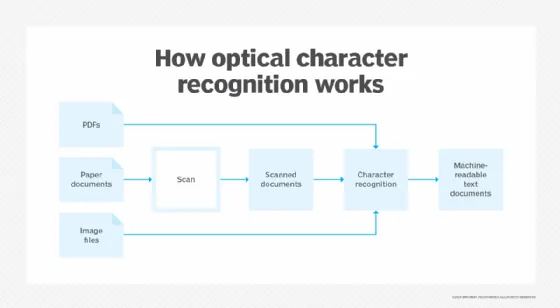
Turning paper pages into editable files relies on pairing optical scanning hardware with multi-stage software tools. Scanners capture images. A desktop scanner or phone camera captures page surfaces as high-contrast raster pixel maps. Software then isolates dark text marks from bright background paper to prepare the content for systematic algorithmic extraction [10].
Modern optical character recognition tools process incoming documents through five coordinated stages. Image acquisition captures the sheet through optical sensors, producing high-resolution bitmaps. Preprocessing cleans the visual file by correcting tilted angles, erasing stray dirt spots, and balancing contrast so that letterforms stand out from the paper background. Text detection and layout analysis map document layout by separating text blocks from graphic art, header rules, and tables. Recognition routines classify single letters by examining shapes or template matches, while postprocessing checks recognized words against dictionaries to fix misread letters before exporting clean files [12, 13].
Layout analysis prevents software from reading multi-column pages in the wrong order. Without zone detection, a scanner sweeps straight over column splits, scrambling unrelated sentences together into nonsense. Modern layout parsers find white gutters between columns, identify table cells, and preserve the original reading sequence so that each paragraph flows naturally into the final text file. Early desktop scanners processed up to 2400 words per minute using these layout boundaries [13, 17].
Cleaning the Scanned Page
Image cleanup determines whether recognition engines can read letters accurately. Binarization serves as the first step by converting color or grayscale scans into strict black-and-white images. Threshold rules evaluate pixel brightness to separate dark text strokes from background paper fibers, stains, or shadows cast during mobile phone photography [12, 13].
Paper sheets passing through automatic feeders often emerge crooked or misaligned. Deskewing algorithms detect baseline angles along rows of print and rotate the image by small fractions of a degree until text lines sit flat. Level rows keep line cutters from clipping tall letter stems. Despeckling filters then clean up visual noise by eliminating stray toner specks, paper dust, and camera sensor artifacts that look like punctuation marks. Line removal filters strip away flat rules, form borders, and box outlines, leaving clean letter glyphs ready for shape inspection. Without this careful filtering, broken ink strokes often lead classifiers to confuse letters with commas and periods [12, 15].
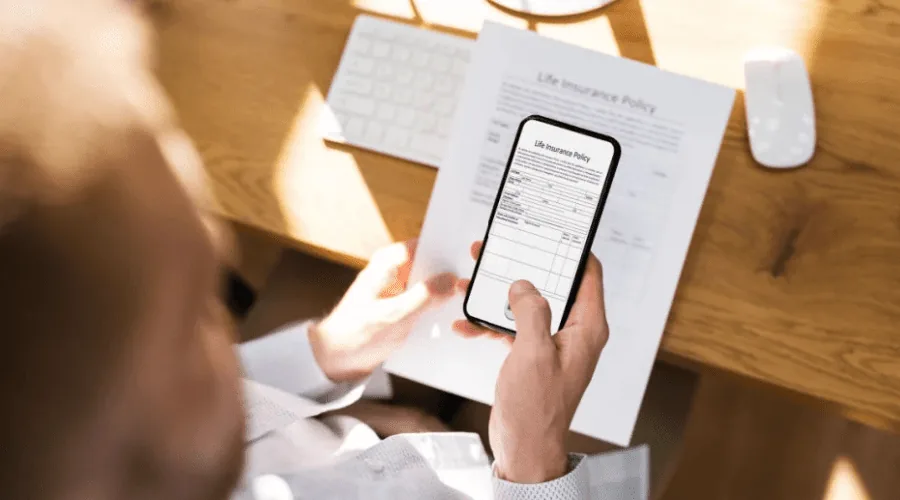
Segmentation splits preprocessed text blocks into lines, words, and characters. Fixed-pitch typewriters make character isolation simple because every glyph occupies an identical space on the page. In contrast, proportional fonts demand careful boundary analysis because narrow letters like ‘i’ and wide letters like ‘w’ create variable whitespace gaps that can confuse automated letter separation routines [15].
Pattern Matching and Feature Extraction
Pattern matching compares each isolated glyph straight against a stored library of character templates. Glyphs match set molds. The software scales the candidate glyph bitmap and measures pixel overlap against predefined font matrices. When overlap exceeds a set threshold, the engine assigns the matching character code, delivering fast results on uniform documents with known typefaces [10, 15].
Feature extraction overcomes the limits of matrix matching by breaking down characters into geometric building blocks. Instead of matching raw pixel grids, the system detects geometric properties such as closed loops, vertical stems, stroke intersections, and diagonal slants. For example, a capital letter ‘A’ is identified by two angled lines meeting at a peak with a horizontal crossbar at the center. In 2016, researchers Veronica Ong and Derwin Suhartono explored this approach in ComTech: Computer, Mathematics and Engineering Applications using the K-Nearest Neighbor algorithm to classify capital letters. Testing their system with 200 sample images for every letter, the team reached an accuracy mark of 76.9%, proving that geometric features provide far greater tolerance for font variations than rigid template matching [1].
Geometric vectors gave early tools the power to read different fonts without storing thousands of separate font bitmaps. Because vectors focus on spatial relationships rather than exact pixel locations, software tolerates minor printing smudges and font variations. This mathematical model gave rise to modern machine learning classifiers that process varied print and handwriting styles in messy office settings [10, 17].


Four Types of OCR Technology
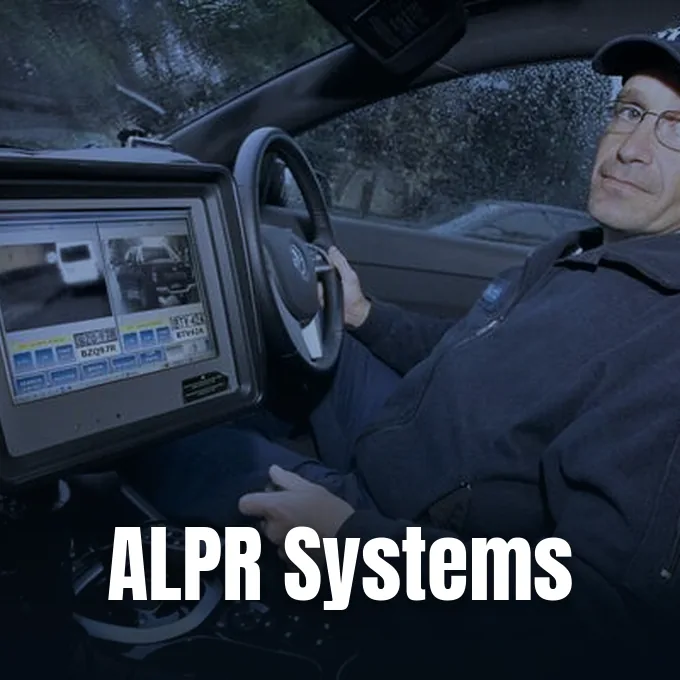
Document tools fall into distinct categories based on algorithmic power and target materials. Simple optical character recognition matches uniform printed fonts against stored template matrices. Optical mark recognition (OMR) detects checkboxes, survey bubbles, and multiple-choice answers, achieving 99.9% accuracy on structured testing sheets by measuring pixel density within predefined zones [5, 9].
Optical mark recognition for forms differs from optical music recognition, a field dedicated to reading printed sheet music into MIDI or MusicXML files. Research into music recognition began at the Massachusetts Institute of Technology during the late 1960s, leading Waseda University engineers to create the WABOT (WAseda roBOT) in 1984 to accompany human singers on an organ. Musitek released the first retail music scanner, MIDISCAN, in 1991. Early researchers included Ichiro Fujinaga, Nicholas Carter, Kia Ng, and David Bainbridge. While text tools read one-dimensional character sequences along a flat baseline, music software decodes two-dimensional layouts where vertical notehead placement determines pitch, note stems define rhythm, and staff lines establish musical semantics [16].
Intelligent character recognition deciphers handwritten script using neural networks trained on varied writing samples. By tracking stroke curves, line intersections, and pen slant, it adapts to individual handwriting habits over time. Reading whole words at once helps software decode joined cursive strokes without having to split connected letters into separate glyphs [5, 8].
Neural Networks and Language Models
Deep learning architectures replaced hand-crafted rules with neural networks that learn character features automatically from data. Pixels turn into features. Convolutional neural networks extract visual features like edges and strokes straight from image pixels. Recurrent networks then read character sequences along text lines, using surrounding text context to decipher faded or ambiguous letters [13, 15].
Open source software played a major role in making neural text extraction accessible worldwide. The open source engine Tesseract, evaluated by researchers C. Patel, A. M. Patel, and D. T. Patel in 2012, later integrated Long Short-Term Memory networks in version 5 to recognize full text lines. Baidu released PaddleOCR to support text recognition in over 80 languages. In 2021, Microsoft researchers Minghao Li, Furu Wei, and their colleagues introduced TrOCR, an end-to-end architecture pairing an image Transformer encoder with a text Transformer decoder. Their initial TrOCR paper appeared as a preprint on arXiv (arXiv:2109.10282) that had not undergone formal peer review, before the team presented their peer-reviewed findings at the AAAI conference in 2023 [2, 15].
Cloud providers deploy these neural models as scalable developer OCR API services. Microsoft Azure Vision offers its Read OCR engine (version 4.0) to extract printed and handwritten text in Latin, Cyrillic, Arabic, and Chinese scripts. The service accepts image files up to 500 megabytes with dimensions between 50 by 50 pixels and 10,000 by 10,000 pixels. Azure requires that text characters must be at least 12 pixels high in a 1024 by 768 image, which matches an 8-point font at 150 dots per inch [3].
Optical Character Recognition in Daily Business
Enterprise document processing has grown into a major commercial sector. Grand View Research valued the global market at $12.56 billion in 2023, projecting a compound annual growth rate of 14.8% through 2030. In North America, the market was valued at $4.75 billion in 2023 and is projected to reach $11.51 billion by 2030 [11].
Financial institutions use automated character parsing to process checks, verify loan application packets, and pull structured transaction rows from scanned bank statements. Healthcare networks rely on character extraction to digitize clinical charts, handwritten physician notes, and laboratory reports, helping doctors review patient records while maintaining compliance with privacy standards like HIPAA. Tools like Adobe Acrobat Pro and OmniPage Ultimate automate office workflows, while Abbyy FineReader converts batch files in 192 languages. Solutions like Rossum parse varied invoice layouts using artificial intelligence, and Readiris provides document signing, security protection, and annotation tools. By automating routine paperwork, companies reduce manual errors and allow administrative staff to concentrate on higher-value analysis tasks [6, 7].

Enterprise cloud suites and security systems also integrate character recognition into daily monitoring. Microsoft SharePoint incorporates an optical recognition service supporting over 150 languages across Word, PowerPoint, and Excel files, applying deduplication to prevent duplicate charges on identical images. In cybersecurity, Proofpoint product marketing manager Itir Clarke explained: “OCR extracts text from scanned forms, medical images, screenshots of sensitive content, PDFs, and more.” Analysts Dave Cook and Tyler Johnson recently used character extraction to neutralize a phishing attack where attackers hid malicious links inside PDF QR codes [4, 9].
Why Image Quality Limits Accuracy
Recognition accuracy depends on the clean condition of source documents. Ink and paper matter. Blurry scans, faded ink, low camera resolution, and crumpled paper create visual noise that degrades character recognition. Colored backgrounds and stained sheets often cause binarization filters to erase light strokes or merge dirt into false letters [7, 12].
Postprocessing routines help resolve visual ambiguities by validating extracted words against dictionaries and language models. Because characters like the number ‘5’ and the capital letter ‘S’ share similar contours, software evaluates context from neighboring words to select the most probable letter. In 2016, researchers Haithem Afli and Andy Way presented a study in the Proceedings of the Workshop on Language Technology Resources and Tools for Digital Humanities examining optical recognition on historical documents. Their framework introduced an error correction module combining language modeling with translation methods, outperforming baseline transcription by nearly 30% relative improvement. Such linguistic postprocessing remains vital for transcribing degraded archives where visual character shapes alone cannot guarantee flawless accuracy [9, 14].
Modern software pairs computer vision with layout modeling to preserve context in multi-column forms and invoices. Standard storage formats like ALTO XML, maintained by the United States Library of Congress, save precise character coordinates alongside recognized text strings. Preserving exact coordinates helps digital archives keep the true layout and visual meaning of original paper records [15].
- ACADEMIC JOURNAL Ong, V., & Suhartono, D. (2016). Using K-Nearest Neighbor in Optical Character Recognition. ComTech: Computer, Mathematics and Engineering Applications, 7(1), 53-65. [Article Link]
- PREPRINT Li, M., Lv, T., Chen, J., Cui, L., Lu, Y., Florencio, D., Zhang, C., Li, Z., & Wei, F. (2021). TrOCR: Transformer-based Optical Character Recognition with Pre-trained Models. arXiv:2109.10282. [Article Link]
- WEBSITE Microsoft. (2025). OCR – Optical Character Recognition – Foundry Tools. [Article Link]
- WEBSITE Microsoft. (2025). Overview of optical character recognition. [Article Link]
- WEBSITE Holdsworth, J. (2024). What Is Optical Character Recognition (OCR)? IBM Think. [Article Link]
- WEBSITE GeeksforGeeks. (2023). What is Optical Character Recognition (OCR)? [Article Link]
- WEBSITE Adobe. (2026). OCR meaning: What is OCR and why it’s important. Adobe Acrobat Guides. [Article Link]
- WEBSITE Coursera Staff. (2025). What Is Optical Character Recognition? Coursera Articles. [Article Link]
- WEBSITE Proofpoint. (2025). What Is Optical Character Recognition (OCR)? Meaning. Threat Reference. [Article Link]
- ONLINE NEWS Kirvan, P. (2025). What is OCR (optical character recognition)? TechTarget. [Article Link]
- WEBSITE Cflow Team. (2025). Optical Character Recognition (OCR): What It Is & How It Works? Cflow Blog. [Article Link]
- WEBSITE DIGI-TEXX. (2025). How Optical Character Recognition Works? A Complete Guide. [Article Link]
- WEBSITE FastOCR Team. (2026). How Does OCR Work? Optical Character Recognition Algorithms. [Article Link]
- CONFERENCE PAPER Afli, H., & Way, A. (2016). Integrating Optical Character Recognition and Machine Translation of Historical Documents. Proceedings of the Workshop on Language Technology Resources and Tools for Digital Humanities (LT4DH), 109-116. [Article Link]
- WEBSITE Wikipedia. (n.d.). Optical character recognition. [Article Link]
- WEBSITE Wikipedia. (n.d.). Optical music recognition. [Article Link]
- WEBSITE Data ID Systems. (2003). OCR Introduction. [Article Link]


