





A canary deployment routes a small portion of live traffic to a new software version before full rollout to the fleet. Dev teams observe live latency, error rates, and dependency calls under real traffic without risking a fleet-wide outage. This setup turns production into a controlled testbed. By exposing changes to a limited slice of real users under live conditions, engineering teams observe actual system behavior, verify third-party integrations, and spot critical regressions before they spread across the infrastructure. If telemetry stays healthy during the trial window, operators step up traffic in planned stages until the new build fully replaces the stable baseline [1].
Origins of the Canary Release
The term comes from coal mining practices dating back to the 1920s [9]. Miners carried caged canaries down into dark shafts because the small birds have a much lower tolerance for toxic carbon monoxide and breathe far faster than humans [2], [9]. Any sign of distress in the cage gave an immediate signal for workers to leave the tunnels before gas levels reached lethal thresholds. Miners depended on that biological signal because invisible fumes gave no other warning underground [6]. Because canaries showed acute distress long before miners felt sick, workers retreated safely to the surface before toxic underground air pockets caused fatal industrial poisoning [9]. Birds are no longer taken into mines, but the concept survived in software as a way to spot hazards before they harm users [2].
Software engineering teams apply that same biological warning principle to protect production web platforms from catastrophic release failures [9]. Instead of upgrading an entire cluster simultaneously, developers route a small percentage of incoming user traffic to the release candidate so real customers can uncover latent defects safely. DevCycle author Adam Wootton noted that live users explore unexpected execution paths and input combinations that synthetic staging tests never encounter [2].
Danilo Sato and Martin Fowler documented canary releases as a practical application of parallel change in modern web architectures. Sato described the method as a way to test capacity in live systems while keeping rollback simple. In their foundational book Continuous Delivery, Jez Humble and Dave Farley showed how phased rollouts help engineering teams release code frequently while minimizing production risks and deployment failures. Chuck Rossi described similar release automation strategies at Facebook, where newly compiled binaries reached internal employees and beta rings before general rollout to global users [5].
Core Principles of Canary Deployment
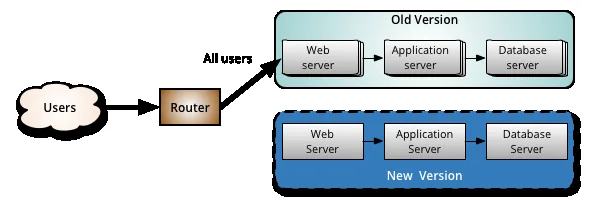
Google Site Reliability Engineering (SRE) defines canarying as a partial, time-limited rollout of a service change followed by systematic evaluation. Google SRE authors Alec Warner, Betsy Beyer, Kyle Smith, Matt Duftler, and Štěpán Davidovič noted that canaries measure real risk. The servers receiving new code form the canary. The rest of the fleet stays on the stable control build, serving as a reliable baseline for comparisons [4]. The technique resembles A/B testing, but their operational goals differ. While A/B tests evaluate product hypotheses and business conversion metrics over weeks, a canary deployment focuses purely on catching software bugs, crashes, and performance drops within minutes or hours [5]. Canarying gives teams empirical evidence before approving general release across Google systems [4].
Automation forms the core of safe releases. Incident data from Google SRE shows that binary and configuration pushes trigger most production outages, prompting engineering teams to rely on repeatable builds, automated test suites, and small change sets. Small packages reduce blast radius [4].
Teams balance release velocity with reliability by setting Service Level Objectives (SLOs) and tracking error budgets. Since 100% reliability is unrealistic, devs accept small release risks as long as live metrics stay inside the error budget limits established for that product. Canaries let teams push updates without exhausting their error budget during an unexpected glitch. If error rates cross agreed SLO limits during testing, automated systems stop the rollout before users notice wide disruption [4].
Traffic Control in Kubernetes
Kubernetes manages canary deployment workflows through pod replica counts and shared label selectors. Operators create two separate Deployment manifests in the cluster with the same app label app.kubernetes.io/name: rollout-demo. The stable Deployment runs three replicas with track: stable. The canary Deployment runs one replica with track: canary, and a shared Service selector directs incoming requests across all four pods without filtering on track labels. Because both Deployments share identical networking contracts and cluster endpoints, developers evaluate release performance under genuine user traffic without altering underlying Kubernetes cluster infrastructure. No extra ingress tools are needed [7].
With four pods active, Kubernetes sends 75% to stable and 25% to canary. The Service takes requests on port 80 and passes them to targetPort 8080. Kubernetes tutorial examples use Google hello-app container images with kubectl to test traffic splits. ClusterIP balances pods [7].
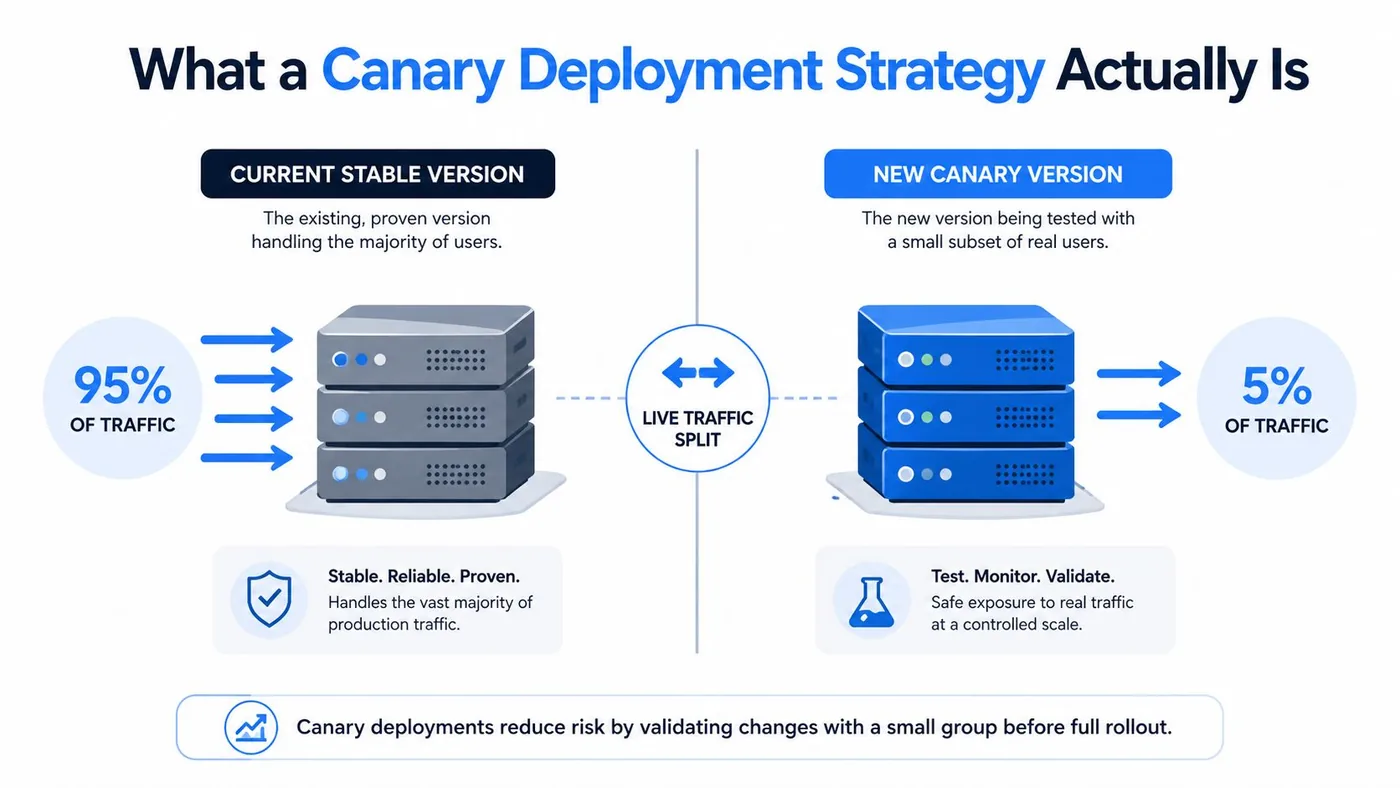
When the test pods show good health, operators scale the canary workload to two replicas, raising canary traffic to 40%. Once the full check passes, the stable Deployment updates its container image to version 2.0, scales up, and the extra canary pods are deleted. If bugs appear instead, devs scale the canary workload to zero replicas. Scaling to zero stops bad traffic at once but keeps the pod manifest for debugging [7].
Application Gateways and Service Meshes
Pod replica ratios link traffic percentages to compute hardware, which can be inefficient on large clusters. The Kubernetes Gateway API solves this issue by using HTTPRoute objects to split traffic by weight. Devs define backendRefs that point to stable and canary services with weights like 90 and 10. Teams can also set header rules, sending requests with env: canary to the new version while other calls stay on the 90/10 split. By separating traffic weights from pod replica counts, operators test release candidates with precision across dynamic production workloads without overprovisioning expensive cluster compute resources. This setup gives operators fine control over traffic without changing replica counts [7].
Application gateways handle weighted traffic splitting in Java environments through declarative rules. In Spring Boot setups, Spring Cloud Gateway routes calls between separate microservices, letting developers direct 90% of requests to stable endpoints and 10% to canary endpoints with RewritePath filters. Matheus Bernardes Spilari tested this architecture by running the stable application on port 8081 and the canary application on port 8082 [6].
Service meshes like Istio and Linkerd bring request routing into microservice meshes. They let teams split traffic by cookies, user identity tokens, or regional origin headers without requiring developers to rewrite underlying microservice code. Cloud load balancers like AWS Application Load Balancer and Azure Application Gateway also support weighted target groups, letting teams run a canary deployment without custom proxy infrastructure. Devs can adjust traffic rules in seconds when response times change. Teams gain flexibility [8].


Metric Gates and Analysis Templates
Manual checks slow teams down. Tools like Argo Rollouts and Flagger automate traffic shifts through declared steps and pause times. A rollout file shifts 10% of traffic to the test pods, pauses for five minutes to gather data, and runs an automated analysis check. If the check passes, the tool moves to 25% and 50% weights with ten-minute pauses before sending all traffic to the new build. GitOps agents like ArgoCD or FluxCD reconcile declared states, ensuring that every candidate release undergoes identical validation criteria before receiving broader production traffic. Automated gates ensure every release meets the same strict standards without relying on tired operators [8].
During each pause, the analysis template queries Prometheus for health metrics. A Prometheus query evaluates HTTP success rates using rollouts_pod_template_hash labels, verifying that successful requests remain above defined operational thresholds before allowing further progression. The rule needs a success score of at least 0.99, with a failure limit of 2. Higher error counts abort the release [8].
Metric gates also meet governance rules in security standards. The NIST CSF 2.0 framework requires resilient systems under category PR.IR-01 and continuous network monitoring under DE.CM-01, mandating rapid rollback capabilities and automated anomaly detection. CIS Controls v8 requires telemetry under CIS-8 for audit logs and CIS-16 for software validation. Similarly, OWASP ASVS standard V16 demands that logging and error handling expose version regressions without hiding failures during staged rollouts. These standards treat rollouts as key controls [1].
Database Compatibility with ParallelChange
Routing network traffic between versions is simple, but shared databases add real complexity. Stable and canary apps query the same data store at the same time, so any breaking schema change will immediately crash running instances across the fleet. To avoid outages, teams use the ParallelChange pattern described by Danilo Sato, splitting schema updates into expand, migrate, and contract phases. The database must support both app versions until old software is retired. Because data contracts remain backwards compatible throughout the rollout phase, developers can revert application builds at any moment without causing data corruption or schema errors. This protects data integrity during rollouts [5].
During the expand phase, developers introduce new columns and tables without dropping legacy fields, allowing the older software version to continue processing database transactions normally. The new build writes data to both fields while asynchronous background jobs backfill historical records. Only after traffic migration completes successfully do operators trigger the contract phase to permanently delete obsolete database columns without risking downtime [5].
Feature flags let teams roll out changes in code without new server deployments. A study of developers from 38 companies showed 17 practices for toggle management, covering metadata, default values, and cleanups. Major web platforms including Etsy, Flickr, Reddit, Netflix, and Gmail use runtime flags to show features to select groups while keeping unfinished code dormant. Martin Fowler warned that release toggles should be a last resort compared to breaking features into smaller chunks. Devs prune dead flags to stop toggle debt [10].
How Canary Deployment Reduces Failure Impact
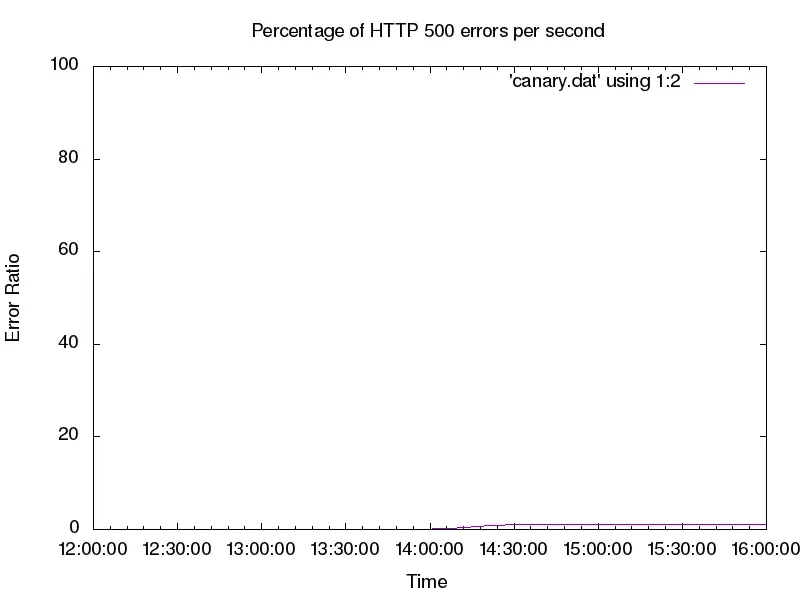
A canary deployment cuts incident impact by confining bugs to a tiny slice of user traffic before issues reach the wider population. In a simulation in the Google SRE workbook, engineers configured an App Engine service to return HTTP errors for 20% of requests to test incident response. A fleet-wide rollout caused instant chaos. In contrast, isolating the candidate build to a canary cohort diluted the defect across total infrastructure, keeping aggregate error rates barely visible to outside traffic. By comparing live error responses between the two cohorts, engineers confirm that isolated canary failures do not threaten overall service availability or trigger cascading outages [4].
Aggregate charts can hide localized failures, so teams monitor metrics by version. In the App Engine test, checking response codes by version showed that the canary generated nearly all errors, while the live build stayed calm. Figure 16-4 in the SRE workbook illustrates how errors spike exclusively on the release candidate [4]. Version labels reveal anomalies [1].
Quick rollback gives teams their best safety net during bad pushes. Because the stable version stays running, rolling back only takes a quick route change to send 100% of traffic to the stable build [9]. A roll-forward fix requires diagnosing code during an active outage and rushing emergency patches into production [4]. Simple routing changes lower recovery time and keep services online [9]. IMVU pioneered similar safeguards with an automated cluster immune system that rolled back bad code on metric drops [5].
Limitations in Low-Traffic Environments
Staged traffic routing does not fit every software workload. Low-traffic services rarely generate enough requests to give reliable statistical signals. On low-volume setups like internal tools or specialized B2B APIs, routing a 1% or 5% split sends only a few requests to test pods during an observation window. A clean dashboard in that setting shows a lack of traffic, not an absence of bugs [8]. Devs who mistake empty charts for stability risk pushing defects to everyone [1]. When request counts fall below statistical relevance, automated gates cannot evaluate whether a candidate build introduces latency regressions, memory leaks, or unhandled exceptions under real load [8].
Canary releases can also fail silently if the exposed user population fails to reflect the diverse operational traffic of the wider production workload. If routed requests only touch static read paths while leaving checkout workflows or third-party payment integrations unexercised, critical defects remain hidden until operators promote the build to all users. NHI Management Group warns that unrepresentative traffic cohorts create false confidence before full release [1].
When traffic is too low for metric gates, teams should pick other release strategies [8]. Blue-green rollouts offer a clean switch between duplicate environments, letting devs validate full software stacks under synthetic test loads before flipping router configurations to public users [5], [8]. Alternatively, targeted feature flags allow teams to enable new features for specific opt-in beta users or internal staff before public release [2], [10]. Choosing the right release pattern depends on traffic volume and system needs. Not every service needs a canary [8].
- REPORT NHI Management Group. (2026, September 24). What Is Canary Release? Definition & Examples. [Article Link]
- WEBSITE Wootton, A. (2023, December 1). What is a Canary Release? DevCycle Blog. [Article Link]
- WEBSITE JetBrains. (n.d.). What is a Canary Release? TeamCity CI/CD Guide. [Article Link]
- BOOK CHAPTER Warner, A., Davidovič, Š., Beyer, B., Smith, K., & Duftler, M. (2018). Chapter 16 – Canarying Releases. In The Site Reliability Workbook. O’Reilly Media. [Article Link]
- WEBSITE Sato, D. (2014, June 25). Canary Release. MartinFowler.com. [Article Link]
- ONLINE NEWS Spilari, M. B. (2025, April 7). Canary Release: A Smart Approach to Software Deployment. DEV Community. [Article Link]
- WEBSITE Kubernetes. (2026, October 26). Deploy a Release Using a Canary Deployment. Kubernetes Documentation. [Article Link]
- WEBSITE CloudCops. (2026, August 16). Canary Deployment Strategy: A Practical Guide for 2026. CloudCops Resources. [Article Link]
- WEBSITE Minick, E. (2026, November 2). What is a Canary Deployment? DevOps Academy. Harness. [Article Link]
- WEBSITE Wikipedia. (n.d.). Feature toggle. Wikimedia Foundation. [Article Link]


