





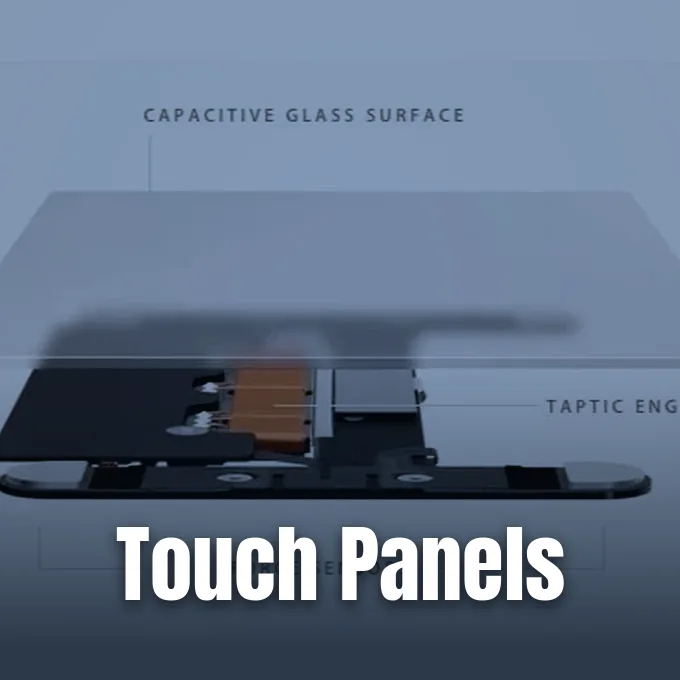
Choosing between capacitive vs resistive touchscreens comes down to how an interface senses touch. Capacitive panels track tiny changes in electrical charge on a conductive sheet. This lets users make swift multi-finger gestures on glass screens without downward pressure. In contrast, resistive panels rely on contact between flexible sheets under firm pressure. They work with plastic styluses, pens, and heavy work gloves. While consumer electronics favor capacitive glass, resistive hardware still handles routine tasks in clinics and factories [1].
- Operating Principles of Touch Panels
- How Do Resistive Touchscreens Work?
- Circuit Architecture in Capacitive vs Resistive Panels
- Input Methods and Gesture Support
- Capacitive vs Resistive Optical Clarity
- Durability in Harsh Environments
- How Capacitive vs Resistive Hardware Took Shape
- Future Sensing and Hybrid Interfaces
Operating Principles of Touch Panels
Interactive touch displays emerged long before mobile phones reached store shelves worldwide. In 1965, engineer Eric Johnson built the earliest finger-driven capacitive display at the Royal Radar Establishment in Malvern [10]. His design placed thin copper wires across a cathode-ray tube, reading capacitance shifts whenever an operator touched the bare wire grid directly with a finger. Johnson showed that direct touch input could speed up operational choices for air traffic control duties by eliminating bulky physical keyboards. His system removed the need for an intermediate mouse or keyboard, laying the groundwork for early graphical user interface (GUI) controls on computer terminals [11].
Resistive technology arose soon after through laboratory work at the University of Kentucky. In 1971, Dr. G. Sam Hurst built a sensor called the Elograph [1]. Hurst then founded Elographics, later known as Elo TouchSystems in Menlo Park, which teamed up with Siemens in 1977 to build a transparent resistive touch panel [9].
Both designs act as transducers that turn touch into electrical data for a digital controller. Capacitive displays rely on the electrical conductivity of human skin to alter an electrostatic field made by a transparent Indium Tin Oxide (ITO) layer [1]. Resistive screens instead need enough force to push a flexible top film into a solid base. Other touch formats exist, such as optical panels where a grid of infrared LEDs and photodetectors senses when a finger breaks light beams in front of the screen [7].

How Do Resistive Touchscreens Work?
A resistive touchscreen uses multiple layers separated by tiny gaps until pressed together. The flexible top sheet is clear polyethylene terephthalate (PET) film, while the bottom base is solid glass. Facing inner sides carry an ITO coating. Insulating spacer dots sit in the gap between them, preventing the conductive coatings from touching when the screen is idle [6].
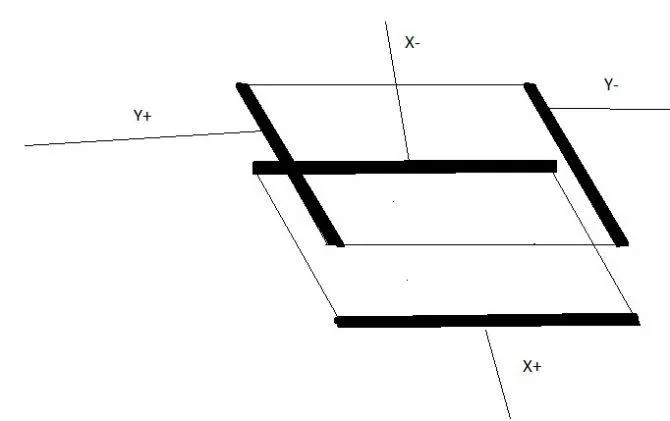
When a finger, pen, or stylus presses down on the screen, the flexible film bends and touches the bottom glass. That contact closes an electrical circuit at that spot. During four-wire operation, the controller puts a steady voltage gradient on the top sheet to read distance along the X axis from the voltage drop, and then switches the voltage to the bottom sheet to read the Y axis. These read cycles happen within milliseconds. The controller converts voltage drops into clean Cartesian coordinates for device software, keeping accuracy stable as contact moves across the panel while avoiding complex signal processing [12].
Because input relies on pressure rather than skin conductivity, resistive panels work with almost any pointer. A press from a plastic wand, gloved finger, or ballpoint pen registers on the active area [9]. Well-tuned analog resistive screens reach coordinate resolutions of 4096 x 4096 points, supporting fine handwriting capture in signature pads [12].
Circuit Architecture in Capacitive vs Resistive Panels
Internal wiring patterns dictate how long each screen type lasts before losing touch accuracy. In basic four-wire resistive layouts, makers place two conductive bars called busbars on the top film and two on the bottom glass. While cheap to build, four-wire designs drift out of alignment as repeated tapping stretches the top film over time [6].
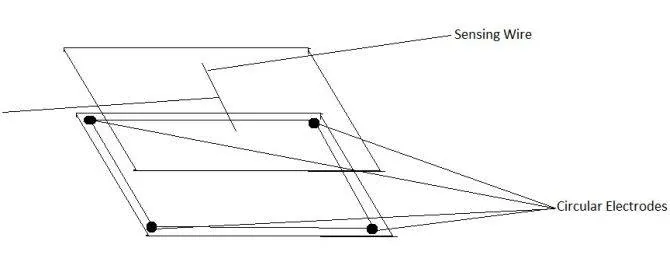
Engineers designed five-wire and eight-wire resistive circuits to fix drift in busy retail point-of-sale terminals and medical kiosks. A five-wire setup moves all four drive electrodes to the corners of the rigid bottom glass, using the flexible top film simply as a passive voltage-sensing probe. Because the conductive layer on the glass does not bend, five-wire screens keep working even if the top plastic film gets scratched by dirt or styluses. Eight-wire designs add backup sense wires to four-wire layouts, giving electrical redundancy that balances voltage changes over time and preserves coordinate accuracy through millions of touches without needing frequent manual resets [6].
Capacitive hardware skips moving sheets by reading charge changes across solid glass. Surface capacitive panels apply voltage across a single conductive coating from four corners, calculating coordinates when a finger draws current. More advanced projected capacitive (PCAP) screens etch conductive grids in rows and columns between glass sheets. This grid measures capacitance changes at every intersection, allowing controllers to track multiple fingers at once without mechanical compression [9].
Input Methods and Gesture Support
The physics of each sensor dictates which tools can control the screen. Standard capacitive panels need a conductive pointer to draw charge from the electrostatic field, responding to bare fingers or styluses with conductive rubber tips. Non-conductive objects like wooden sticks, plastic styluses, and thick winter gloves fail to change capacitance. In cold regions or medical cleanrooms, workers wearing thick leather or rubber gloves cannot use standard capacitive screens unless the gloves feature conductive silver thread sewn into the fingertips. Handset makers tune software thresholds to detect faint electrical disruption through thin winter gloves, but thick mittens still block sensing [8].
Resistive panels work well whenever operators must use different tools. Because the sensor responds only to downward pressure, people can tap with cheap plastic styluses, pens, or thick mittens [7]. Early pocket systems, like the Casio PB-1000 computer in 1987, used fine stylus points for writing kanji and drawing [11].
Gesture support creates a major split between both technologies. Projected capacitive glass tracks multiple touch points for two-finger zooming and rotating in modern phone operating systems [9]. Standard resistive screens misread two simultaneous touches as a fake point between fingers. In 2009, French firm Stantum built a modified resistive system called TouchPark with PMatrix firmware on Texas Instruments Zoom hardware to read multi-finger inputs, but phone makers chose capacitive glass [5].



Capacitive vs Resistive Optical Clarity
Display clarity reveals another difference in capacitive vs resistive panel design. A resistive screen has two coated sheets and an air gap, creating four reflective surfaces in front of the display. Each surface reflects room light and dims screen brightness. In bright outdoor sunlight, resistive displays look washed out, needing stronger backlights to stay readable [6].
Capacitive displays offer clearer viewing because they bond protective glass right over the screen. Without air gaps or plastic sheets, light from OLED and LCD panels passes through with little loss [9]. In car stereos from makers like Kenwood and Sony, capacitive glass keeps maps crisp during bright daytime trips [7].
Keeping high sensitivity through glass requires smart noise filtering in touch controller chips. Phone makers must isolate tiny finger signals from radio interference produced by antennas and display power supplies. Moto Development Group researchers noted that Apple tackled this on the original iPhone by using a 12-volt power source for touch lines, while other component builders ran 3- to 5-volt circuits. Moto Development Group vice president Chris Verplaetse compared the feel of the iPhone to a Mercedes door closing versus a Hyundai door. J. Daniel Hebert, chief executive of Moto Development Group, noted that driving touch performance required deep engineering investments rather than simply deferring to outside component vendors [4].
Durability in Harsh Environments
Work environments often dictate which touch panel survives years of use. Resistive screens remain popular in manufacturing plants, commercial kitchens, and marine consoles where grease, dust, and water coat equipment. Because resistive sensors respond only to mechanical force, water drops and oil films do not trigger accidental inputs. The flexible top sheet also absorbs bumps from dropped tools without shattering [1].
The main flaw of resistive hardware is wear on the flexible top film. Repeated tapping on the same button area stretches the plastic and wears off the inner ITO coating. Sharp metal objects can scratch the soft outer film, creating dead zones on the coordinate grid [6].
Capacitive screens use tempered glass faces that resist scratches from everyday items like keys and coins [8]. Even when a glass screen gets hairline cracks, projected capacitive grids often keep tracking touches across unbroken zones. However, standing water droplets form conductive paths that disrupt electrostatic fields, causing phantom taps or frozen controls until the glass is wiped dry. For outdoor ATMs and marine panels in heavy rain, designers write special firmware to reject water-induced capacitance shifts. Industrial suppliers like New Vision Display build custom projected capacitive displays that filter out water interference and tolerate extreme operating temperatures [9].
How Capacitive vs Resistive Hardware Took Shape
Market demand for capacitive vs resistive hardware shifted during the smartphone boom. Early handhelds running Windows Mobile or Palm OS used resistive screens with plastic styluses [4]. After Apple launched the iPhone with fluid multi-touch in 2007, consumer interest turned to glass. Research firm DisplaySearch found that projected capacitive screens passed resistive screens in total revenue in 2010 and overtook resistive unit shipments in 2011 [2, 12]. Randy Lawson, a senior analyst with chip research firm iSuppli, noted that semiconductor companies faced major commercial risks as phone makers weighed resistive controllers against newer capacitive chips [2].
Video game hardware kept resistive screens longer to serve older software libraries. When Nintendo released the Nintendo 3DS in 2011, hardware chief Hideki Konno said the handheld kept a resistive lower screen to preserve compatibility with original Nintendo DS games designed for fine stylus input. Nintendo also built a 6.2-inch resistive screen into the Wii U GamePad in 2012. Handheld consoles later moved to capacitive glass, as seen in the hybrid dock architecture of the Nintendo Switch console [3].

Chip suppliers adapted as gadget makers shifted screen types. Cypress Semiconductor in San Jose made capacitive chips, while Maxim Integrated Products in Sunnyvale made resistive controllers for MP3 players, printers, and kiosks. Bart DeCanne, a business director at Maxim, explained that resistive panels remained popular because they were adaptable and inexpensive for cars and consumer gadgets [2]. In dual-screen phones, builders designed folding models like the iPhone Duo announced by Apple in September 2026 [11, 14].
Future Sensing and Hybrid Interfaces
Display engineers now combine fast capacitive gestures with the pressure sensitivity of resistive panels. Standard capacitive glass cannot tell how hard someone presses down. In 2015, Apple added Force Touch to the Apple Watch, using tiny sensors to measure downward finger force on the screen [11].
Scientists also study electrostatic friction to give smooth glass a tactile feel. In an experimental paper in Soft Matter, researchers Ö. Şirin, M. Ayyıldız, B. N. J. Persson, and Ç. Başdoğan showed that applying alternating voltages to a capacitive screen changes friction on a sliding finger. By changing signal frequency, amplitude, and waveform, the panel creates synthetic textures that feel like rough paper, bumps, or buttons on flat glass without moving parts. The team demonstrated that electroadhesion alters tactile sensation through controlled electrical fields, offering new interface feedback for consumer electronics [1].
Other teams explore sound and structural tricks to expand touch input. At Carnegie Mellon University, researcher Chris Harrison built TapSense, using an acoustic sensor on a screen to tell whether a user tapped with a fingertip, finger pad, fingernail, or knuckle [1]. Display makers also build in-cell and on-cell panels that put touch electrodes right inside the display stack. These hybrid designs turn flat displays into rich interactive tools for daily work [9].
- WEBSITE Conover, D. (2026). Explained: How Touchscreens Work. The BYU Design Review. [Article Link]
- ONLINE NEWS Johnson, S. (2009). Touch screen gamble: which technology to use. Phys.org. [Article Link]
- ONLINE NEWS Savov, V. (2011). Nintendo 3DS has resistive touchscreen for backwards compatibility, what’s the Wii U’s excuse? Engadget. [Article Link]
- ONLINE NEWS Ganapati, P. (2010). Finger Fail: Why Most Touchscreens Miss the Point. WIRED. [Article Link]
- ONLINE NEWS Miller, P. (2009). Stantum’s mind-blowing multitouch interface on video! Engadget. [Article Link]
- ONLINE NEWS Dube, R. (2018). Capacitive vs. Resistive Touchscreens: What Are the Differences? MakeUseOf. [Article Link]
- WEBSITE Woodford, C. (2022). Touchscreens. Explain that Stuff. [Article Link]
- WEBSITE HP. (2026). How Do Touchscreens Work? A Comprehensive Guide to Interactive Display Technology. HP Tech Takes. [Article Link]
- WEBSITE HowAtlas. (2026). How Touchscreens Work: Unveiling the Technology Behind Interactive Displays. [Article Link]
- WEBSITE Malvern Radar and Technology History Society. (2016). 1965 – The Touchscreen. [Article Link]
- WEBSITE Wikipedia. (n.d.). Touchscreen. [Article Link]
- WEBSITE Wikipedia. (n.d.). Resistive touchscreen. [Article Link]


