



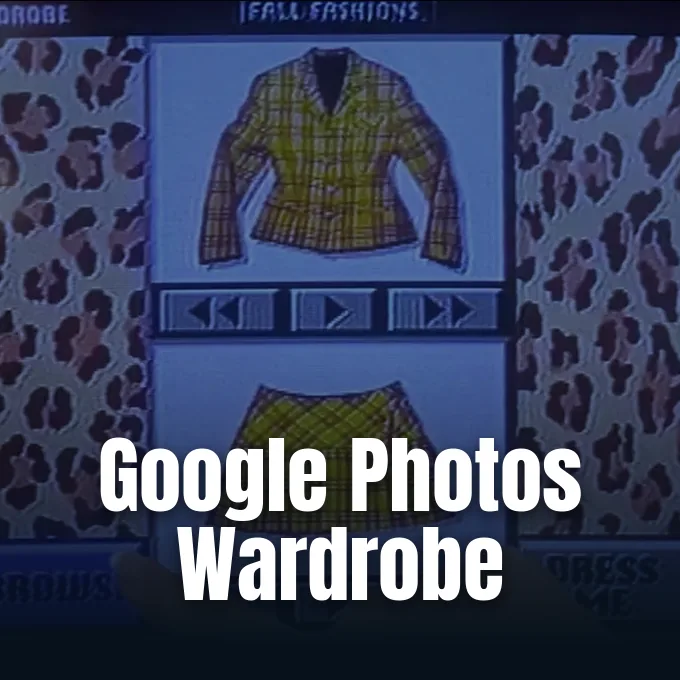
A computerized system that catalogs every outfit in a user’s closet used to exist only as cinema fiction. Google has turned that Hollywood concept into reality by releasing its Google Photos wardrobe feature across mobile operating systems, scanning backed-up library pictures to identify worn garments and assemble a searchable digital closet. Styled after Cher Horowitz’s computerized closet in the comedy Clueless, the software groups apparel by category without requiring separate catalog photos against white backdrops. The expanded rollout delivers the digital wardrobe to iOS and Android users across the U.S., India, and Brazil [2].
Google Photos Wardrobe Reaches iOS
Google initially previewed the automated closet concept in April, outlining a phased deployment schedule that prioritized Android smartphones during the early summer months [1]. Android received priority access in June [2]. Now, the Mountain View technology giant has completed the second phase of that deployment by launching the feature inside the Google Photos app for Apple’s iOS ecosystem [1]. As technology reporter Sarah Perez noted for TechCrunch, the release ensures that iPhone owners in the three launch countries can catalog their clothing without waiting for separate platform parity updates or delayed feature migrations [2].
Availability currently centers on three key international territories: the U.S., India, and Brazil [1]. Rather than restricting the rollout to flagship hardware tiers, Google enabled the tool for all standard consumer accounts operating on modern iOS and Android operating systems in those designated regions. The broad deployment reflects an intentional effort to democratize styling utilities that were previously confined to boutique commercial applications or required costly subscription services. Both mobile platforms share features [2].
Users often wonder why Google Photos showing in gallery views connects to cloud synchronization, especially when new automated categories populate existing photo streams [2]. The Google Photos wardrobe integration resides specifically inside the Collections Tab, preventing newly generated garment cards from cluttering primary chronological camera roll views. This dedicated placement allows iPhone and Android users to separate everyday styling archives from general vacation albums and family portraits. Google launched the feature today [1].

Machine Learning Detects Apparel in Photo Archives
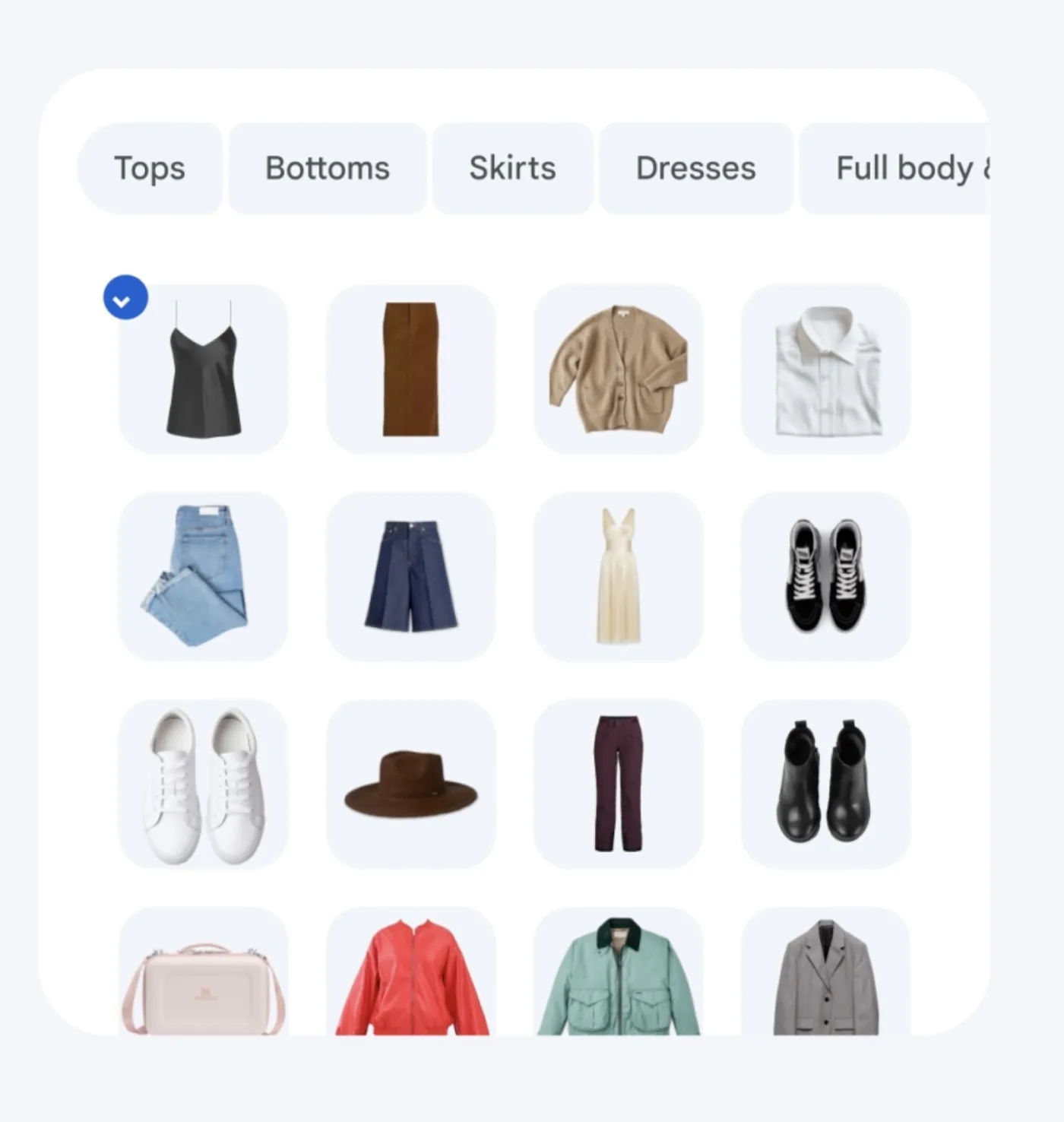
The underlying computer vision technology scans an account holder’s photographic archive to detect wearable items, isolating fabrics from background scenery, lighting shifts, and physical poses before categorizing each piece into designated functional segments like tops and bottoms. Machine learning algorithms distinguish between individual garments without requiring separate catalog photos against sterile studio backdrops. Computer vision detects everyday garments [2].
Garments populate the dedicated Wardrobe section in the Collections Tab, where Google Photos groups each wearable piece into searchable segments [1]. Users can review isolated apparel items directly from their personal gallery stream without manually tagging individual pictures [2]. Google Photos handles garment parsing [1].
Google Photos Virtual Closet Enables Outfit Combinations
Once garments are indexed within the Google Photos virtual closet interface, individuals can mix and match distinct tops and bottoms to construct customized outfits without opening physical dresser drawers or sorting through cluttered storage spaces. The software provides an interactive virtual try-on mode that displays how separated pieces align together, granting users a clear visual preview of potential combinations before getting dressed. Fashion enthusiasts can save finalized pairings directly into an organized moodboard for upcoming social occasions, business trips, or seasonal wardrobe refreshes. Furthermore, finished styling concepts can be exported and shared directly with friends through standard messaging channels or collaborative photo albums, transforming solo closet planning into an interactive social styling experience [1].
The visual workflow deliberately pays homage to the memorable computerized wardrobe interface used by protagonist Cher Horowitz in the comedy film Clueless. In that cinematic depiction, an affluent Beverly Hills teenager relied on desktop computing to manage an overwhelming collection of designer outfits. Technology commentator Sarah Perez observed that while the movie framed digital styling as a luxury reserved for the ultra-wealthy, modern mobile vision models bring equivalent conveniences to everyday smartphone users free of charge. TechCrunch highlighted the cinematic parallel [2].


Privacy Protections for the Google Photos Closet
How does Google prevent automated wardrobe scanners from leaking personal styling preferences to fashion advertisers? Because clothing choices reveal personal habits, body measurements, and stylistic preferences, commercial monetization of fashion habits remains a legitimate user concern. Google explicitly clarified that the wardrobe analysis operates strictly to assist the account holder, confirming that personal fashion telemetry is not shared with external commercial entities or third-party retailers [2].
Retailers receive zero wardrobe data. Private clothing selections remain shielded from targeted advertisements and commercial tracking networks [2].
Proper operation of the Google Photos wardrobe relies directly on steady cloud synchronization. When users encounter situations where why Google Photos not backing up prevents recent clothing images from appearing, wardrobe indexing pauses until library uploads finish. Incomplete camera roll backups also explain why Google Photos not showing all photos occurs when searching for specific accessories or newly purchased shoes [2]. Resolving connection bottlenecks ensures the computer vision model indexes every valid garment automatically [1].
Gemini Spark and Creative Editing Additions
The international arrival of the Google Photos wardrobe accompanies a broader suite of utility upgrades across Google Photos. In the U.S., Google introduced an intelligent workflow powered by Gemini Spark, enabling subscribers to select, brighten, and distribute images using a single conversational text prompt rather than navigating multi-step adjustments across distinct editing menus. Access to Gemini Spark requires an active Google AI Pro or Ultra subscription tier [2].
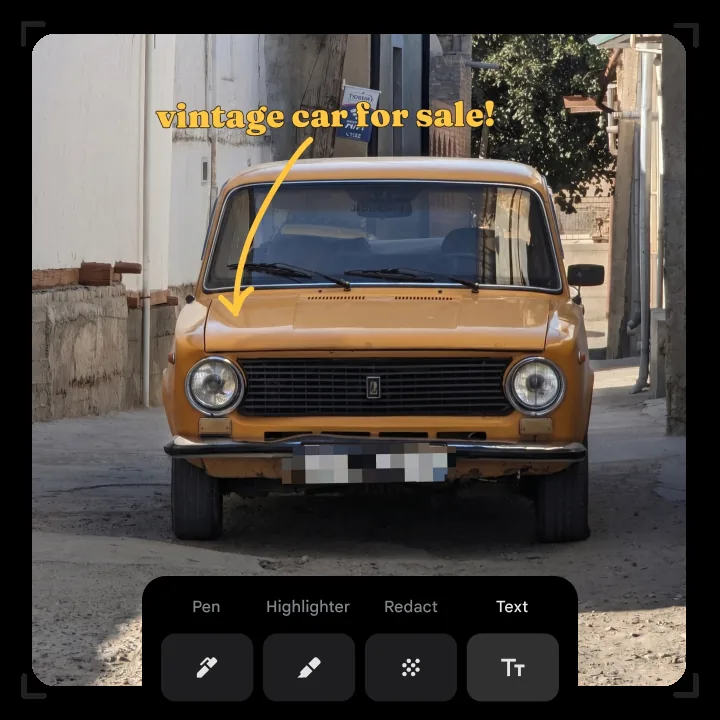
Complementing generative text prompts, Google revamped its built-in Markup toolkit to grant creators precise graphical control over mobile edits. The updated software introduces a specialized redacting pen engineered to obscure sensitive private data, such as vehicle license plates, personal street addresses, or identification documents before images are shared publicly. In addition, artists gain adjustable thickness sliders for freehand sketching as well as a refreshed typography picker containing distinct text styling fonts. These granular adjustments make mobile photo preparation faster and safer [2].
Creative transformation capabilities also received a substantial upgrade through Google’s Remix editing system. As reporter Juli Clover documented at 11:34 am PDT for MacRumors, Google Photos added 15 new templates to Remix, letting users reimagine static photography through stylized algorithmic themes. Remix gained 15 creative templates [1].
Moods Filters and Display Updates on Android
Android users receive exclusive aesthetic enhancements through a newly deployed camera suite designated as Moods. These specialized software presets emulate vintage photographic aesthetics, allowing mobile photographers to apply nostalgic textures directly within the application. Available filters include authentic renditions of classic 35mm film grain and the distinctive low-contrast exposure characteristics of early 2000s digital cameras. Vintage optics transform casual smartphone snapshots into textured visual memories [2].
The platform rollout demonstrates Google’s commitment to uniform visual intelligence across mobile operating systems while preserving distinctive ecosystem perks for its own operating environment. This software push parallels how Google expands Noto 3D emoji across partner Android brands to modernize visual expression across handsets. Whether curating apparel or applying retro filters, consumer imaging tools increasingly rely on automated cloud processing to deliver personalized creative experiences [2].
By bridging mobile fashion indexing between Android and Apple hardware, the Google Photos wardrobe initiative establishes automated wardrobe planning as a standard smartphone utility rather than an experimental novelty. Smartphone owners residing across the U.S., India, and Brazil can immediately test the digital closet by updating their client software through the Apple App Store or Google Play Store [1]. As additional regions join the platform roadmap, automated wardrobe curation will continue redefining how mobile libraries organize personal style archives [2].
- ONLINE NEWS Clover, J. (2026, September 24). Google Photos wardrobe feature comes to iOS. MacRumors. [Article Link]
- ONLINE NEWS Perez, S. (2026, September 24). Google Photos ‘Clueless’-inspired virtual closet is now available on Android and iOS. TechCrunch. [Article Link]


