




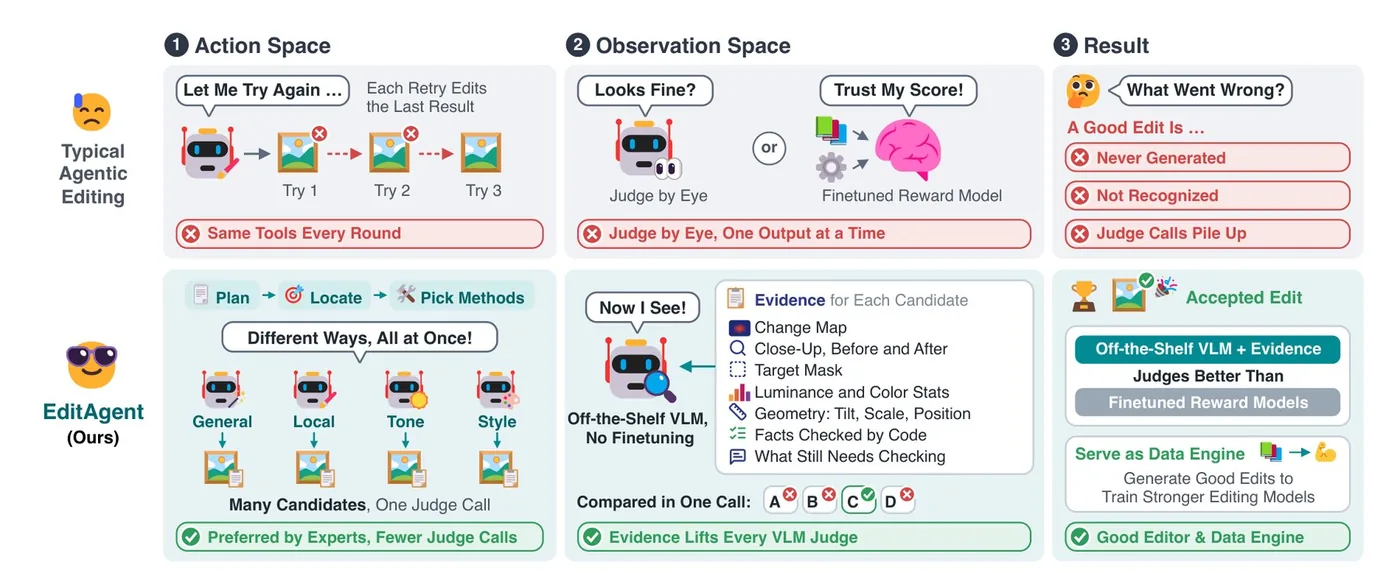
Adobe Research and UC San Diego built an experimental test system named EditAgent to study how smart agents handle multi-step tasks like photo editors in professional studios [1]. Lead researcher H. Xu and his team paired general image generators with targeted tools for rotation, zoom, and sharpening to see if coordinated code could handle tricky tasks. Test runs show that single-model tools fail often on routine fixes, but linking specific tools under an auto judge helps software meet human standards. The project reflects an effort by Adobe to bring practical Photoshop AI features to Creative Cloud without removing human taste from the final canvas [2].
Benchmarking EditAgent with Specific Tools
In a test of 600 image edits scored blindly by five photo pros, the general model Flux-2-Klein-9B failed to make a usable edit in 42.7 percent of tasks [1]. The paper, posted by H. Xu and his team as an unreviewed preprint on arXiv, probed why diffusion models falter on precise tweaks. The tests exposed clear limits. When the agent sent failed tasks to specific tools built for crops, sharpening, or rotation, it solved two-thirds of those errors on its own. The test showed that relying on one general model creates bottlenecks, but sending sub-tasks to focused code gives more reliable results.
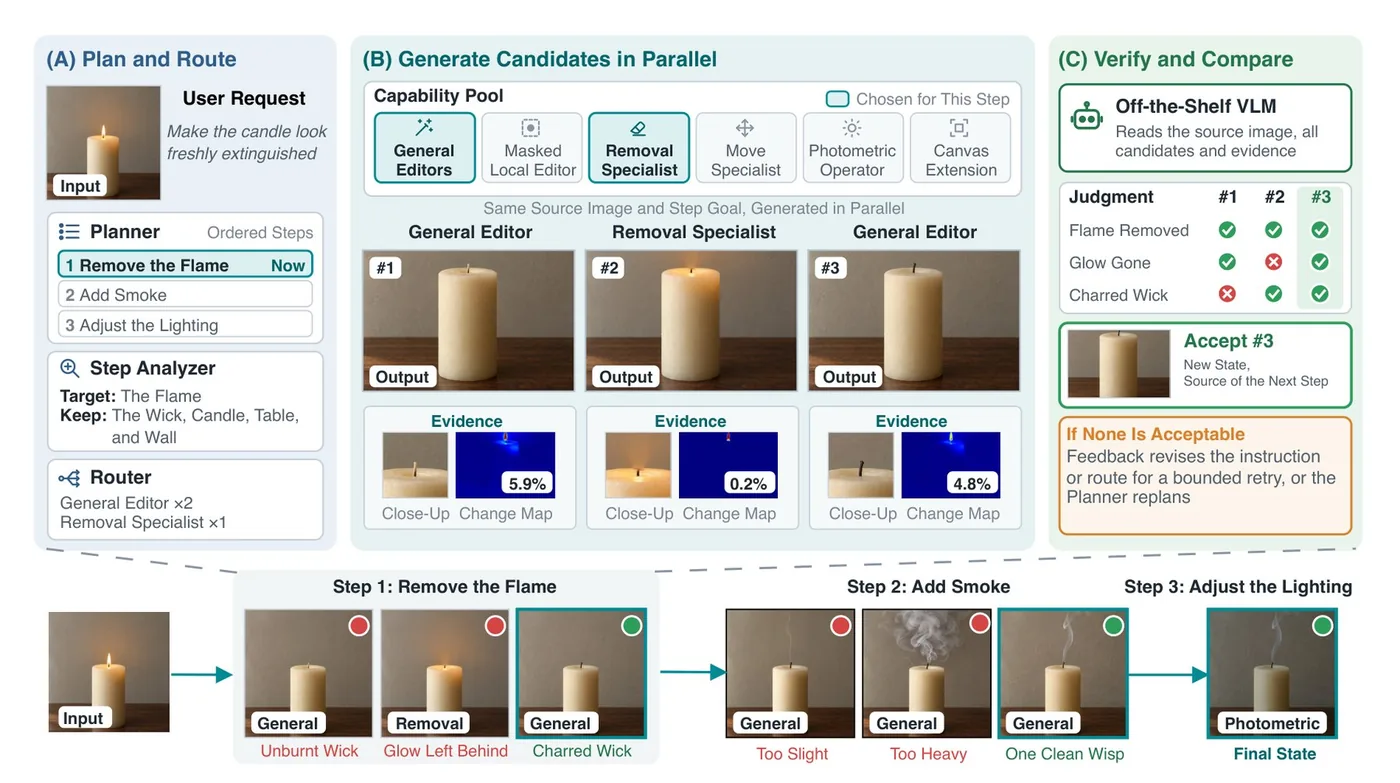
Instead of changing an image in slow steps that stack visual errors, the agent builds several edit options at once from the clean source file [1]. Parallel generation won easily. In blind tests, photo pros chose parallel options in 78.5 percent of matchups, needing half as many scoring passes.
Real-world data from creative forums backs up these findings [1]. In another unreviewed preprint paper, researcher M. R. Taesiri studied 83,000 photo editing requests sent to Reddit. Taesiri found that top AI models like GPT-4o, Gemini-2.0-Flash, and SeedEdit solved only about 33 percent of everyday requests. They struggled on low-creativity tasks that needed pixel accuracy, often changing faces or clothes when trying to clean up a simple background.
Photoshop AI Workflows in Multi-Step Tasks
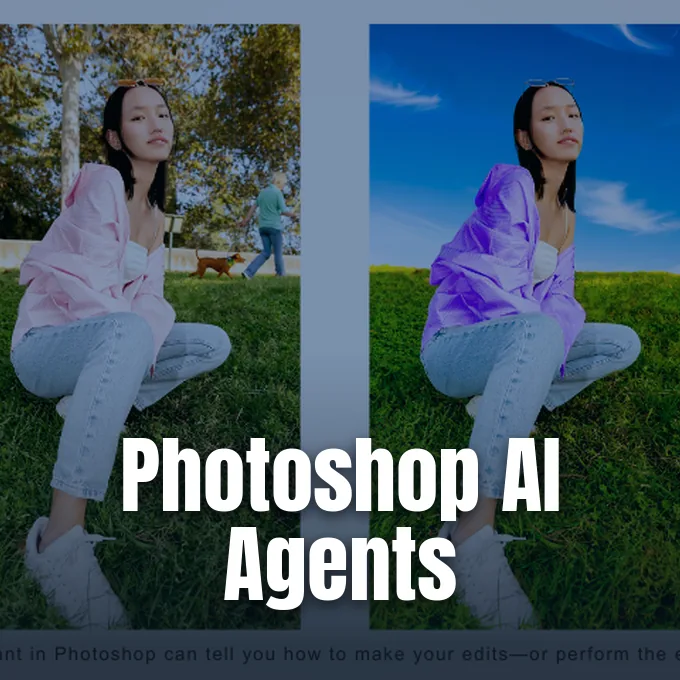
Adobe Research has spent years studying how natural-language agents can work with manual controls in desktop creative software [2]. Senior Research Scientist Trung Bui, who helped guide the work with Adobe’s Digital Imaging and Search teams, stated that user tests showed clear splits among creators. “Some want the agent to do everything for them, but others want to control the editing process and learn as they go,” Bui said. The team built tool-linking code that spots and opens needed Photoshop tools. This hybrid setup lets users choose between full automation and step-by-step help, so beginners can learn while seasoned pros keep full control over layers, masks, and color tweaks.
The core setup draws on an unreviewed preprint co-written by Bui and scientists at the National University of Singapore, named ImageEdit-R1: Boosting Multi-Agent Image Editing via Reinforcement Learning [2]. The design uses reinforcement learning to guide vision agents that handle intent, pick regions, and paint pixels without drifting off course.
These lab concepts reached public testing when Adobe rolled out a test release of its assistant for Photoshop on web and mobile (iOS and Android) [4]. Product manager Mike Polner pointed to AI Markup, a web feature that lets artists draw borders right on canvas and type prompts for local fixes. Paid users got unlimited runs through April 9, giving creators space to test fresh Photoshop AI workflows on real graphic files.

How Evaluation Records Guide Model Decisions
Standard vision models fail to judge small image changes because shrunken full-canvas views hide soft edges and slight color shifts [1]. To fix this blind spot, EditAgent builds a proof file holding close-up crops of edited spots, change maps, and measured color numbers. In one trial run with brightness tweaks, the numbers showed that a general editor overexposed highlights and pushed warmth past the user prompt. The numbers told a different story. Guided by hard metrics, the auto judge picked an alternate draft that stayed within limits. Feeding pixel metrics to language models helps software spot flaws that human eyes catch right away.
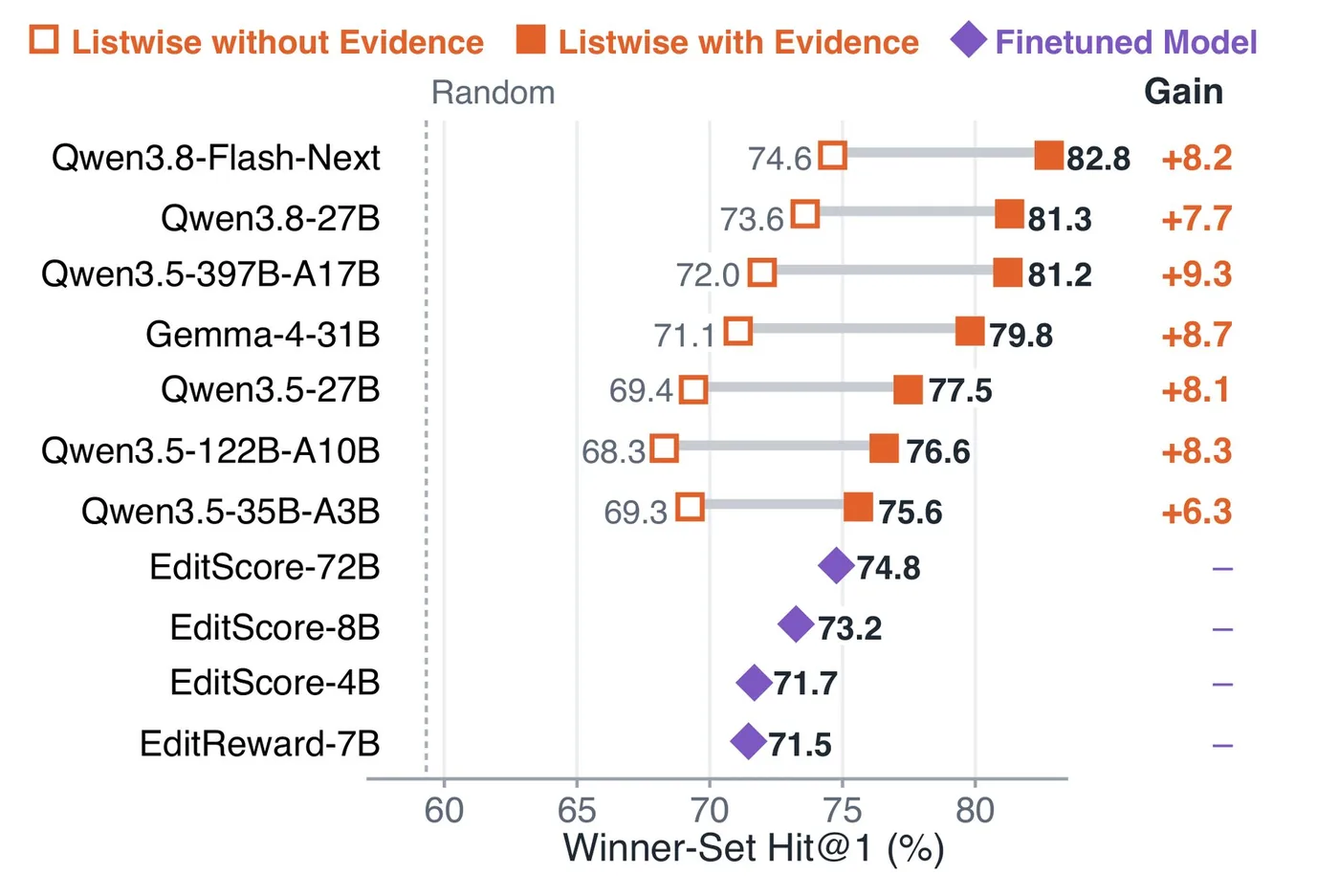
With proof files in hand, open models beat specialized judges trained on human scoring data [1]. The open model Qwen3.8-27B picked a good edit in 81.3 percent of runs. That topped the fine-tuned model EditScore-72B, which scored 74.8 percent on the same 600-edit test.
EditAgent also runs a history check to stop later edit passes from wiping out earlier approved work [1]. In one test run, an instruction to “let in more daylight” in a bathroom render led a model to turn a frosted window clear. Why is this tracking vital for studio work? The history checker caught the clash and brought back the frosted glass. The fix took hold without extra user prompts.
Bringing Photoshop AI to Creative Cloud
In June 2026, Adobe expanded its creative agent to several desktop tools during an executive talk in San Jose, California [3]. David Wadhwani, president of Adobe’s Creativity & Productivity business (Nasdaq: ADBE), stated that smart assistants will run multi-step tasks in Photoshop, Premiere Pro, Illustrator, InDesign, and Frame.io. “Every creative now has an agent capable of helping them execute across every app and platform where they work so they can set the vision, apply their taste and make the calls that only they can,” Wadhwani said. Adobe frames the agent as a helper rather than a replacement.
Adobe supported its strategy with feedback from an international creator poll documented in its Creators’ Toolkit Report, which gathered insights from over 16,000 creators [3]. The survey showed a stark split. About 75 percent of creators view AI as an everyday tool, but 85 percent say final artistic choices must stay in human hands [5]. Adobe had earlier added mobile video tools when Adobe Premiere arrived on Android with free 4K video editing. In contrast to how Apple Creator Studio adds MotionVFX and cross-app AI tools, Adobe links its prompt layer straight into Photoshop AI panels.
Outside its own creative apps, Adobe links its helper to external tools like ChatGPT, Claude, Copilot, Google Gemini, and Slack [3]. Premiere Pro builds first cuts, and Illustrator creates asset sets from spreadsheets, letting creators run Photoshop AI steps without leaving their primary chat windows [5].
Compute Demands and Training Data Gains
The main hurdle stopping wider release of multi-agent setups like EditAgent is the high compute load needed to make parallel drafts [1]. Xu and his team found that running parallel tools and auto judges needs roughly ten times more compute than running a single editor. On the EdiVal test, an agent using Qwen in its third round beat commercial setups like Seedream 4.0 and GPT-Image-1.5 in visual output. The extra compute adds up fast. Waiting minutes for an agent to build candidate drafts and pull numbers breaks user focus, leading Adobe to favor lighter assistants for consumer releases.
Instead of shelving compute-heavy agents, the team used EditAgent to build about 26,000 verified training pairs from its test runs to tune faster downstream editors [1]. Training on verified agent data improved open models like Qwen-Image-Edit-2511 and Flux-2-Klein-9B, but training on raw unverified output from FLUX made the base models worse.
Adobe plans to build conversational features deeper into creative suites while testing multimodal inputs like pointing and voice [2]. Trung Bui noted that user control remains the guiding rule. “Now we can blend generative AI technology with conventional workflows to create an AI agent that collaborates with the user,” Bui said. Human taste still drives the art. These coordinated steps aim to make upcoming Photoshop AI tools faster and more dependable.
- ONLINE NEWS Kemper, J. (2026, November 1). Adobe is testing how well AI agents can use editing tools like a Photoshop professional would. The Decoder. [Article Link]
- PRESS RELEASE Adobe Research. (2026, June 16). Do it for me, or show me how: The research behind Photoshop’s AI Assistant. Adobe Research. [Article Link]
- PRESS RELEASE Adobe. (2026, June 18). Adobe unveils major expansion of creative agent across Firefly and Creative Cloud apps including Photoshop and Premiere. Adobe News. [Article Link]
- WEBSITE Polner, M. (2026, March 10). Image editing just got smarter with AI in Photoshop and Firefly. Adobe Blog. [Article Link]
- ONLINE NEWS Pal, M. (2026, June 18). Adobe’s new AI assistant could save you hours in Photoshop and Premiere. Digital Trends. [Article Link]


