





Engadget writer Roger Fingas reported on November 15, 2026, that isolating connected household devices on a separate smart home network creates stubborn practical problems for everyday users. Many people attempt to split their routers into multiple bands or guest accounts to boost digital privacy and wireless reach. But separating these devices often stops phones, tablets, and computers from communicating with the automated accessories that manage lights, sensors, and locks [1].
Benefits of Smart Home Network Isolation
Dividing a smart home network across separate frequencies offers clear advantages for equipment located far from a home router. Roger Fingas pointed out that the 2.4GHz band carries wireless signals over longer distances than faster 5GHz or 6GHz bands, giving distant accessories the steady signal they need [1].
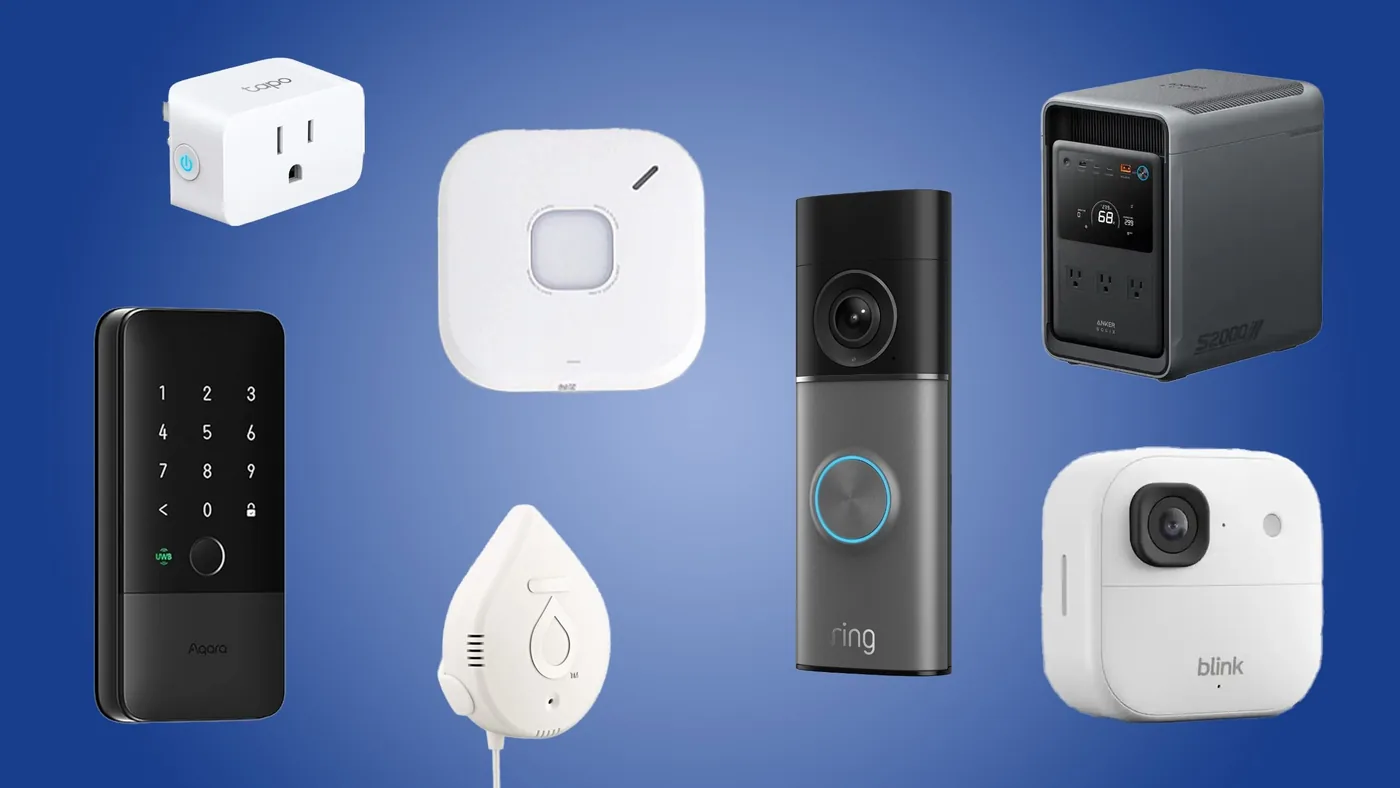
Longer range proves especially helpful for security gear mounted along outdoor yard boundaries. In an assessment for Tom’s Guide, editor Mike Prospero explained that homeowners often install perimeter equipment like outdoor security cameras and smart locks to protect their property during the holidays. Devices like the Eufy outdoor camera feature dual lenses with an 8X zoom along with built-in solar panels, allowing them to operate on distant fences without running electrical cords [2]. When peripheral hardware drops off a home router, front locks fail to open and camera feeds cut out without warning. Fingas said that “migrating accessories to your router’s 2.4GHz band (via a separate SSID) can sometimes solve issues with range,” ensuring that perimeter cameras stay connected when someone approaches the house [1].
Digital privacy provides another strong incentive for isolating household accessories. Placing budget gadgets onto a guest login prevents intruders from using an infected sensor to jump into personal laptops or phones that hold sensitive bank logins. Fingas said that smart products carry security vulnerabilities just like desktop computers, making guest networks look sensible on paper [1].
Communication Failures on Split Networks
Despite potential security benefits, isolating connected accessories often creates frustrating practical friction. The main obstacle is that devices assigned to separate network accounts can’t communicate with one another across router boundaries. A router’s guest network is designed specifically to block connected hardware from contacting other household systems, which means a smartphone sitting on the main Wi-Fi band can’t send local commands to a thermostat or smart lock assigned to the guest login. Fingas reported that while split 2.4GHz and 5GHz SSIDs should allow local traffic in theory, users routinely encounter connection drops unless they reconfigure advanced router permissions [1].
This communication divide breaks automated household routines that depend on cross-device coordination. Prospero pointed out that Tapo smart plugs rely on the Matter protocol to bridge controls between Apple, Google, and Amazon platforms. If smart plugs sit on an isolated guest network, automated hubs can’t trigger lighting schedules when families arrive home [2].
Manual workarounds quickly become tedious during everyday routines. Whenever someone wants to adjust a smart bulb or change heating levels, they must open their phone settings, leave the faster 5GHz network, and reconnect to the slower accessory band. Fingas said that controlling smart home gear through an Apple Mac becomes awkward when computer connections are isolated from household hardware [1]. As newer artificial intelligence capabilities integrate into desktop platforms, separating computers from home accessories causes far more inconvenience than protection. In the same way, First Alert smoke detectors that pick up fast-burning and smoldering fires need to reach nearby smart speakers so families hear urgent alarms in any bedroom [2].


Mesh Routers and Setup Troubles
Mesh Wi-Fi hardware creates even steeper hurdles for split network configurations. These mesh systems depend on a single, unified wireless name that automatically steers connected gadgets between 2.4GHz and 5GHz bands. Fingas reported that splitting bands on mesh equipment is impossible because disabling automatic steering breaks the smooth handoffs between router nodes [1].
First-time pairing failures cause persistent frustration when installing budget accessories on unified mesh routers. Fingas warned that cheaper 2.4GHz-only products often can’t be detected by a smartphone during setup because mobile handsets automatically connect to the 5GHz radio while accessories listen on 2.4GHz. This pairing mismatch forces users to walk to the far edge of their property just to weaken the 5GHz signal until the phone drops down to 2.4GHz. Prospero reviewed emergency hardware like Moen water leak detectors, sold in a three-pack for $139, and the Anker Solix S2000 battery backup, an 8.2 × 11.1 × 12.7-inch unit weighing 35.7 pounds that delivers 1,500 watts of steady power and 3,000 watts at peak output. If these emergency tools fail to link with household apps during setup, they can’t send temperature warnings or trigger water shutoff valves when basement pipes freeze [2].
Migrating dozens of existing accessories to a new network name also creates hours of tedious manual work. Each plug, bulb, and sensor must be factory reset and paired through its app from scratch. Fingas warned that reconfiguring a full smart home network is rarely worth the trouble if existing connections already work reliably [1].
Vulnerable Hardware in Everyday Homes
Hardware security flaws provide the main reason homeowners consider network segmentation. Many low-cost accessories receive sparse software updates and lack strong encryption, leaving them exposed to automated internet scans. Fingas reported that smart devices carry just as many flaws as standard computing equipment, with the added danger that hacked cameras give strangers a look inside private rooms [1].
The variety of connected gadgets entering everyday homes increases these privacy worries. Prospero evaluated several holiday protection gadgets, including video doorbells and smart door locks designed to secure houses when families travel. A budget Ring video doorbell selling for $39 offers 2K video resolution and two-way talk, using artificial intelligence to detect visitors and alert owners if someone attempts to steal a package from the porch. Meanwhile, the Aqara U400 smart lock uses ultra-wideband radio to unlock doors automatically when an owner walks up with an Apple Watch or phone, while allowing families to assign custom access schedules for dog walkers [2].
Outdoor surveillance cameras generate especially sensitive video feeds that homeowners want to guard. Prospero pointed to Blink cameras that deliver 2K video and run for two years on battery power, featured in a holiday promotion offering two units for 66% off. Other plug-in models pan 360 degrees and tilt 115 degrees with color night vision to follow movement [2].
Practical Alternatives for Smart Home Wi-Fi
Homeowners do not need to split their networks before checking whether their current setup actually causes trouble. Fingas advised against moving accessories to a 2.4GHz band if existing connections perform reliably, describing unneeded network changes as mere busywork. He pointed out that households face little danger if they stick with reputable hardware brands and apply security updates [1].
Adopting hardware built on unified connectivity standards helps bridge security with daily convenience. The emerging Matter standard, supported by accessories like Tapo smart plugs, lets gadgets communicate through encrypted local commands across Apple, Amazon, and Google systems without routing data through remote third-party cloud servers. Prospero also pointed out that dependable backup systems like the Anker Solix S2000 can keep household refrigerators running for up to 35 hours during harsh winter storms without requiring complicated network setups [2]. Choosing hardware with strong local communication protocols gives homeowners peace of mind while keeping everyday automation simple and responsive.
For households struggling with dropped signals along distant property lines, upgrading to a mesh Wi-Fi system solves range problems far better than splitting SSIDs. Fingas explained that mesh systems handle node handoffs automatically, giving outdoor security cameras and smart locks the signal reach they need. Sticking to reputable brands and updating firmware keeps a smart home network safe without breaking everyday device controls [1].
- ONLINE NEWS Fingas, R. (2026, November 15). Should you keep your smart home gadgets on a separate home network? Engadget. [Article Link]
- ONLINE NEWS Prospero, M. (2026, November 15). 7 smart home devices you need to keep your home safe during the holidays. Tom’s Guide. [Article Link]


