



Valve released a new Steam client beta on October 15 that turns the Steam Linux client binary into a native 64-bit app and isolates it inside a runtime container. Writing for Phoronix, Michael Larabel said that the update alters how Steam runs across distros by shifting away from the legacy 32-bit build that defined the platform since its initial release [1]. Although Valve made the client binary 64-bit, the company said Linux gamers still need 32-bit graphics drivers on host systems to run older games without graphics errors [4].
Running Steam for Linux Inside Containers
For more than thirteen years, the Steam Linux client ran as a 32-bit program. Valve originally launched Steam on Linux on Valentine’s Day over a decade ago, when Michael Larabel covered the debut for Phoronix [1]. Distros routinely shipped 32-bit packages back then [2]. Over the following decade, keeping those packages around turned into an annoying chore for distro maintainers as desktop Linux distributions like Ubuntu and Arch Linux moved almost entirely to modern 64-bit software [1].
Valve announced the build shift in its release notes, writing: “The Steam client is now a 64bit application”. The software no longer runs bare [3]. Rather than executing directly on the host OS, Steam now runs inside an isolated Steam Runtime container using the pressure-vessel tool, which provides a predictable software environment that behaves consistently across distinct distributions [2]. Brian Fagioli reported for NERDS.xyz that in earlier releases, Valve layered runtime libraries over host libraries, creating frequent package conflicts whenever host distributions differed from the baseline environment expected by Steam. Container isolation protects core libraries whether a gamer boots Fedora, Debian, Arch Linux, or Ubuntu on desktop hardware [3].
The work didn’t happen overnight [2]. Liam Squires-Hand covered the early groundwork for GamingOnLinux, reporting that Valve began public tests on March 20, 2026, when it put out a preview build called the Linux SteamRT3 Beta [5]. Lunar Computer also tracked the containerized client rollout, documenting how Valve developed the SteamRT3 build to improve cross-distribution reliability [6]. Runtime documentation links the 64-bit client to a container called steamrt3c, which project notes describe as a variant of the sniper runtime created specifically to package the client application on Linux [2].
32-Bit Driver Needs for Legacy Games
News of a 64-bit client led many players to hope they could wipe 32-bit packages from their personal computer storage drives. Valve quickly warned that multilib packages remain mandatory. In a technical requirements document published 82 minutes after the announcement on October 15, Valve explicitly stated that 64-bit-only operating systems aren’t supported on modern PC hardware. Host systems still need 32-bit drivers [4].
Chris Steven of MIXED Reality News reported that Valve engineer Andres Rodriguez outlined the technical reality on GitHub at 23:52 UTC on October 15, writing that dropping 32-bit support remains impossible for the ecosystem. “Note that i386 multilib is still required,” Rodriguez wrote, stating that “running steam in a 64bit only environment is NOT supported”. He said that while the client binary is 64-bit, games still rely heavily on 32-bit code. Even with Proton WOW64 translating Windows calls for newer releases, a large catalogue of native Linux games will immediately fail without 32-bit graphics drivers and libraries installed on the host operating system. Rodriguez said dropping 32-bit host libraries wasn’t the goal of the update, though placing the client inside a container should help reduce the total package footprint [4].
The call for a pure 64-bit client isn’t new. A user filed an issue asking for a 64-bit-only client on September 30, 2014, after encountering missing 32-bit dependencies on CentOS 7, and that ticket remains open after accumulating more than 320 comments. When an unofficial package appeared on the Arch User Repository, Rodriguez asked packagers to stop. “Please don’t create packages like these,” Rodriguez said, warning that inexperienced testers would file confusing bug reports with Valve [4].


System Requirements and Display Support
Valve paired the beta release with a specific list of platform requirements. Host computers must provide glibc 2.31 or newer and a Linux kernel of version 5.6 or higher, while hardware rules call for an x86_64 processor supporting CMPXCHG16B and SSE3 instruction sets. Steam also needs a D-Bus session bus, functional OpenGL and Vulkan drivers, and unprivileged user namespace permissions to create isolated mount namespaces for the container environment [4].
Audio and display support also carry firm platform boundaries. Valve supports PipeWire through pipewire-pulse as well as PulseAudio, but marks older sound frameworks like JACK and ALSA dmix as unsupported configurations for this client release. On desktop sessions, Steam still requires an X11 server. That means players must run an X11 session or Xwayland, so a pure Wayland desktop without Xwayland can’t run Steam on Linux today. NetworkManager isn’t mandatory for standard desktops, but Valve recommends it when Steam acts as the main system shell on SteamOS setups [4].

Some technical hurdles still linger in the beta runtime. A March 20 bug report showed that the runtime folder still holds an older 32-bit build of the reaper binary, which forces distros to keep 32-bit GL packages installed just for that helper tool [4]. While hardware discussions like why the Valve RAM crisis won’t change Steam Deck 2 plans center on memory pricing and handheld manufacturing timelines, Valve’s desktop client work shows how the company modernizes its Linux stack across PC platforms [2].
Desktop Steps for Steam for Linux Testers
Trying the beta build doesn’t require complex terminal commands. Sourav Rudra tested the update on Ubuntu 26.04 LTS for It’s FOSS, saying players on modern distros like Fedora just install the official client package and join the preview channel. The switch takes moments [2].
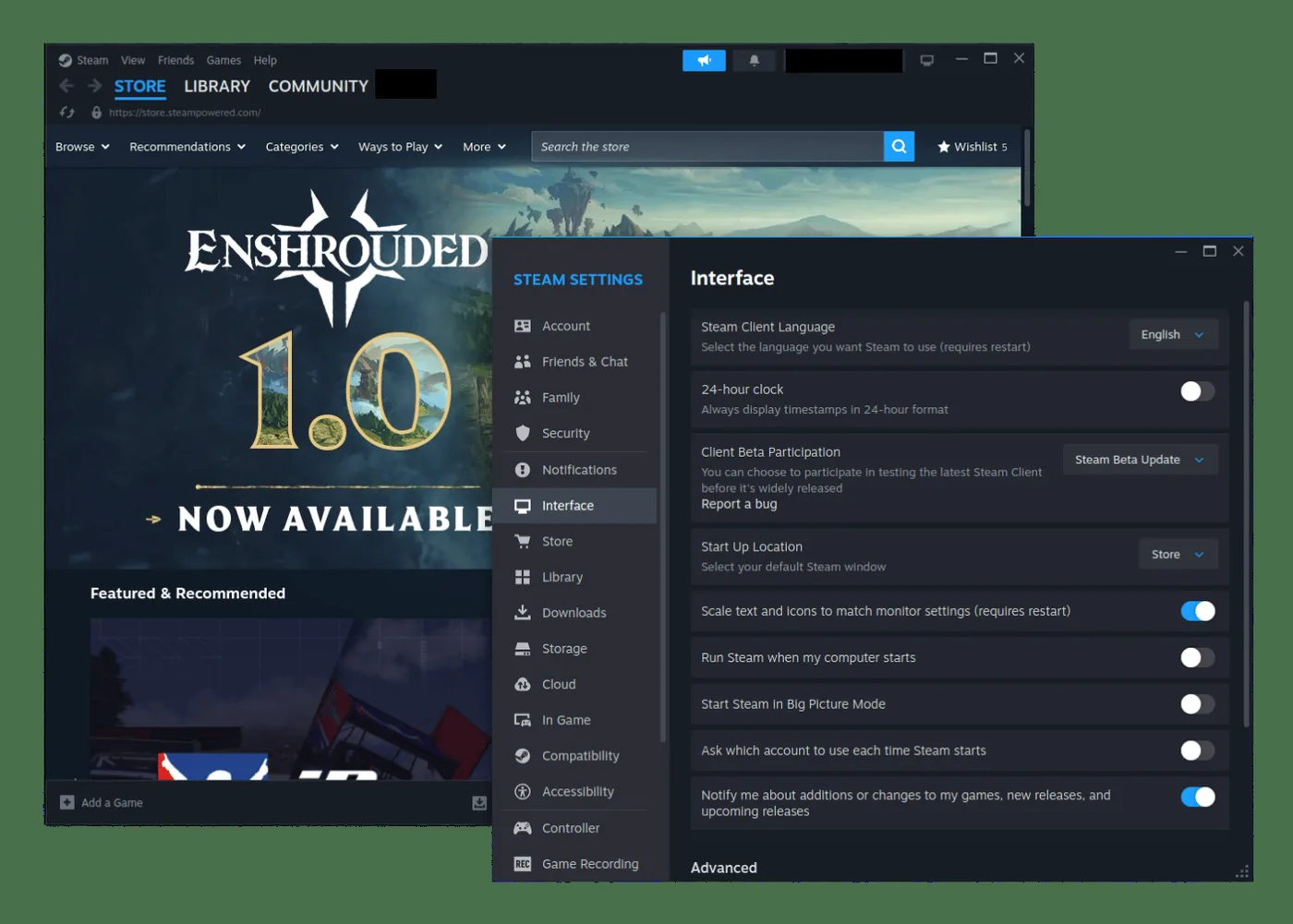
To test the build, open Steam, click the Steam menu at the top left, and select Settings. Under the Interface tab, click Client Beta Participation and select Steam Beta Update from the dropdown menu to update the Steam Linux client files. After clicking Restart Now, the client downloads new files and relaunches within the runtime container [2]. Valve welcomes tester feedback and asks players to report bugs using the button in Settings or through the official GitHub issue tracker [5].
Valve hasn’t announced when the 64-bit client will roll out to all users on the stable branch [3]. As Chris Steven reported for MIXED Reality News, Valve first introduced automated Proton support for non-Steam Windows software through preview channels before pushing it to everyone [4]. Gamers who want a quiet desktop don’t need to switch right away, but curious players can try the containerized build today [3].

Achievement Sets and Remote Play
The beta also brings changes that reach well beyond Linux. Valve introduced Steam Achievement Sets, a system that lets game makers group achievements into distinct categories for base games and downloadable expansions across all desktop platforms. That prevents new DLC releases from resetting a player’s hard-earned full game completion badge [3].
With Achievement Sets, finished sets stay finished when studios add new challenges later. Brian Fagioli at NERDS.xyz pointed out that studios can also archive expired seasonal tasks or retired challenges, keeping profiles clean. Valve also refreshed the Achievements page to present player stats more clearly [3]. For Linux users, the update resolves an issue where the client updater dialog failed to show up during startup [2].
Remote Play also gained helpful upgrades for home streaming. A new Display Style setting allows players to stretch and zoom video streams when a host PC and receiving client screen use differing aspect ratios [3]. When streaming from Windows hosts, Remote Play now works even while Remote Desktop is active. Advanced Host Options now include display selection, refresh rate controls, and HDR toggles, with support for the SudoVDA virtual display driver to create matching virtual monitors [5].
Finally, Big Picture Mode received several useful interface tweaks [3]. Steam chat now lives in the quick access menu, paired with quick chat shortcuts made for the Steam Deck and controller users [5]. When users turn on High Contrast mode, background artwork displays properly on the home screen. Valve also fixed an issue where docked Steam Controllers turned back on after being shut down on the charging puck dock. Memory leak fixes in streaming and controller code round out the update as Valve refines the Steam Linux client for broader stable deployment [3].
- ONLINE NEWS Larabel, M. (2026, October 15). Today’s Steam Beta Makes The Linux Client A 64-bit App. Phoronix. [Article Link]
- ONLINE NEWS Rudra, S. (2026, October 16). Valve’s Steam Client for Linux Goes 64-bit. It’s FOSS. [Article Link]
- ONLINE NEWS Fagioli, B. (2026, October 15). Valve finally makes Steam for Linux a 64-bit application. NERDS.xyz. [Article Link]
- ONLINE NEWS Steven, C. (2026, October 16). Steam’s Linux beta client just went 64-bit, but Valve still won’t support a 64-bit-only system. MIXED Reality News. [Article Link]
- ONLINE NEWS Squires-Hand, L. (2026, March 20). New Steam Beta can run the Linux client inside a container with 64bit. GamingOnLinux. [Article Link]
- WEBSITE Lunar Computer. (2026, March 20). Valve Tests Containerized Steam Client With 64-Bit Linux Runtime. Lunar Computer. [Article Link]


1 comment