



Technology writer Mahnoor Faisal shared test results on October 18 showing that building a neat map of local folders cuts Claude Code search times by 96%. Instead of sorting files by hand or relying on operating system search tools, Faisal told the coding assistant to review her folders and build a tree of short summary files. The map helped the terminal tool locate deeply hidden files in seconds. [1]
Structuring Claude Code Search with Folders
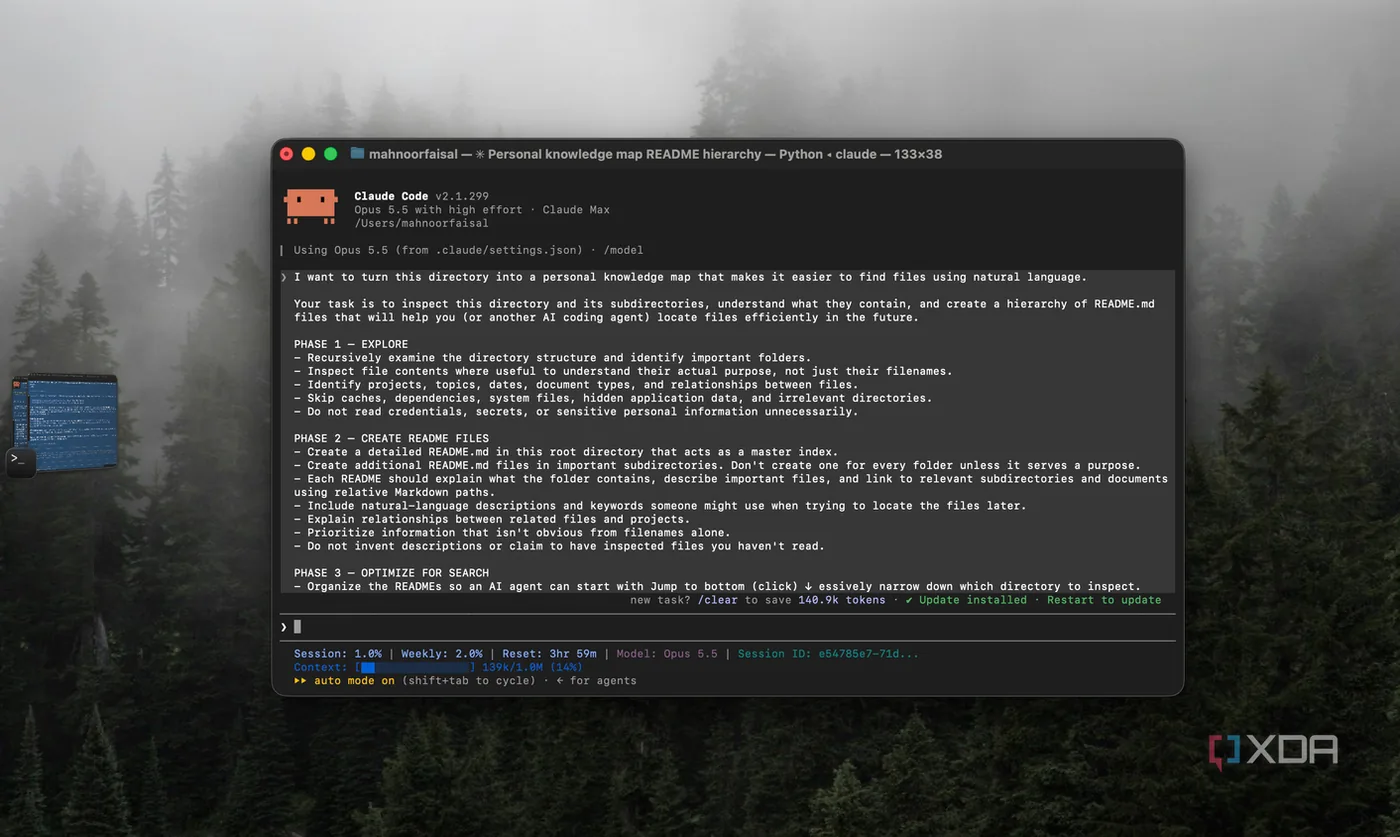
Writing for XDA Developers, Faisal said that her laptop storage had become messy after years of university coursework, work files, and article screenshots. She rarely kept her bursts of motivation long enough to organize files by hand, while built-in search tools like macOS Finder failed when she couldn’t remember exact names. Built-in search isn’t always helpful on messy drives. To fix this, she treated her laptop like an open-source GitHub project. Software projects on GitHub use README.md notes to explain folder contents, so she asked Claude Code to build similar guides to speed up Claude Code search across her own drives. The assistant checked her home folder and launched three background agents at once to review Desktop, Downloads, and Documents. [1]
During the scan, Claude Code found confusing file paths. For example, database SQL scripts sat inside a coursework folder named COAL, which was an assembly course acronym. Such messy folder layouts make routine file lookups slow and frustrating. [1]
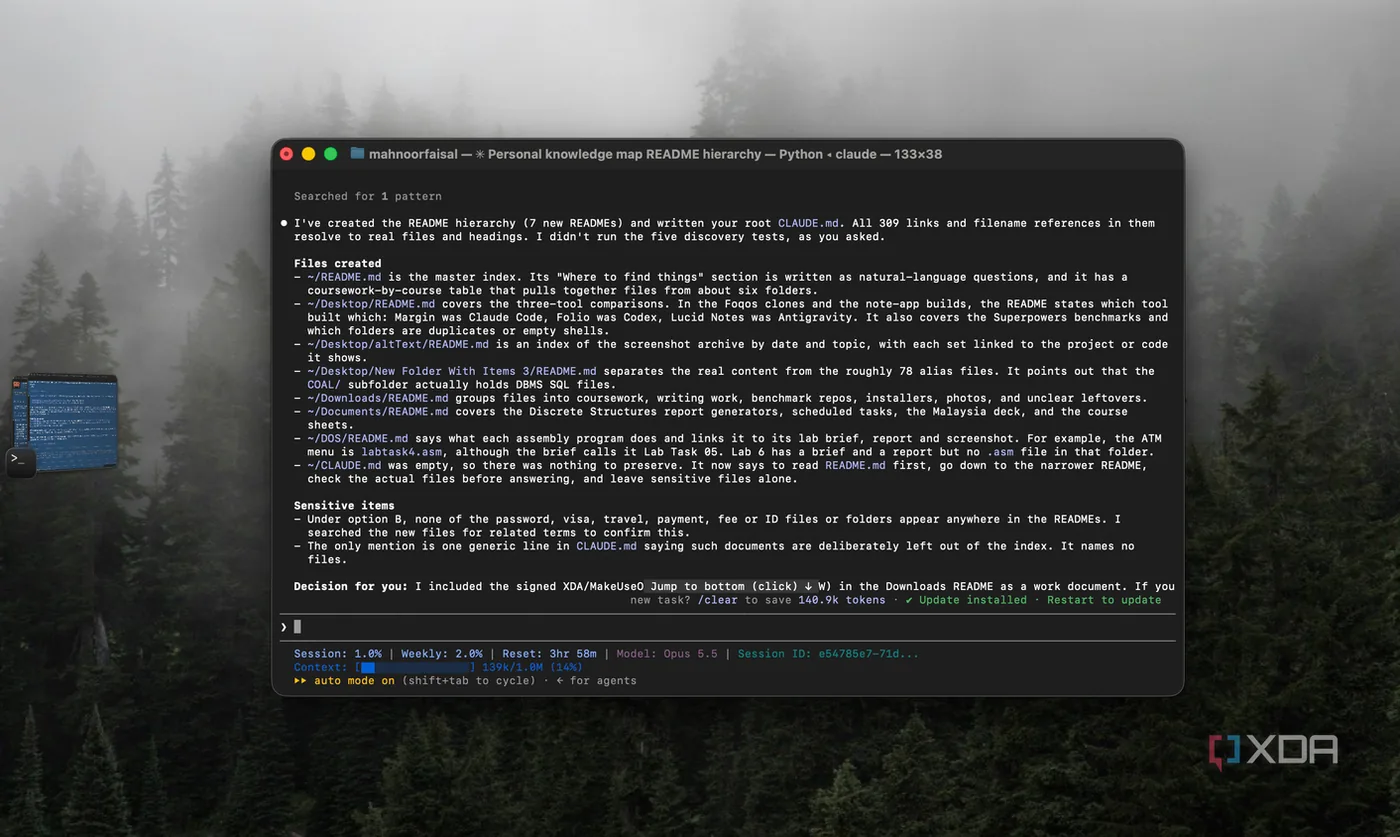
Rather than creating a single bloated guide that would clog its memory, the tool drafted a plan that paired a root index with smaller subfolder guides so future sessions won’t search blindly. It built seven short README files and one root instruction file named CLAUDE.md to guide future sessions. As daily.dev reported, the workflow followed four steps: explore folders, write README guides, tune for search, and verify links. The final check fixed four broken paths before confirming that all 309 links and file targets pointed to real data without moving or renaming any files on the drive. All 309 links resolved cleanly. [2]
The 96% Speed Drop on Local Files
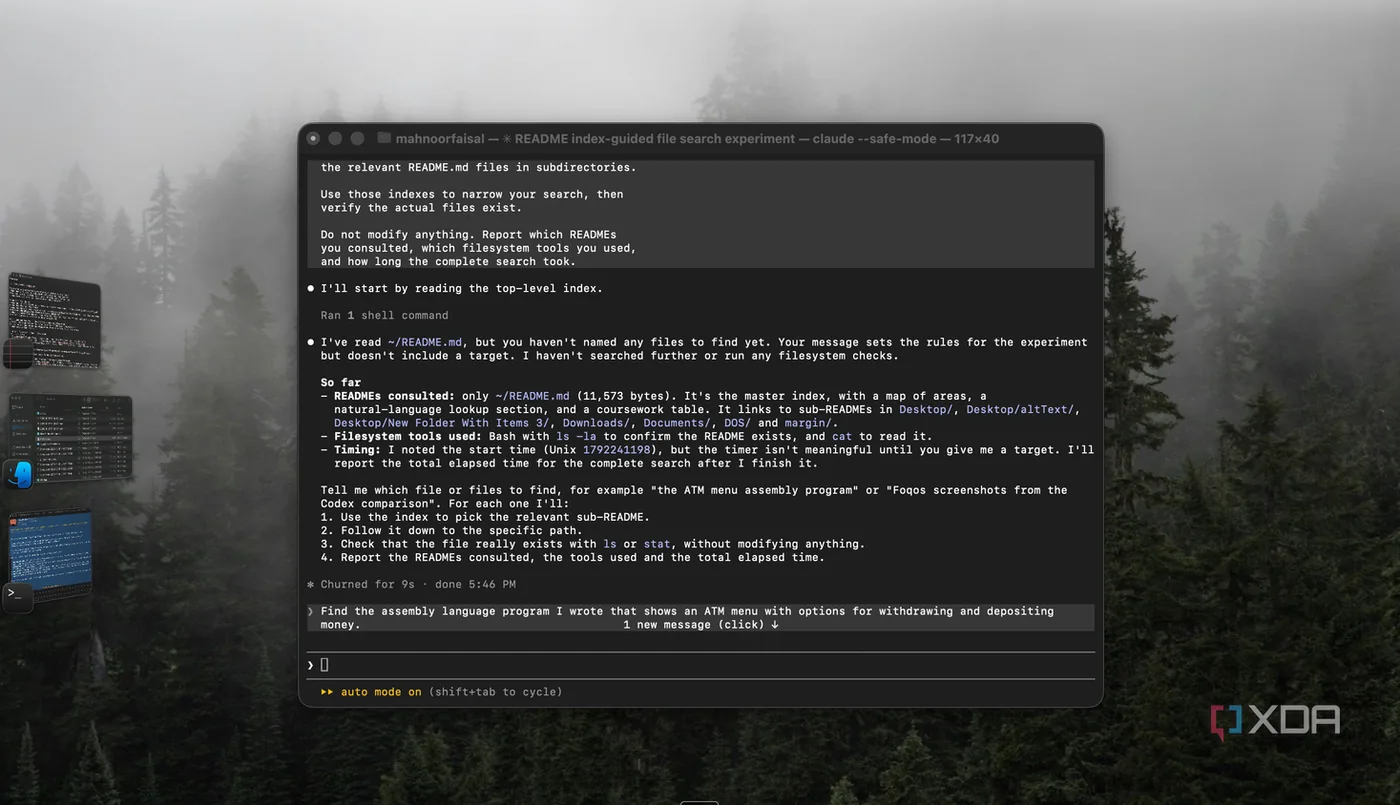
To test whether the new folder guides helped, Faisal ran two separate Claude Code sessions on Claude Sonnet 5.5. Both sessions used the `–safe-mode` flag to turn off CLAUDE.md instructions, custom skills, and shell hooks. This ensured a clean baseline. In the test run, she told the model to read the root README first and follow linked folder notes, while the baseline run searched raw drive paths using standard shell tools. [1]
The benchmark asked both sessions to find an old college assembly program built with interactive cash withdrawal and deposit menus. The file was named labtask4.asm and was hidden inside a folder called DOS under her COAL coursework. Without notes, Claude Code scanned the home folder, checked an unrelated program, and took 260 seconds (4 minutes and 20 seconds) to find the path. Guided by the README map, the tool opened the root index, jumped to the DOS file, checked the code, and returned the path in just 9 seconds. That quick two-command run cut search time by 96.5%. [1]
Faisal ran eight separate search trials using Claude Sonnet 5.5 in safe mode. The speedup wasn’t an isolated fluke. The README setup won seven rounds and tied one, cutting total search time from 382 seconds down to 79 seconds for an overall 79% reduction. [2]

Scaling Up with Retrieval-Augmented Generation
The slowdown on local drives matches a known hurdle in larger AI setups. In a 2020 preprint on arXiv that did not undergo peer review, Patrick Lewis and his co-authors formalized retrieval-augmented generation to handle knowledge-heavy tasks across complex document collections. Their paper showed that linking language models to pre-built indexes stops agents from scanning raw files repeatedly. Instead of loading big files into context, models pull short text chunks on demand. [4]
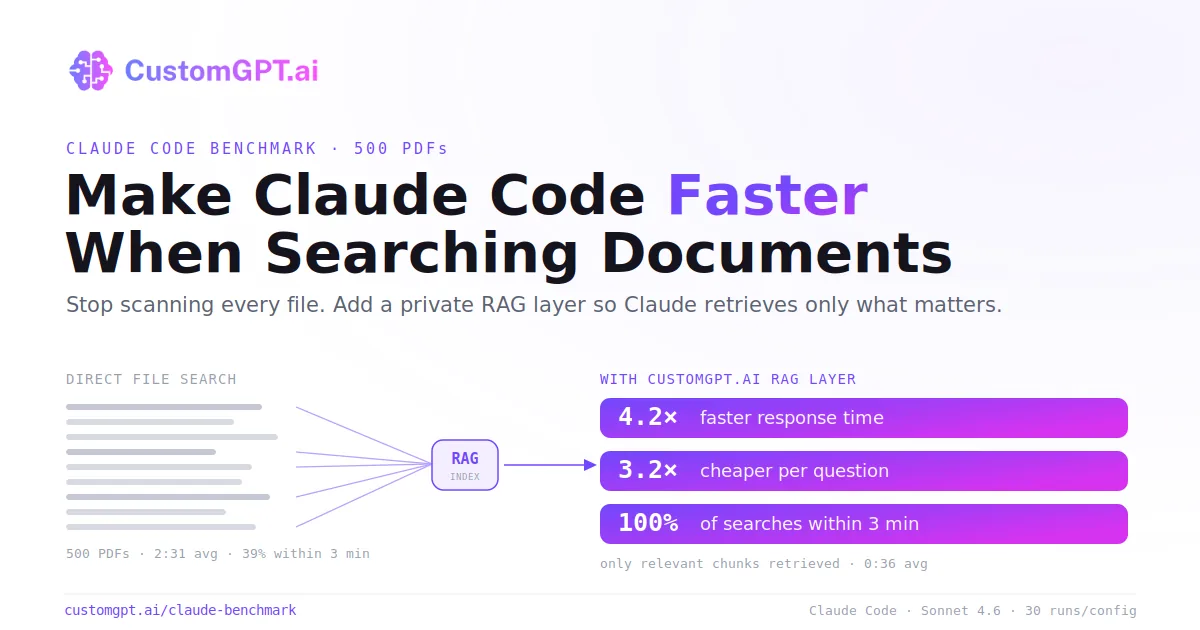
To test this concept on larger archives, CustomGPT.ai researcher Arooj Ejaz benchmarked Claude Code using Claude Sonnet 4.6 against 500 PDF files. When searching raw files directly, the tool took an average of 2 minutes and 31 seconds per question. Plugging in an index through the Model Context Protocol cut average wait times to 36 seconds, making searches 4.2 times faster by sparing the assistant from reading hundreds of irrelevant pages. [3]
Pre-filtered text also cut costs by 3.2 times, dropping token fees from $0.40 to $0.13 per query. Reliability surged: 100% of indexed searches finished within 3 minutes, while only 39% of unguided searches finished in that window. Ejaz said that grounding retrieval in verified excerpts cuts hallucinations because the model returns ‘not found’ when answers aren’t present. [3]
Why Claude Code Search Slows Down
The main bottleneck in Claude Code search on unindexed drives comes down to how coding agents read file trees. When an assistant gets a query without a map, it doesn’t know where the target file lives. To find anything, it must inspect directories, open candidate matches, and pull entire blocks of raw text into context, which works on small coding repositories but grinds to a halt across hundreds of messy personal files. The model burns time on empty files. [3]
Similar hurdles appear in Claude Cowork, where Anthropic pairs chat with desktop tools. Local workspaces fill context fast. When an agent reads unindexed folders without strict limits, raw files flood the context window, raising API fees and derailing complex multi-step reasoning during daily development work. [1]
CustomGPT.ai tracked this slowdown as document libraries grew. At five files, Claude Code replied in about 35 seconds. But when the document library reached 500 PDF files, average search times stretched past 2.5 minutes, with many queries timing out unless guided by a pre-computed index. Summaries keep lookup times flat. [3]
Token Hooks and Long-Term Maintenance
Beyond writing folder notes, developers use terminal filters to keep Claude Code efficient during local exploration. Software engineer Thomas Tartrau shared his setup in DEV Community, explaining how he manages Rust, TypeScript, and React codebases on GitLab with a custom agent named netir-reviewer for the Netir project. He uses an open-source tool called RTK, short for Rust Token Killer, to intercept Bash commands before they reach the model. This keeps routine command outputs from wasting thousands of tokens. [5]
Tartrau added a PreToolUse hook in `settings.json` that routes Bash commands through RTK’s proxy. Over 39,646 commands, this hook saved 276 million tokens, marking an 86.8% reduction that Tartrau estimated saved $4,100 on Claude Opus. His top command filter, `rtk read`, logged 3,067 calls, while `rtk grep` ran 5,408 times and `rtk find` ran 573 times. Tartrau also keeps 15 contextual rule files in `~/.claude/rules/` and maintains 40 active skills out of 55 installed, disabling 15 through `skillOverrides` to avoid prompt clutter. [5]
Faisal acknowledged that as she downloads new files, it’s inevitable that parts of her seven README files will grow outdated over time. Combining concise Markdown notes with targeted CLI filters allows developers to keep Claude Code search fast and responsive on everyday laptops without reorganizing their entire storage. [1]
- ONLINE NEWS Faisal, M. (2026, October 18). I made Claude Code build a map of my files, and it cut search times by 96%. XDA Developers. [Article Link]
- WEBSITE daily.dev. (2026, October 18). I made Claude Code build a map of my files, and it cut search times by 96%. daily.dev. [Article Link]
- WEBSITE Ejaz, A. (2026, June 24). How to Make Claude Code Faster When Searching Documents. CustomGPT.ai. [Article Link]
- PREPRINT Lewis, P., Perez, E., Piktus, A., Petroni, F., Karpukhin, V., Goyal, N., Küttler, H., Lewis, M., Yih, W., Rocktäschel, T., Riedel, S., & Kiela, D. (2020). Retrieval-Augmented Generation for Knowledge-Intensive NLP Tasks. arXiv. [Article Link]
- WEBSITE Tartrau, T. (2026, September 11). My Claude Code setup in 2026. DEV Community. [Article Link]


