




Microsoft launched two preview features on November 4, 2026. The official rollout introduces fresh ways to use cloud gaming controllers without forcing players to buy specialized console gear for casual television play. Players can turn a standard mobile phone into a touch gamepad on supported smart TVs, while testers in the United States trial direct Wi-Fi pairing on the new Xbox Nano Controller. Both options focus on reducing hardware barriers for cloud game streaming, though Microsoft confirmed that game availability and supported devices stay limited during this opening test phase [1].
Cloud Gaming Controllers in Two New Previews
Team Xbox structured the test around two different living room habits. One option serves players who sit before a television without a gamepad within reach, allowing a standard smartphone web browser to handle every input command for that television session. The second option serves owners of the Xbox Nano Controller. Instead of sending signals over television Bluetooth, the controller routes input packets straight over local Wi-Fi. Will Fulton from Xbox Wire stated that the engineering group wants to measure how each input method behaves across home networks before deciding whether to expand the features to more regions and hardware platforms [1].
Tom Warren at The Verge revealed the Wi-Fi feature one day before Microsoft made its public announcement. The phone preview launched globally in all supported Xbox Cloud Gaming territories. While Nano Wi-Fi connections remain exclusive to the United States, engineers at Microsoft picked this regional limit to test cloud server load before rolling out the software to international players [2].
The release arrives as Microsoft adjusts its broader game streaming service. PerEXP Teamworks previously reported on paid Xbox Cloud Gaming access for non-subscribers as Microsoft tested hourly access passes. Kris Holt at Engadget reported that these controller previews arrive just ahead of new monthly playtime caps scheduled for November. Broadening input choices helps lower entry barriers for casual subscribers who lack console hardware, while giving active players lower latency through home networks [3].
Mobile Phones as Touch Gamepads
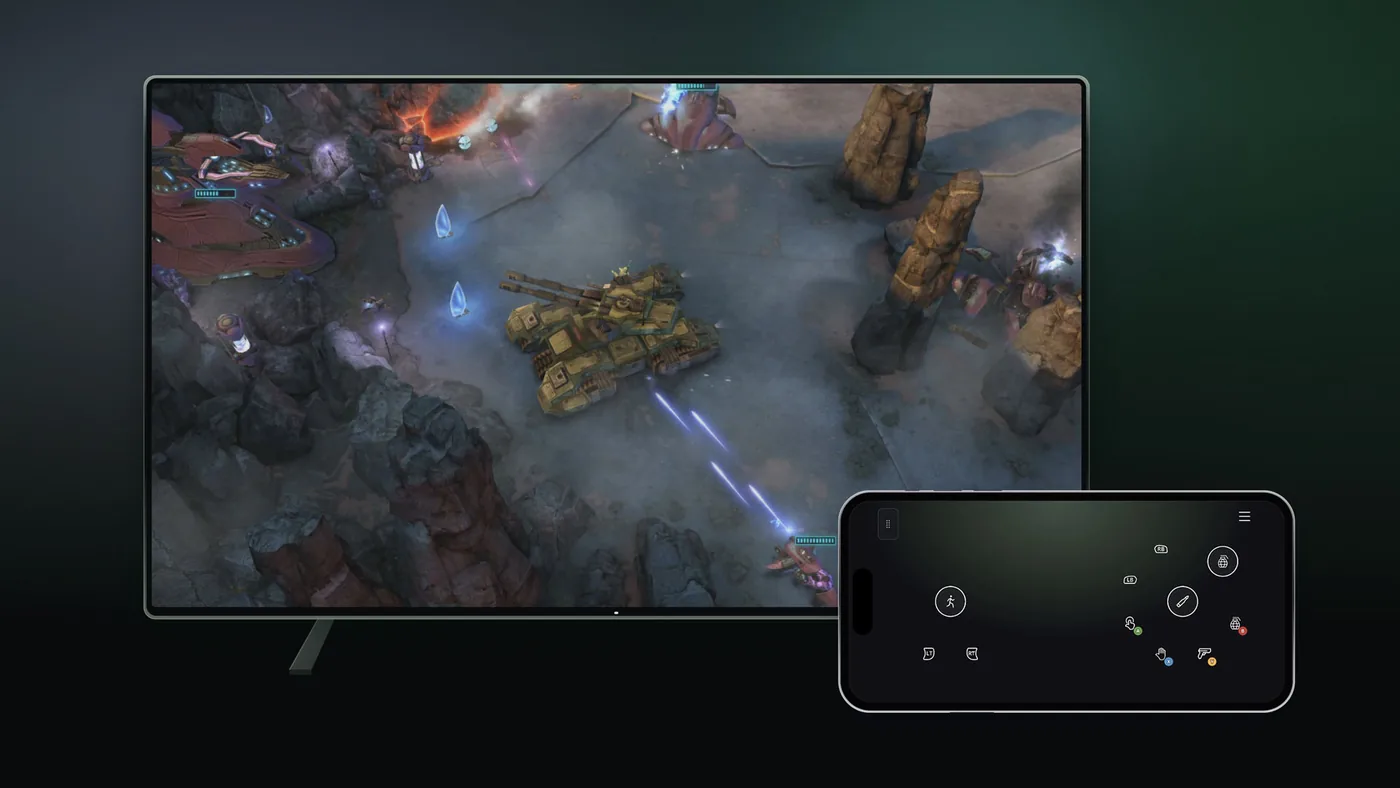
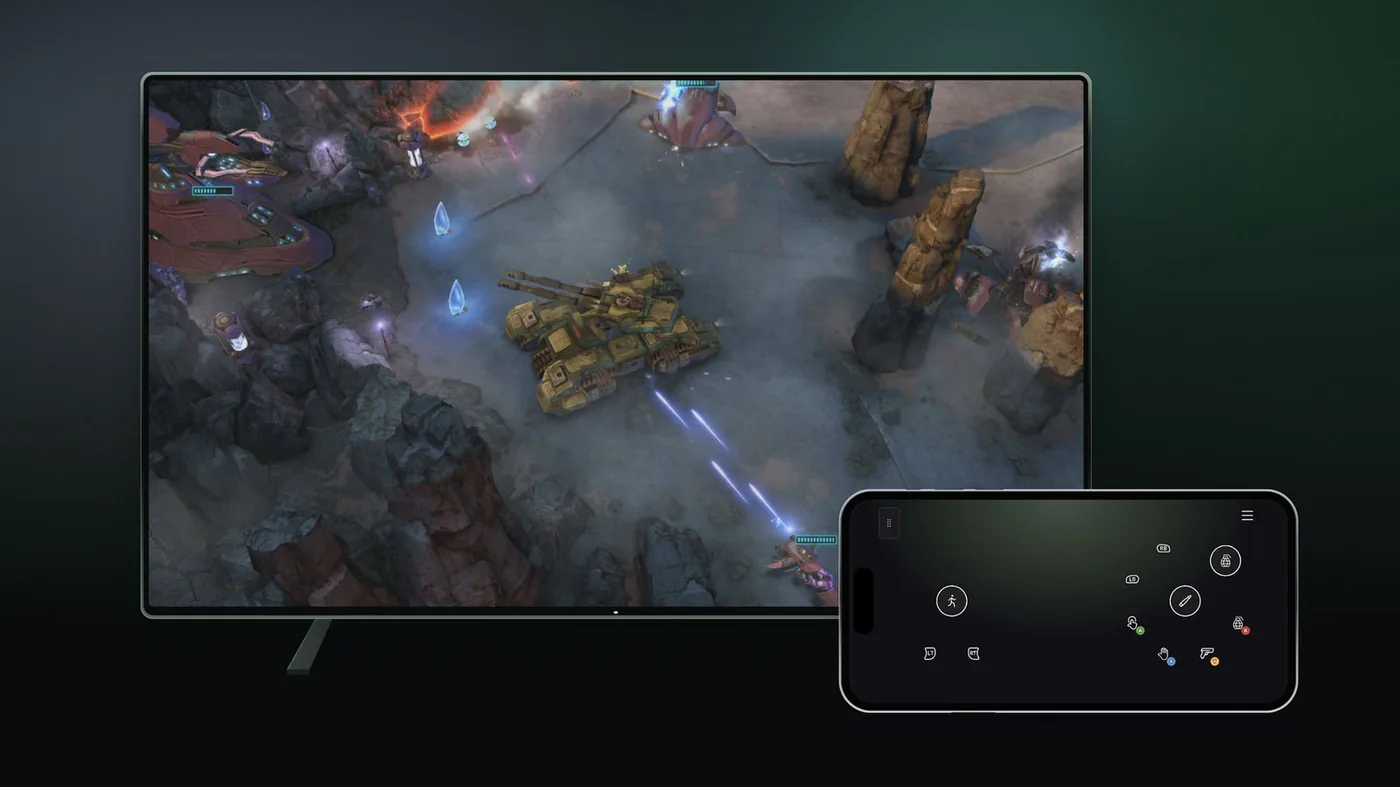
Using a smartphone avoids separate software downloads. Microsoft loads the touch controls inside a mobile web browser on Android or iOS devices. A player with a supported smart TV opens the Xbox app to enable Preview Features, and when a game starts without a synced Bluetooth gamepad, an on-screen prompt invites the user to play with a phone instead [1].
Connection happens through a camera scan. The television screen displays a unique QR code. Players scan that image with an Android or Apple device, and the browser control pad opens right away. Microsoft said that select titles feature custom button layouts designed for specific game rules. Tailored layouts help players navigate touchscreen buttons across flat screen glass [1].
Touchscreen controls suit some game genres far better than others. Kris Holt at Engadget reported that flat glass buttons lack tactile feedback. Virtual buttons feel clumsy for fast competitive shooters that require quick trigger pulls. Turn-based role-playing games, tactical strategy titles, and slower puzzle games benefit most from mobile controls because input timing is far less demanding during tactical decision phases. Other streaming providers have explored this exact mobile bridge. Netflix already lets subscribers use mobile phones as controllers for television video games, while Google’s defunct Stadia service offered phone touchpads for living room screens before shutting down. For Xbox users who want a quick session without searching for batteries or pairing wireless gamepads, the phone browser interface serves as a convenient emergency backup. Living room players can start unexpected gaming sessions without hunting down missing accessories [3].

Direct Wi-Fi Links for the Nano Gamepad
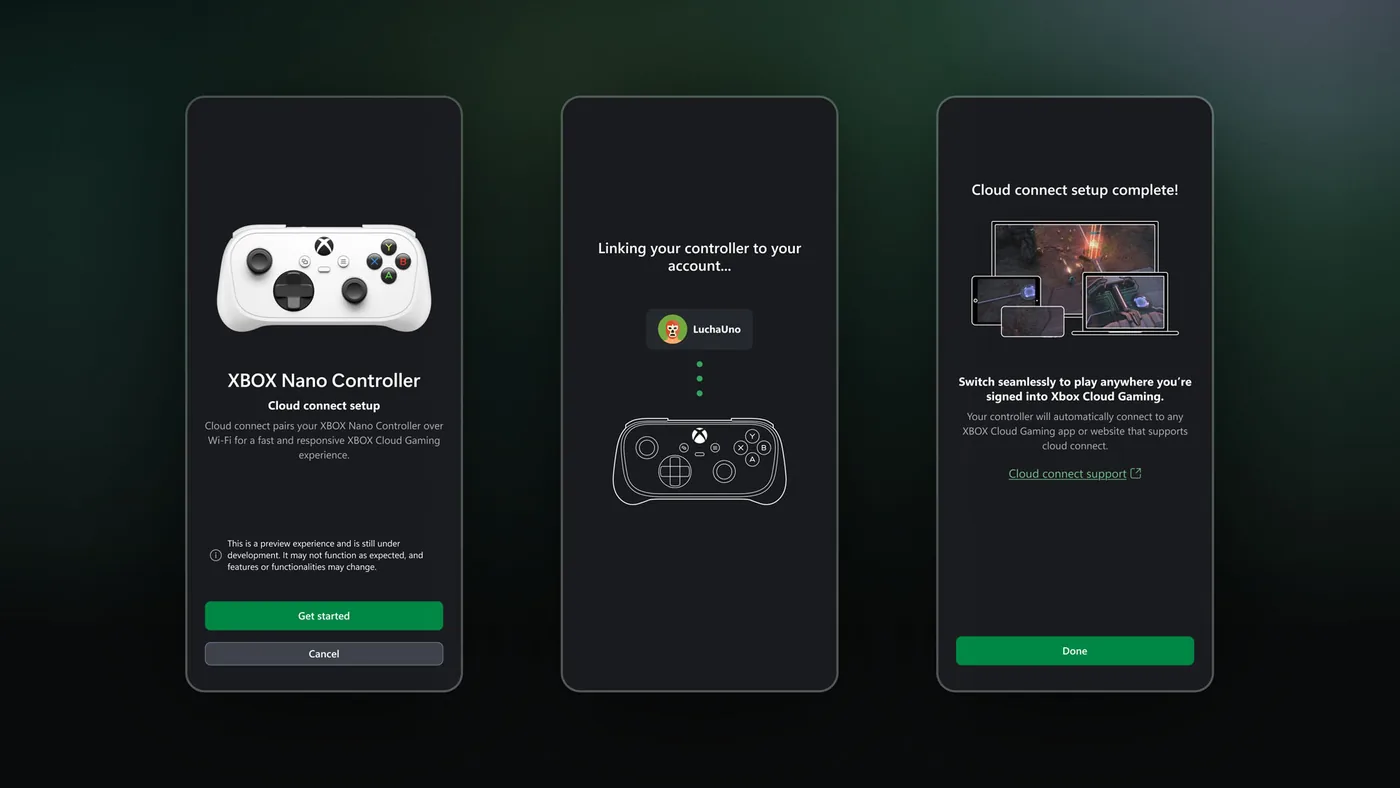
While the phone controller targets casual convenience, cloud connect on the Xbox Nano Controller tackles input delay. Standard cloud gaming setups route gamepad signals to a television via Bluetooth, and the TV then forwards those commands over home internet to remote servers. Cloud connect removes that intermediary device completely. The Xbox Nano Controller transmits button presses straight to local Wi-Fi [1].
The Xbox engineering team explained the mechanical benefit clearly in its announcement. “Instead of a Bluetooth connection to your TV, cloud connect uses your Wi-Fi to connect directly to the cloud server running your game,” the team said. “That can help reduce input latency, so gameplay may feel more responsive” [1]. Tom Warren at The Verge reported that this wireless link currently works on smart TVs and web browsers. Early testers evaluate latency differences across both environments. By connecting straight to the server cluster hosting the session, the controller bypasses Bluetooth polling delays and television input queues that often cause noticeable lag during live streams [2].
Setting up cloud connect on the Nano gamepad involves a few preparatory steps. Configuration occurs through two separate software paths. On mobile devices, users launch the Android Xbox beta release, while desktop players open the Windows Xbox Accessories program to manage their hardware profiles. Microsoft specified that PC users must enroll in the Xbox Insider testing program before the Accessories application unlocks direct Wi-Fi configuration options. Once configured, the gamepad connects automatically whenever a supported session begins [1].
Stadia Proved Cloud Gaming Controllers Need Wi-Fi
Bypassing host screens to reduce latency has a clear history in streaming. When Google launched Stadia, its official gamepad used built-in Wi-Fi specifically to communicate directly with cloud datacenter racks rather than routing commands through local screens. That hardware design shaved milliseconds off round-trip button latency. The design proved that cloud gaming controllers feel noticeably snappier when relieved of Bluetooth stack delays. Kris Holt at Engadget reported that Microsoft is now reviving that proven concept with the Xbox Nano Controller. Input packets travel straight to cloud servers without passing through local television display drivers along the way [3].
Standard Bluetooth connections introduce noticeable latency on many televisions. Many television displays process video through post-processing engines that buffer incoming controller packets. Display buffering creates an input lag between pressing a button and watching an action unfold on screen. Connecting over Wi-Fi allows the controller to establish an independent network pipeline straight to the cloud instance. A Wi-Fi connection bypasses television display processing completely [1].
Microsoft continues to treat cloud connect as an experimental feature. In official support documentation, the company cautioned that availability and supported games stay limited while engineering teams monitor network data. The Wi-Fi mode currently does not work on every Xbox Cloud Gaming endpoint. Mobile phones and older console interfaces still rely on standard Bluetooth connections. A trial limited to United States testers on smart TVs and web browsers allows Microsoft to gather detailed network metrics before undertaking a worldwide release [1].

Preview Rules and Player Feedback
Both preview features rely on player reports to uncover software bugs and connection drops. Microsoft confirmed that it is testing both experiences to identify what works smoothly and what needs software refinement on different home networks. Players testing the mobile phone controller on smart TVs can submit feedback through two separate routes. On a mobile phone, tapping the Xbox icon in the top-left corner of the browser pad opens a menu with a direct Give Feedback button. Alternatively, on the television screen, users can open the Xbox Guide by pressing the guide button or clicking the top-left icon, or select their profile icon in the top-right corner of the main menu to log their impressions. Player reports help engineers isolate touch latency issues on different television hardware [1].
Testers evaluating the Xbox Nano Controller have their own reporting path. Feedback for cloud connect must be submitted through either the Xbox Accessories app on PC or the official Xbox mobile app by selecting the built-in feedback icon. Desktop setup on Windows requires an Xbox Insider membership. Enrolled testers report pairing bugs straight to engineering teams through existing insider channels [1].
The dual previews show Microsoft’s effort to make cloud gaming accessible from any living room screen. By offering touch controls through a standard mobile browser, the company expands access to cloud gaming controllers without forcing casual players to purchase expensive console hardware. At the same time, direct Wi-Fi pairing provides responsive performance for users demanding lower input lag. As both tests gather feedback from early adopters, Microsoft continues refining its streaming ecosystem to adapt to how people play [1].
- PRESS RELEASE Fulton, W. (2026, November 4). Preview Two New Ways to Play with XBOX Cloud Gaming. Xbox Wire. [Article Link]
- ONLINE NEWS Warren, T. (2026, November 4). Xbox previews two new ways to control cloud games. The Verge. [Article Link]
- ONLINE NEWS Holt, K. (2026, November 4). Xbox is testing two new controller options for Cloud Gaming. Engadget. [Article Link]


