





Computer monitors have long run at fixed refresh intervals like 60 Hz or 144 Hz, yet graphics cards render video game frames at unpredictable speeds depending on scene complexity. When a graphics processor outputs frames out of step with monitor refreshes, the screen splits into jarring horizontal cuts known as tearing, or drops into distracting motion judder. In g-sync vs freesync monitors, display controllers adapt dynamically to incoming frame times so the panel draws each picture the moment it finishes. This synchronization eliminates visual tears without introducing the severe input latency of older software locks [1].
- How Frame Rates Cause Screen Tearing
- The V-Sync Problem in Display Latency
- How G-Sync vs FreeSync Solved Frame Pacing
- Proprietary Modules in NVIDIA G-Sync Hardware
- Open VESA Standards Behind AMD FreeSync
- Why Does FreeSync Cause Flickering in Dark Scenes?
- FreeSync vs G-Sync in Real-World Gaming Setup
- HDMI 2.1 and the Variable Refresh Rate Standard
How Frame Rates Cause Screen Tearing
Raster displays draw images row by row from top to bottom at regular intervals. Simon Baker explained on TFTCentral that screen tearing happens when a graphics card pushes a new frame while the monitor is still in the middle of scanning its previous cycle. Because the monitor cannot update its entire surface at once, it shows the top half of an older frame alongside the bottom half of a newly arrived frame. The horizontal tear becomes obvious during fast camera pans or quick strafing movements in competitive action titles [1].
Cathode-ray tubes established the original technical terms for display refresh behavior. In a CRT monitor, an electron beam swept across light-emitting phosphors that faded quickly unless refreshed by a vertical blanking signal, which video controllers repeated many times every second. As documented in Wikipedia, a CRT running a horizontal scanning frequency of 96 kHz at a resolution of 1280 × 1024 produced an effective refresh rate of approximately 89 Hz under standard timing formulas. Early video game programmers could compute graphics only during this vertical blanking interval while the beam moved back to the top of the glass. On larger CRT screens measuring 17 inches or wider, most people experienced mild discomfort unless the display reached 72 Hz or higher, making rapid refresh cycles necessary to avoid eye strain [3].
Liquid-crystal displays work differently because their pixels hold light as long as electrical power flows through them. Modern LCD panels avoid intrinsic phosphor flicker, but their fixed scanning intervals still tear images when unsynchronized game engines send frames out of phase. LCD backlights typically operate at 200 Hz [3].
The V-Sync Problem in Display Latency
Before variable refresh displays arrived, PC gamers relied on a graphics setting called V-Sync to manage frame pacing. Turning V-Sync off lets the graphics card send newly finished frames as soon as rendering completes, which keeps controller inputs responsive but leaves screen tearing everywhere. Turning V-Sync on solves tearing by commanding the graphics card to hold each finished picture until the monitor completes its active scan line pass [1].
Holding frames in system memory eliminates visual splits, but it creates a steep penalty in input latency. On a standard 60 Hz display, each refresh cycle lasts 16.7 milliseconds, meaning mouse movements and keyboard actions face a built-in delay before showing up on screen [3]. When a graphics card cannot finish its next frame before the monitor demands an update, the display simply repeats the previous image, which creates an abrupt stutter during movement. In heavy gaming scenes, this lag can cause frame rates to suddenly drop from 60 frames per second down to 30 frames per second. Video buffers hold frames until the next interval arrives, which makes game responsiveness feel sluggish to competitive players [1].
Sudden drops in frame rates disrupt gameplay in fast action titles. When frame pacing swings wildly, input timing changes from moment to moment, making accurate aiming difficult for players [1]. At 144 Hz, frame persistence drops to 6.9 milliseconds [3].
How G-Sync vs FreeSync Solved Frame Pacing
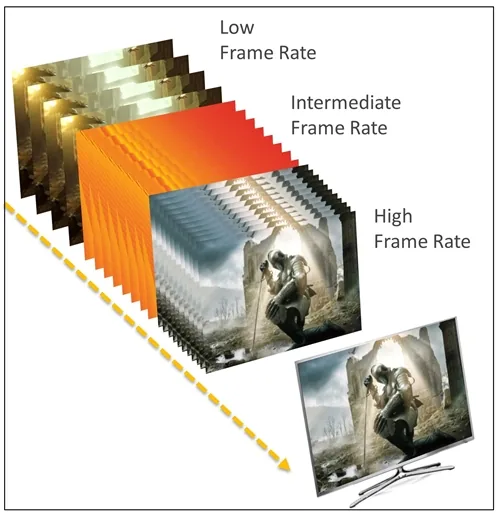
Variable refresh rate technology solved the traditional dilemma by reversing how graphics cards and displays talk to each other. Instead of forcing a computer to match an unyielding panel clock, the monitor adjusts its timing dynamically so each refresh begins the instant the graphics processor completes a frame. This dynamic handshake delivers the tear-free clarity of V-Sync on without the crippling stutter and input delays of locked refresh cycles, giving gamers smooth motion across varying frame rates [1].
The underlying principle of matching refresh rates to image workload has deep historical roots across computer hardware. In 1985, U.S. Patent 4,511,892 described a variable refresh system for stroke CRT displays, where a timing module communicated with a stroke vector generator to extend the refresh interval so that complex flight instruments would not lose vector lines [7]. Decades later, U.S. Patent 7,844,842 detailed how laptop systems adjusted screen frequencies between 60 Hz on wall power and 30 Hz on battery power to conserve finite energy reserves without degrading user responsiveness. The patent showed how microprocessors and display controllers coalesced screen updates to reduce overall battery drain [8]. Modern variable refresh monitors adapt this exact timing flexibility to synchronize intense 3D gaming graphics [1].
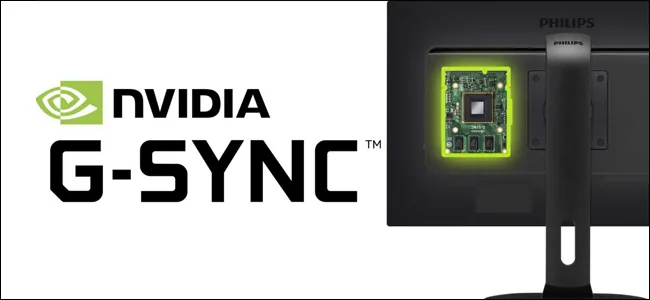
Modern PC display standards formalized this variable approach during the early 2010s. VESA added Adaptive-Sync as an optional feature to DisplayPort in 2009 before writing it directly into DisplayPort 1.2a in 2014 [2]. NVIDIA was first to market with commercial G-Sync hardware in 2014, while AMD launched its FreeSync initiative shortly after to promote open display standards. In g-sync vs freesync evaluations, both technologies achieve the same fundamental goal of tear-free frame pacing, but they take sharply divergent hardware paths [1].
Proprietary Modules in NVIDIA G-Sync Hardware
NVIDIA built its original G-Sync ecosystem around a custom hardware board that replaced the generic scaler chip inside gaming monitors. This module took direct charge of communication with desktop and laptop GeForce GTX graphics cards, orchestrating pixel delivery and running custom overdrive curves across the panel [1]. The first retail monitor to feature G-Sync capability was the 24-inch ASUS VG248QE, which arrived in 2013 with a 144 Hz twisted nematic panel [3].
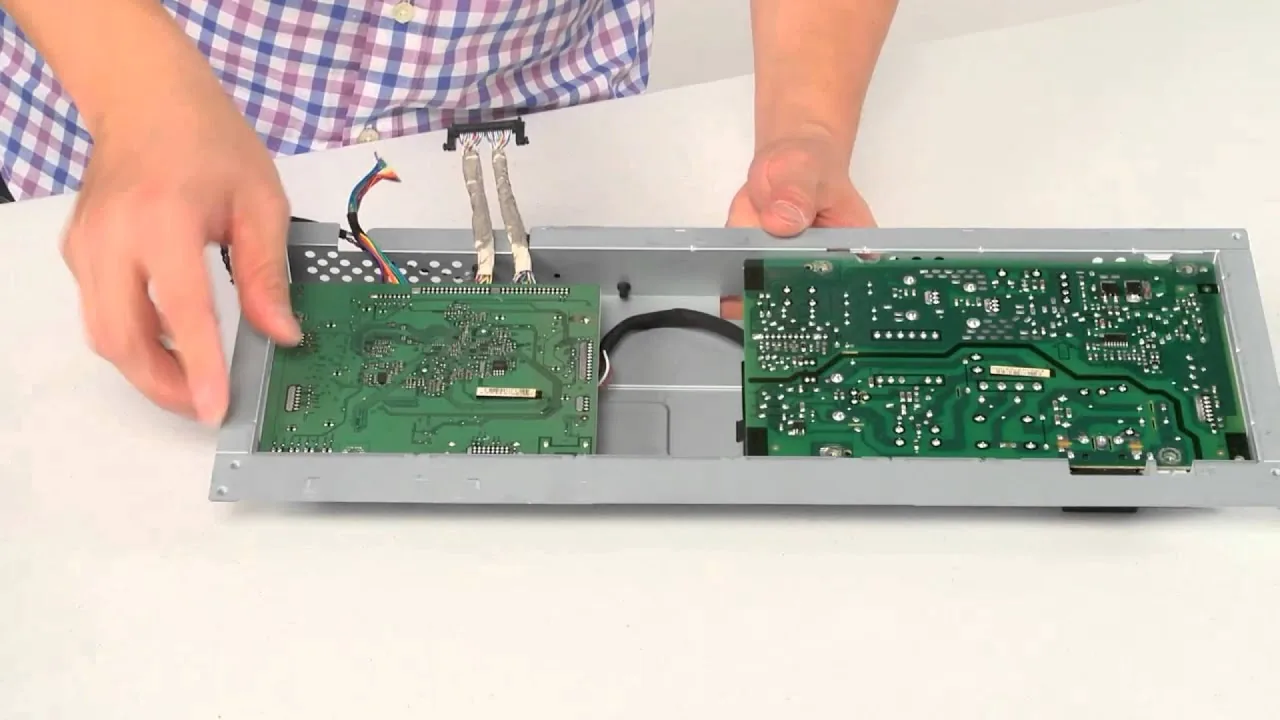
Early adopters could also install G-Sync hardware directly into existing displays. In January 2014, NVIDIA launched a DIY upgrade kit for the ASUS VG248QE priced at $199, supplying a replacement circuit board, external power supply, and specialized tools for installation. The retail display itself cost around $270, while an ASUS model with the board pre-installed carried a manufacturer suggested retail price of $399 [4]. As Simon Baker reported on TFTCentral, integrating first-generation G-Sync modules added between £100 and £200 to monitor production costs, while later version 2 modules added up to £600 to consumer prices [1]. PC Perspective contributors Allyn Malventano and Levi Kendall published early guides explaining how players could replace original circuit boards with the G-Sync board [4].
Replacing the scaler gave G-Sync monitors exceptional input latency, but it introduced several design trade-offs. Early module boards offered only one DisplayPort socket and one HDMI port, while standard monitors provided multiple inputs alongside modern options like USB Type-C. The hardware module also blocked on-screen display features like picture-in-picture modes, and its cooling fan created noticeable noise in quiet rooms. However, the module allowed manufacturers to overclock native 60 Hz panels on ultrawide displays like the Acer Predator X34 and Asus ROG Swift PG348Q up to 100 Hz [1].
Open VESA Standards Behind AMD FreeSync
AMD approached variable refresh rates from an open industry perspective by building FreeSync on top of VESA protocols. When VESA incorporated Adaptive-Sync into DisplayPort 1.2a as an optional standard, AMD used the specification to deliver variable refresh capability without requiring custom hardware modules [2]. Because monitor manufacturers could rely on standard scaler chips from suppliers like Realtek and MStar, FreeSync screens carried little to no manufacturing surcharge [1].
Relying on standard scalers gave monitor builders complete freedom over physical ports and firmware features. FreeSync displays readily included multiple HDMI sockets, DisplayPort connections, and audio pass-through jacks that proprietary G-Sync modules could not support. Monitor makers also preserved their own custom on-screen display menus, giving players access to picture-by-picture viewing and specialized color profiles. By avoiding proprietary licensing fees, FreeSync quickly spread across hundreds of budget monitors and office displays that never could have justified the cost of a dedicated G-Sync chip [1].
The open nature of FreeSync also led to noticeable inconsistencies across different monitor models. While hardware G-Sync screens regularly supported wide variable refresh ranges like 40 Hz to 144 Hz, early FreeSync monitors often had narrow windows like 48 Hz to 75 Hz. When game performance dropped below the minimum threshold on a narrow-range screen, variable refresh turned off, causing stutter or tearing to return instantly [1]. ASUS released the 240 Hz ROG Swift PG258Q in 2017 [3].
Why Does FreeSync Cause Flickering in Dark Scenes?
Why do variable refresh displays sometimes exhibit brightness flicker during sudden frame rate drops? Gamers frequently observe this visual pulse in dark gaming scenes or static loading menus when frame rates fluctuate wildly. In a 2025 study published in the Journal of the Society for Information Display, researcher H. Kim and colleagues explained that rapid refresh swings below 60 Hz trigger aperiodic luminance shifts that human eyes perceive as brightness instability [9].
Display panel engineering plays a massive role in whether variable refresh cycles maintain steady brightness levels. In Scientific Reports, research by L. J. Kim showed that variable refresh rates alter pixel emission times on AMOLED panels, causing noticeable color and brightness shifts unless corrected by voltage compensation schemes [11]. In related work on low-temperature polycrystalline silicon and oxide displays, J. C. Kim and co-authors demonstrated that extending circuit compensation time reduced luminance fluctuations, pushing flicker levels down to −51 dB during low refresh operation [10]. Additional research by J. S. Kim in 2025 verified that nine-transistor pixel circuits kept flicker below −50 dB at 10 Hz [12]. Without proper voltage compensation across peripheral circuits, rapid frame changes create subtle brightness strobing across dark backgrounds [9].
Hardware architecture determines how well a monitor resists these luminance swings during erratic gameplay. Dedicated G-Sync modules apply dynamic variable overdrive tuned specifically to the panel, adjusting pixel voltages on the fly to keep brightness stable across the entire refresh range. Budget FreeSync monitors without custom overdrive processing often struggle to maintain uniform voltage when frame rates oscillate near lower refresh boundaries, resulting in the dark-scene flickering that players report online [1].
FreeSync vs G-Sync in Real-World Gaming Setup
When variable refresh monitors first arrived on the market, choosing between display standards locked players into a single graphics vendor. Gamers with NVIDIA graphics cards had to buy G-Sync monitors, while owners of AMD Radeon cards had to purchase FreeSync displays to enjoy tear-free gaming [5]. That rigid boundary softened in 2019 when NVIDIA updated its graphics drivers to support variable refresh rates over standard VESA Adaptive-Sync connections, allowing GeForce owners to run variable refresh on certified FreeSync monitors [1].
The competitive gaming market pushed monitor refresh ceilings far beyond standard desktop limits. ASUS introduced the 360 Hz ROG Swift PG259QN in 2020 using a Fast IPS panel, before releasing the ROG Swift Pro PG248QP in 2023 with an overclocked 540 Hz panel. Testing on the PG248QP showed that its 1.85 millisecond persistence demanded an NVIDIA RTX 4090 to fully saturate frame rates in competitive titles. In May 2026, LG Electronics announced the UltraGear 25G590B, delivering a native 1000 Hz refresh rate at full HD resolution. Frame persistence on that 24.5-inch panel drops to tiny fractions of a millisecond, showing how high-refresh engineering continues to accelerate [3].

For most buyers, the core decision in g-sync vs freesync hardware comes down to cost versus certified quality. FreeSync displays offer an affordable entry point for everyday gamers, but buyers must check reviews to confirm the panel has a wide refresh range and reliable overdrive tuning. Hardware module G-Sync screens cost significantly more, but they guarantee flawless variable overdrive, ultra-low input lag, and broad refresh ranges right out of the box [1].
HDMI 2.1 and the Variable Refresh Rate Standard
Variable refresh rate technology eventually moved beyond desktop computer monitors and entered the living room television space. As Adeel Soomro reported for DisplayLag, the HDMI Forum introduced Game Mode VRR as part of the HDMI 2.1 specification alongside new 48Gbps cables and Dynamic HDR support. This upgrade doubled video resolution ceilings up to 8K and 10K, while raising 4K refresh rates to 120 Hz to allow console and PC gamers to play fast action titles on giant living room screens [5].
Living room consoles adopted variable refresh rates to smooth out demanding big-screen games. Variable refresh support helped consoles like the PlayStation 4 and Xbox One deliver fluid motion without distracting screen tears or sudden frame drops during intense graphical action [5]. The HDMI Licensing Administrator in San Jose, California oversees the HDMI 2.2 specification, which pairs variable refresh rates with Auto Low Latency Mode and Quick Frame Transport to eliminate judder across modern media centers [6].
The emergence of open HDMI standards and universal Adaptive-Sync protocols has reshaped the entire display market. Today, modern graphics cards and gaming consoles communicate seamlessly with television panels and desktop monitors without forcing players into proprietary hardware ecosystems [2]. Whether players select budget-friendly FreeSync displays or premium hardware-driven screens, variable refresh technology ensures fluid, tear-free gaming across every major gaming platform [1].
- WEBSITE Baker, S. (2019, April 18). Variable Refresh Rates – G-sync and FreeSync. TFTCentral. [Article Link]
- WEBSITE Variable refresh rate. (n.d.). In Wikipedia. [Article Link]
- WEBSITE Refresh rate. (n.d.). In Wikipedia. [Article Link]
- ONLINE NEWS Verry, T. (2014, January 17). NVIDIA G-Sync DIY Kit For ASUS VG248QE Monitor Now Available for $199. PC Perspective. [Article Link]
- ONLINE NEWS Soomro, A. (2017, January 5). HDMI 2.1 brings 8K, 10K resolution and variable refresh rates. DisplayLag. [Article Link]
- WEBSITE HDMI Licensing Administrator. (2026, January 1). Variable Refresh Rate (VRR). hdmi.org. [Article Link]
- PATENT Variable refresh rate for stroke CRT displays. (1985, April 16). U.S. Patent No. 4,511,892. [Article Link]
- PATENT Variable refresh rate for power management. (2008, November 21). U.S. Patent No. 7,844,842. [Article Link]
- ACADEMIC JOURNAL Kim, H., Hwang, H., Kim, Y., & Yi, Y. (2025). Time‐Domain Analysis for Periodic and Aperiodic Display Flicker in Variable Refresh Rate Displays. Journal of the Society for Information Display, 33(11), 1076-1091. [Article Link]
- ACADEMIC JOURNAL Kim, J. C., Lee, I. S., Kim, H. T., An, J. B., Js, K., Yoo, J. S., Hwang, H. W., Choi, H. C., Ha, Y. M., & Kim, H. J. (2023). A novel LTPO AMOLED pixel circuit and driving scheme for variable refresh rate. Journal of Information Display, 24(4), 283-298. [Article Link]
- ACADEMIC JOURNAL Kim, L. J., Jung, S., Kim, H. J., Kim, B. H., Kwon, K. J., Ha, Y. M., & Kim, H. J. (2022). Image quality enhancement in variable-refresh-rate AMOLED displays using a variable initial voltage compensation scheme. Scientific Reports, 12(1), 5977. [Article Link]
- ACADEMIC JOURNAL Kim, J. S., Lee, I. S., Park, J. Y., Yoo, J., Park, S. Y., & Kim, H. J. (2025). LTPO-based pixel circuit with highly uniform luminance and low flicker for variable refresh rate in AMOLED displays. Scientific Reports, 16(1), 3865. [Article Link]


