




Google rolled out new security tools to protect mobile users from fake texts and crooked incoming calls on Wednesday. Threat rings rely on voice cloning. The company is bringing Android scam defenses that combine cloud models with local on-device software to spot fraud in Google Messages and block unapproved call redirects. While scam networks turn to caller spoofing and fake bank alerts, Google’s current systems in the Phone and Messages apps already flag more than 5 million suspected scam calls and text messages each month [1, 2].
Cloud Systems Drive Android Scam Defenses
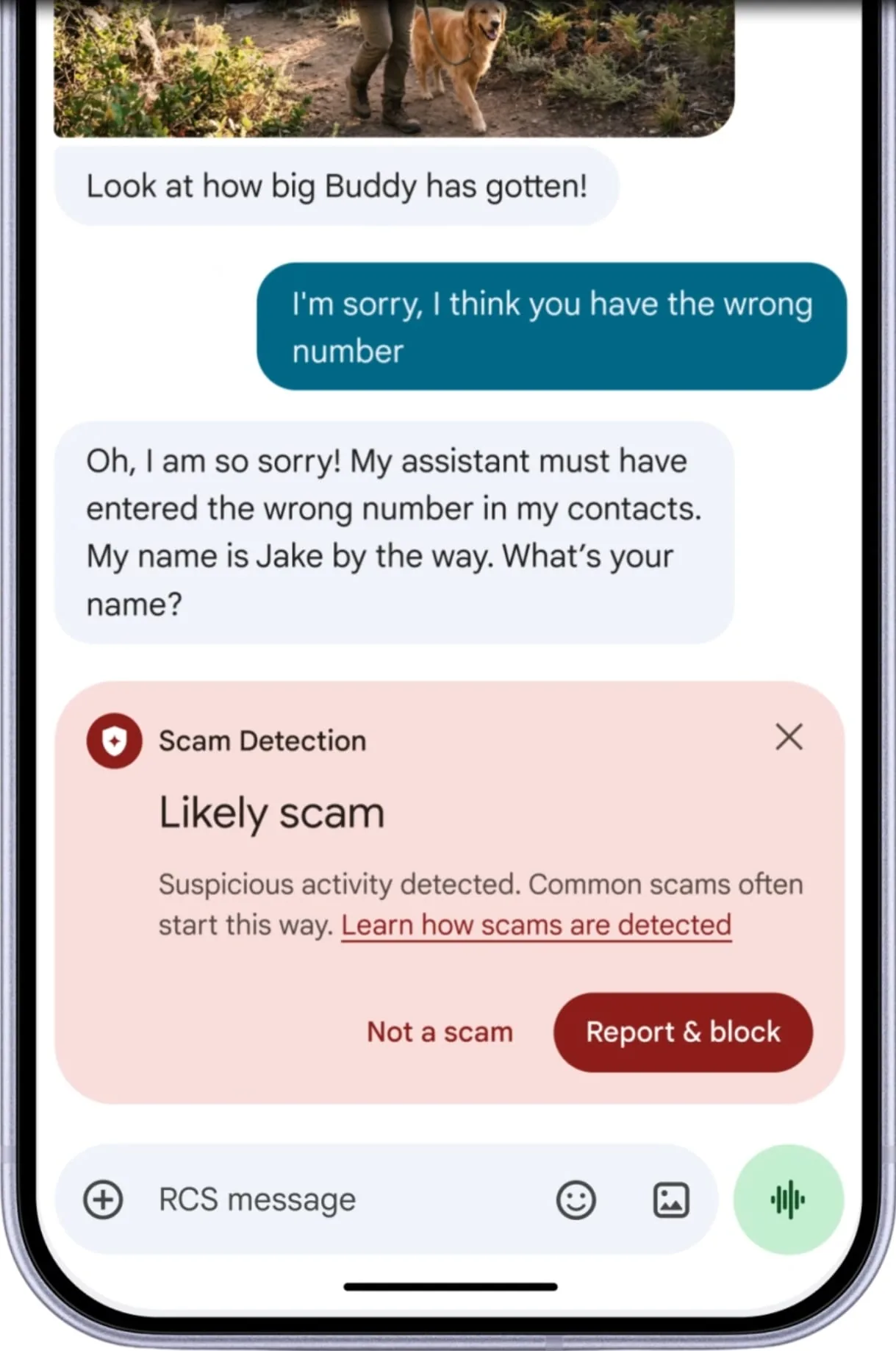
The main push focuses on Google Messages through an optional defense mode that scans incoming chats from unknown numbers, though users must turn this setting on by hand because it isn’t enabled by default. Google said that the tool uses Gemini models on remote servers to inspect chats and spot signs of fraud before people fall for tricky requests. It won’t touch chats with saved contacts, so everyday personal messages stay safe and private [1, 2].
To keep chat data safe while using cloud servers, Google routes these texts into an encrypted setup named Private AI Compute, where remote models review long passages and weigh chat context without exposing personal details to staff or outside snoopers. Google said that “mobile scams have evolved far beyond basic robocalls and phishing texts, turning into sophisticated operations that use spoofed numbers, fake bank alerts, and AI voice cloning”. Scams grow harder to spot every day. The company added that “with scams growing harder to spot, it’s nearly impossible for users to catch every red flag themselves” [1]. Google said that its cloud tools can understand a scammer’s intent faster when bad actors try to coax bank logins from unwary phone owners [2].
This server setup isn’t landing on every phone right away. Google confirmed that the enhanced mode will roll out over the coming weeks to eligible devices. The move to Google Messages carries extra weight because Samsung shut down its old Samsung Messages app in July, urging former users to switch to Google’s app. As millions of phone owners switch over, this cloud check gives them a stronger shield against fraud [2].

Local Models Accelerate Android Scam Detection
Cloud models handle complex chats, but on-device tools play a key role in phone safety too, with Google using Gemini Nano to inspect unfamiliar web links sent by unsaved numbers. Because this small model runs right on the phone, it spots risky links without sending web habits over the internet, giving people time to think before tapping [1].
The local model uses live web signals to check whether a link leads to a known phishing page or a shady download. If a text has a risky link, Google Messages puts up a clear alert. Bad actors often try to automate scams to catch victims off guard. In security research from PerEXP Teamworks, analysts tracked how rogue tools like the RatHat Android malware used AI to automate device control against victims, and Google’s on-device shields try to block similar automated tricks before users visit harmful websites [1].
On-device scam detection in chat alerts began on Pixel phones. Pixel handsets received the feature first. It won’t stay locked to Google hardware, though. Later this year, Google plans to bring these alert defenses to hundreds of millions more phones from Motorola, OnePlus, and Xiaomi [1, 2]. Local tools keep alerts fast, so users don’t wait for server trips to see a warning on their lock screen. That rapid feedback loop makes Android scam detection truly practical during fast chats where one quick tap can ruin an account [1].

System Controls Block Call Forwarding Abuse
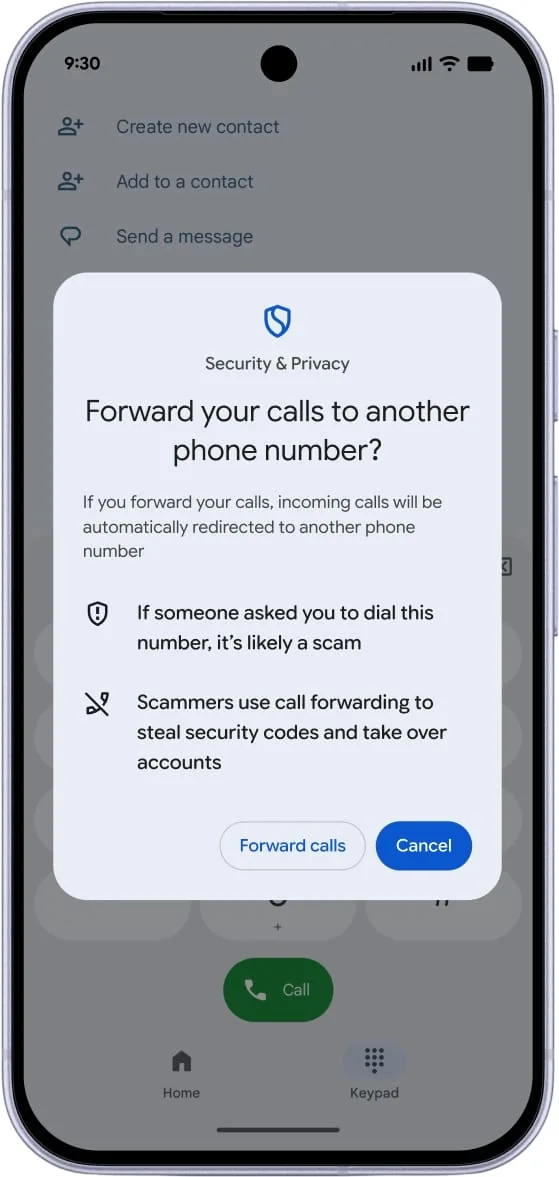
Beyond text messages, scammers use call forwarding as a tool for account takeover fraud, tricking people into dialing carrier codes or stealthily turning on forwarding rules to send calls to scam numbers. Diverting calls lets criminals steal one-time passcodes from banks, email accounts, and web platforms. To halt this trick, Android now blocks third-party apps from silently turning on call forwarding behind the scenes [1, 2].
Many victims don’t know their calls were diverted until they miss vital alerts or find their accounts locked, largely because shady apps used to run system forwarding codes without asking the user for permission. Rogue apps hide their actions. Android now blocks background apps from making those tweaks quietly, asking for clear user consent before routing rules can change. If an app tries to change forwarding settings on its own, Android stops the action and warns the owner [1, 2].
The operating system also stops tricks built around Man-Machine Interface (MMI) dialer codes. Scammers often pose as tech help or couriers, telling victims to dial numbers that begin with stars and end with hash marks. Android now shows a warning popup before manual MMI forwarding codes take effect, telling users what the code does. This gives phone owners a clear chance to stop the trick before someone hijacks their phone line [1].
Screen Sharing Masks Sensitive Payment Fields
Remote help scams are another risk where crooks urge victims to share their phone screens during a call, watching the display while telling people to open bank apps or enter card numbers. To close this gap, Android is adding sensitive data masking to Chrome and Android WebView, hiding private logins while screen sharing stays live [1].
When a user opens a login page or payment tab while screen sharing, the phone hides password boxes and card numbers, so anyone watching the shared screen sees only blank boxes instead of real account digits or passcodes. Privacy masking runs inside the system, so individual apps do not need custom code to get this guard. This automated defense shields users even when pushy callers try to rush them on the phone [1, 2].
Hardware security layers back up these visual shields across Android. Google earlier patched phone modems against silent attacks, as shown in reports on how Google Pixel phones patched a zero-click modem flaw to stop remote exploit payloads. Combining modem patches with screen masking stops crooks from exploiting wireless bugs or spying on displays to steal private secrets [1].
Partner Networks Expand Android Scam Protections
Phone calls stay a top target for identity theft through fake caller IDs that mimic trusted banks, prompting Google to widen its verified bank calls tool that checks incoming call centers before ringing the handset. The verification platform checks whether an incoming call truly came from a real bank call center before it rings the handset [1].
If the check fails to confirm that a real bank placed the call, Android cuts off the ring. Calls end immediately on failure. Google said that since June, this tool has blocked over 3 million fake calls for Banco do Brasil and Itaú Unibanco alone, while also expanding support for global firms like Revolut. Dropping unverified calls at the network level spares users from slick callers who pretend to be bank fraud officers [1].
Public worry over phone scams and phishing texts is high in recent consumer surveys. The survey covered 4,500 adults. Google ordered a study to check user worries, and findings showed that 40% of the 4,500 adults in a YouGov poll felt very or extremely worried about mobile fraud. That common concern shows why people want automatic phone tools rather than relying only on personal care [2].
While smart filters block millions of scam attempts each month, Google reminded users that good daily habits stay helpful next to system tools, advising phone owners to install system updates promptly and keep apps patched. Mobile owners should independently call their bank directly whenever strange messages push for quick account action or private pin codes [1].
- ONLINE NEWS Toulas, B. (2026, October 15). Android gets AI defenses against messaging scams, fake calls. BleepingComputer. [Article Link]
- ONLINE NEWS Gallaga, O. (2026, October 14). Android Strengthens Scam Defenses for Calls and Texts. CNET. [Article Link]


